

Anonymizers
Anonymizers are available in both cloud and self-hosted installations of Opik.
Anonymizers help you protect sensitive information in your LLM applications by automatically detecting and replacing personally identifiable information (PII) and other sensitive data before it’s logged to Opik. This ensures compliance with privacy regulations and prevents accidental exposure of sensitive information in your trace data. To keep the original data and mask it only for some users, based on their role, see Data Anonymization.
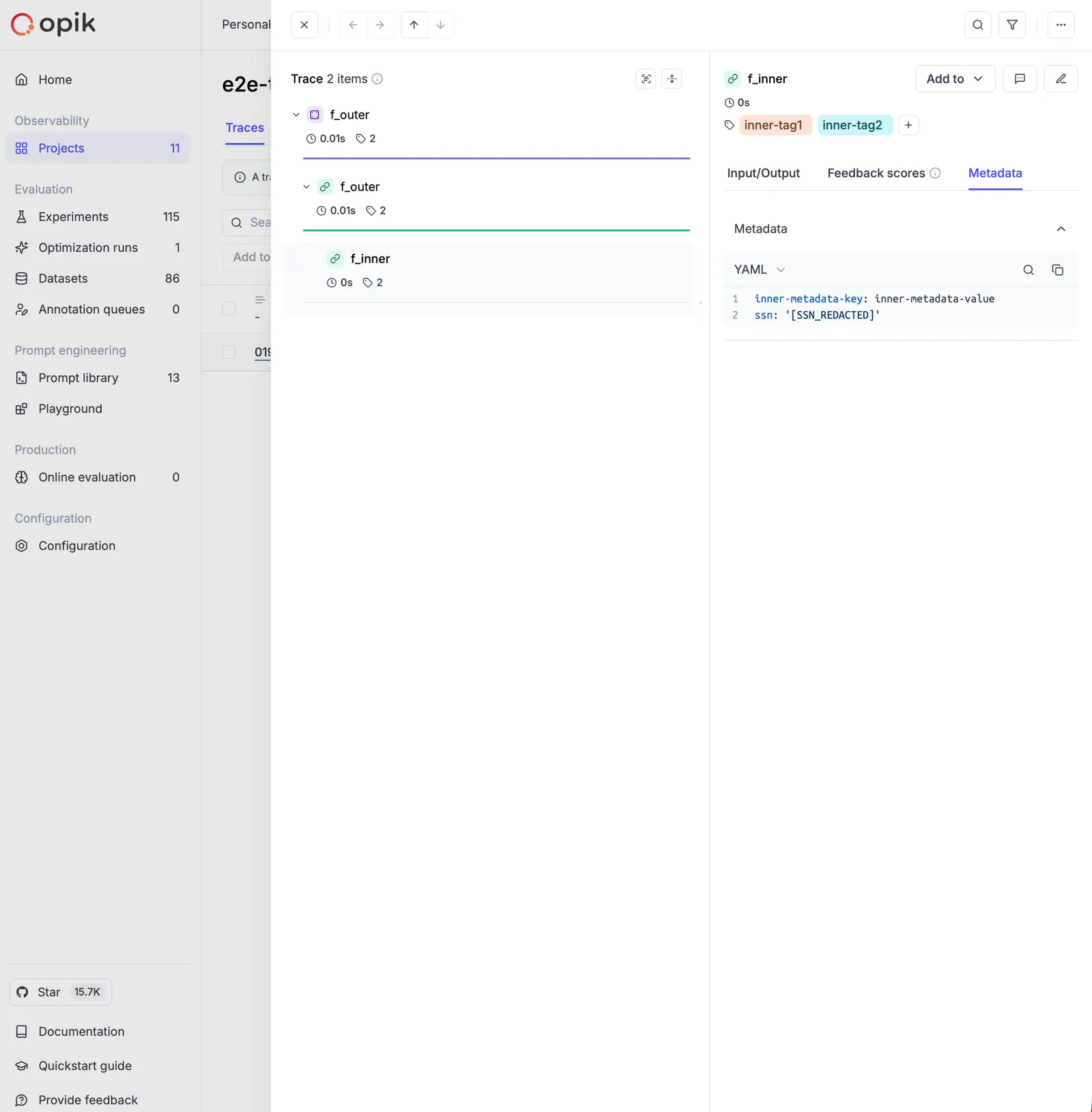
How it works
Anonymizers work by processing all data that flows through Opik’s tracing system - including inputs, outputs, and metadata - before it’s stored or displayed. They apply a set of rules to detect and replace sensitive information with anonymized placeholders.
The anonymization happens automatically and transparently:
- Data Ingestion: When you log traces and spans to Opik
- Rule Application: Registered anonymizers scan the data using their configured rules
- Replacement: Sensitive information is replaced with anonymized placeholders
- Storage: Only the anonymized data is stored in Opik
Types of Anonymizers
Rules-based Anonymizer
The most common type of anonymizer uses pattern-matching rules to identify and replace sensitive information. Rules can be defined in several formats:
Regex Rules
Use regular expressions to match specific patterns:
Function Rules
Use custom Python functions for more complex anonymization logic:
Mixed Rules
Combine different rule types for comprehensive anonymization:
Custom Anonymizers
For advanced use cases, create custom anonymizers by extending the Anonymizer base class.
Understanding Anonymizer Arguments
When implementing custom anonymizers, you need to implement the anonymize() method with the following signature:
The kwargs parameters:
The anonymize() method also receives additional context through **kwargs:
field_name: Indicates which field is being anonymized ("input","output","metadata", or nested field names in dots notation such as"metadata.email")object_type: The type of the object being processed ("span","trace")
When are kwargs available?
These kwargs are automatically passed by Opik’s internal data processors when anonymizing trace and span data before sending it to the backend. This allows you to apply different anonymization strategies based on the field being processed.
Example: Field-specific anonymization
The field_name and object_type kwargs are primarily useful for implementing context-aware anonymization logic. If you don’t need field-specific behavior, you can safely ignore these kwargs.
Example: Anonymization of nested data structures
Also, you can extend the RecursiveAnonymizer base class to work with nested data structures.
This allows you to apply the same anonymization logic to all nested fields. In this case you
need to implement the anonymize_text() method instead of anonymize().
Advanced Custom Anonymizer Example
Usage Examples
Basic Setup
Here’s a complete example showing how to set up anonymization for a simple LLM application:
Advanced Configuration
For more sophisticated anonymization scenarios:
Using third-party PII libraries
In addition to regex and custom Python functions, you can reuse existing PII detection / redaction tools such as Microsoft Presidio or cloud APIs (AWS Comprehend, Google Cloud DLP, Azure AI Language). These tools can be wrapped inside an Opik anonymizer so that all trace data is pre-redacted before it’s logged. You typically integrate third-party tools in one of two ways:
- Local open-source libraries running inside your app or self-hosted Opik deployment
(e.g. Microsoft Presidio,
scrubadub). - Managed cloud services called via their SDKs from your anonymizer (e.g. AWS Comprehend PII, Google Cloud DLP, Azure AI Language PII).
Third-party anonymizers are just custom anonymizers under the hood. You call the
external engine inside anonymize() or a function rule, then return the
redacted data back to Opik.
Example: Microsoft Presidio (open source, runs locally)
First, install Presidio in your environment:
Then create an Anonymizer that delegates to Presidio:
You can combine a Presidio anonymizer with existing regex/function rules by registering multiple anonymizers; they will be applied in sequence.
Integration with Frameworks
Anonymizers work seamlessly with all Opik integrations:
OpenAI Integration
LangChain Integration
Configuration Options
Max Depth
Control how deeply nested data structures are processed:
Multiple Anonymizers
Register multiple anonymizers that will be applied in sequence:
Best Practices
Rule Ordering
Rules are applied in the order they’re defined. More specific patterns should come before general ones:
Performance Considerations
- Use precompiled regex patterns for improved performance on large datasets when implementing custom anonymization functions. Note: Opik’s
RegexRuleautomatically compiles patterns when the rule is created. - Keep the number of rules reasonable to avoid performance impacts
- Consider using more specific patterns to reduce false positives
Testing Anonymizers
Always test your anonymization rules to ensure they work correctly:
Troubleshooting
Common Issues
Anonymizer not working:
- Ensure the anonymizer is registered with
opik.hooks.add_anonymizer() - Check that your patterns are correct using a regex tester
- Verify that
opik.flush_tracker()is called if needed
Performance issues:
- Reduce the complexity of regex patterns
- Limit the number of registered anonymizers
- Consider using more specific patterns to reduce processing overhead
False positives:
- Make your regex patterns more specific
- Test thoroughly with representative data
- Consider using negative lookbehind/lookahead assertions
Security Considerations
- Test thoroughly: Always test anonymization rules with representative data
- Regular updates: Review and update patterns as your application evolves
- Compliance: Ensure your anonymization approach meets regulatory requirements
- Backup strategy: Consider how to handle cases where anonymization fails
- Access control: Limit access to original data and anonymization rules
Remember that anonymization is a one-way process — once data is anonymized in Opik, the original values cannot be recovered. Plan your anonymization strategy accordingly.