

Here are the most relevant improvements we’ve made since the last release:
🚨 Native Slack and PagerDuty Alerts
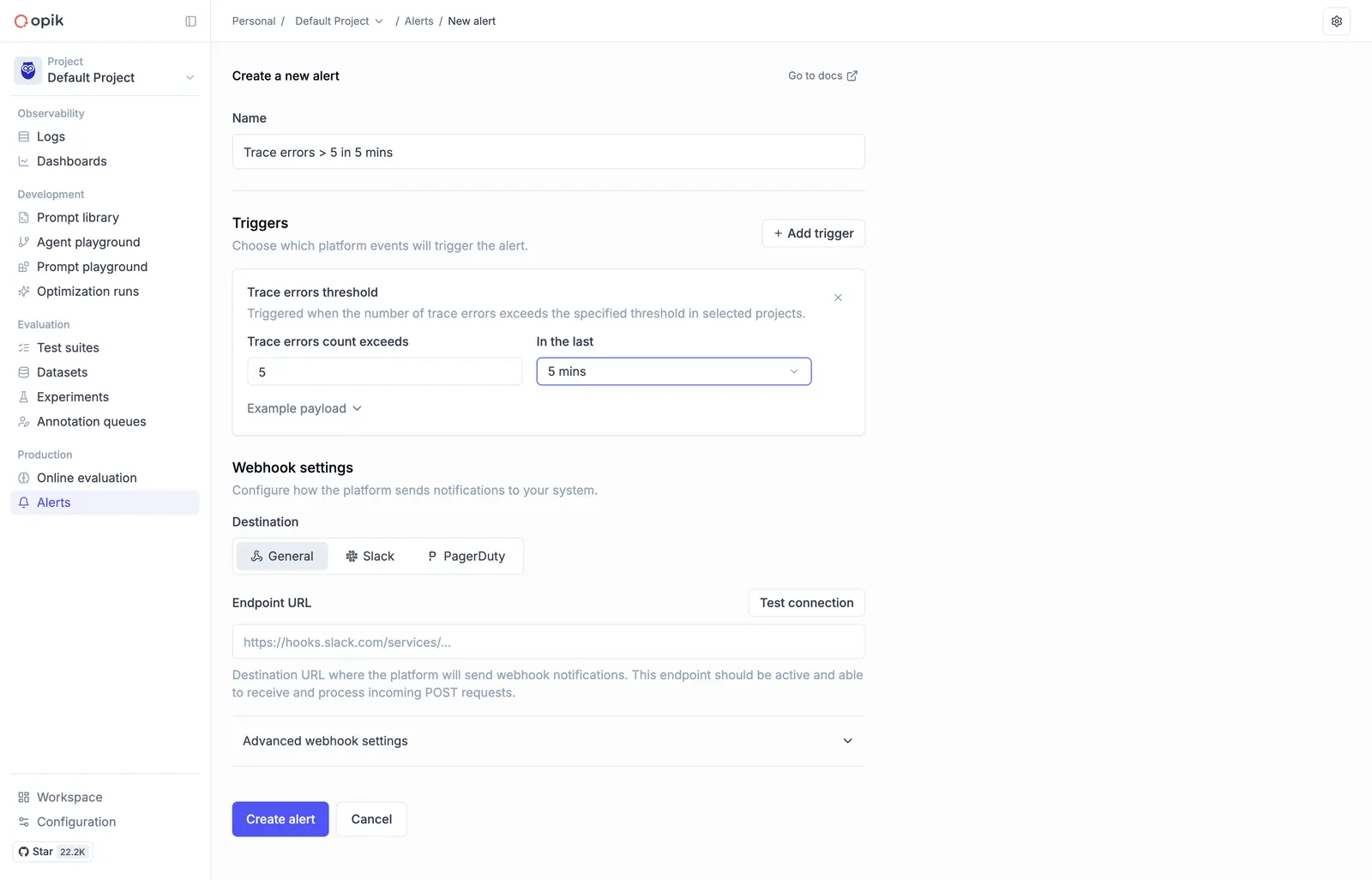
We now offer native Slack and PagerDuty alert integrations, eliminating the need for any middleware configuration. Set up alerts directly in Opik to receive notifications when important events happen in your workspace.
With native integrations, you can:
- Configure Slack channels directly from Opik settings
- Set up PagerDuty incidents without additional webhook setup
- Receive real-time notifications for errors, feedback scores, and critical events
- Streamline your monitoring workflow with built-in integrations
👉 Read the full docs here - Alerts Guide
🖼️ Multimodal LLM-as-a-Judge Support for Visual Evaluation
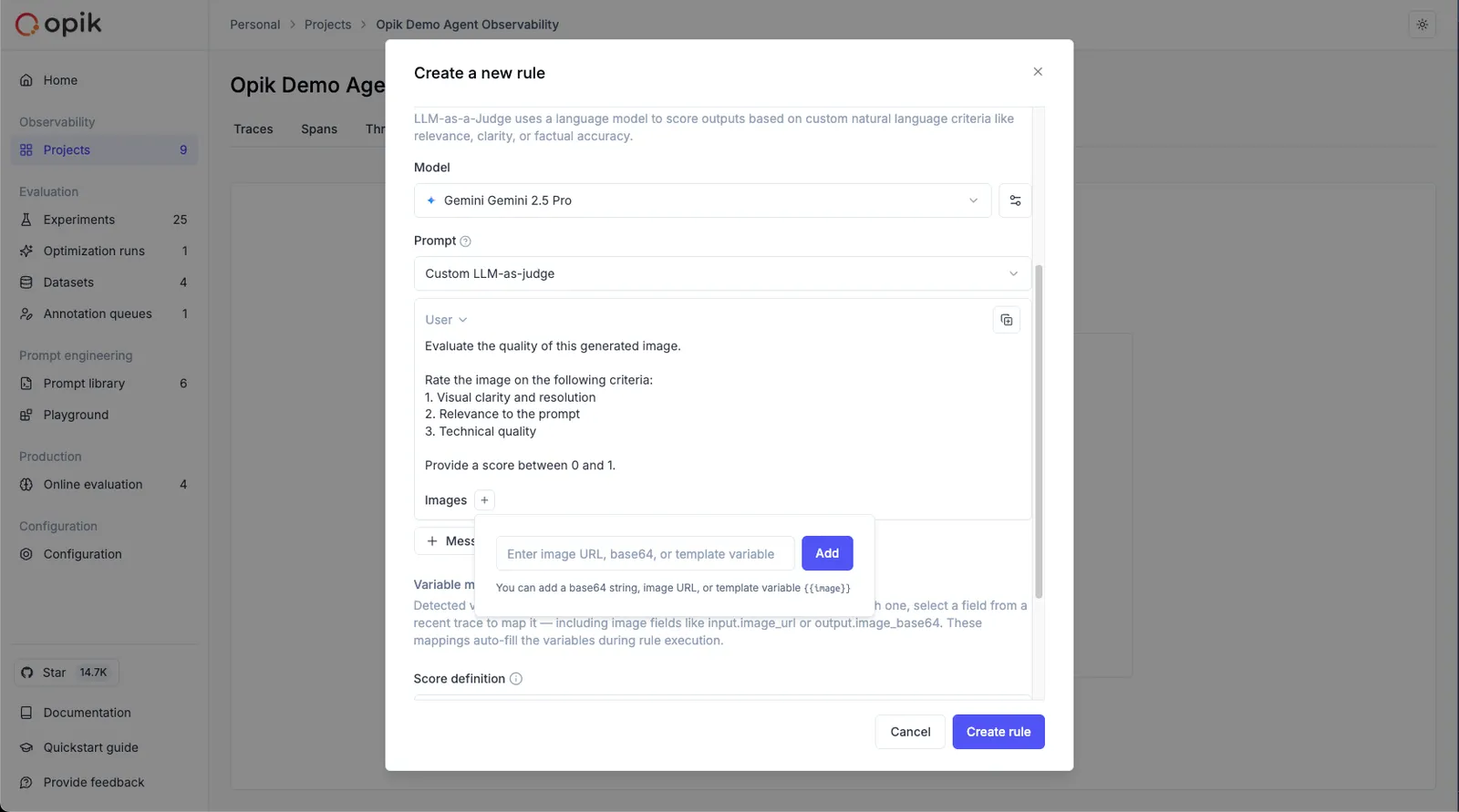
LLM as a Judge metrics can now evaluate traces that contain images when using vision-capable models. This is useful for:
- Evaluating image generation quality - Assess the quality and relevance of generated images
- Analyzing visual content in multimodal applications - Evaluate how well your application handles visual inputs
- Validating image-based responses - Ensure your vision models produce accurate and relevant outputs
To reference image data from traces in your evaluation prompts:
- In the prompt editor, click the “Images +” button to add an image variable
- Map the image variable to the trace field containing image data using the Variable Mapping section
👉 Read more: Evaluating traces with images
✨ Prompt Generator & Improver
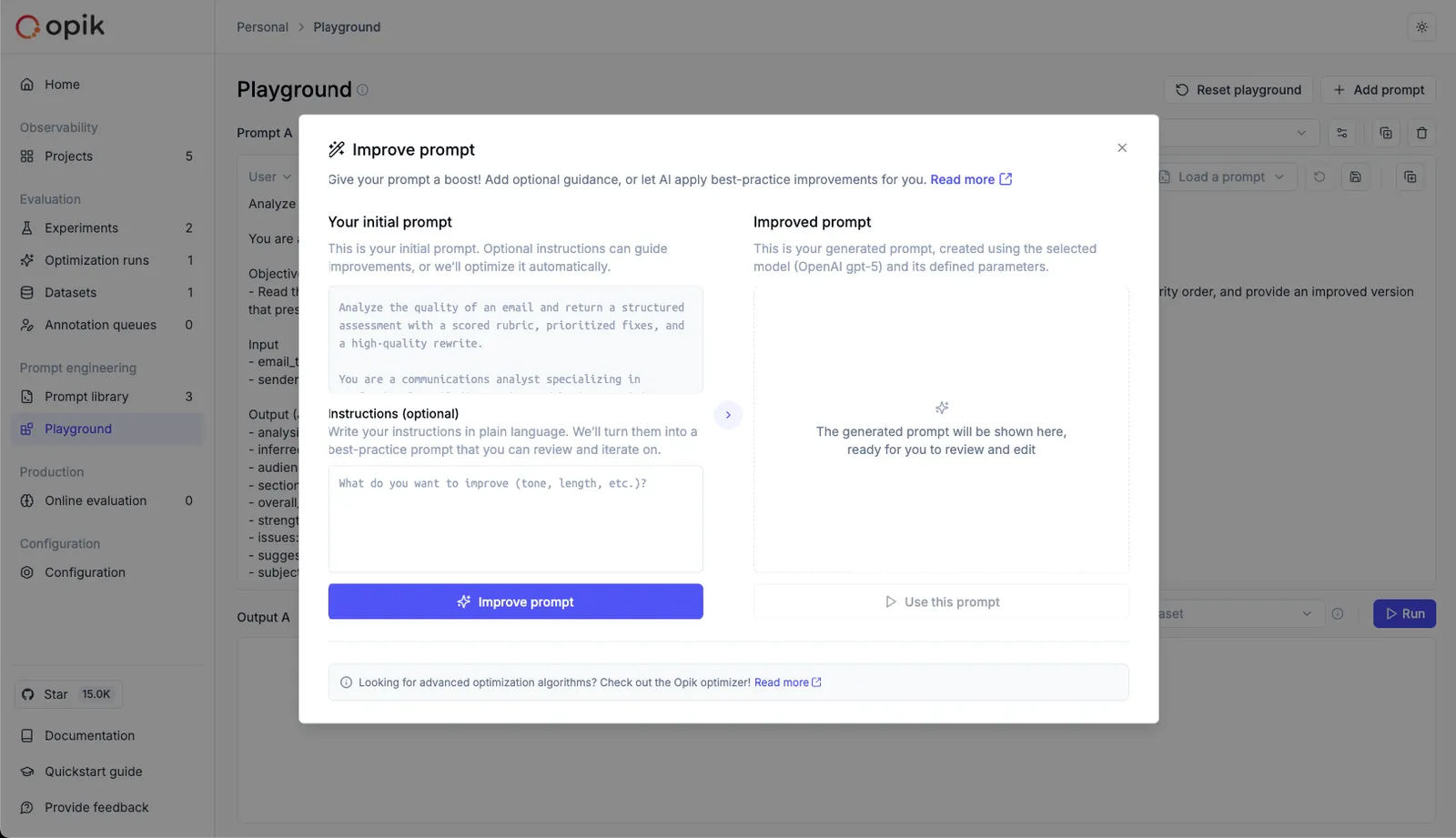
We’ve launched the Prompt Generator and Prompt Improver — two AI-powered tools that help you create and refine prompts faster, directly inside the Playground.
Designed for non-technical users, these features automatically apply best practices from OpenAI, Anthropic, and Google, helping you craft clear, effective, and production-grade prompts without leaving the Playground.
Why it matters
Prompt engineering is still one of the biggest bottlenecks in LLM development. With these tools, teams can:
- Generate high-quality prompts from simple task descriptions
- Improve existing prompts for clarity, specificity, and consistency
- Iterate and test prompts seamlessly in the Playground
How it works
- Prompt Generator → Describe your task in plain language; Opik creates a complete system prompt following proven design principles
- Prompt Improver → Select an existing prompt; Opik enhances it following best practices
👉 Read the full docs: Prompt Generator & Improver
🔗 Advanced Prompt Integration in Spans & Traces
We’ve implemented prompt integration into spans and traces, creating a seamless connection between your Prompt Library, Traces, and the Playground.
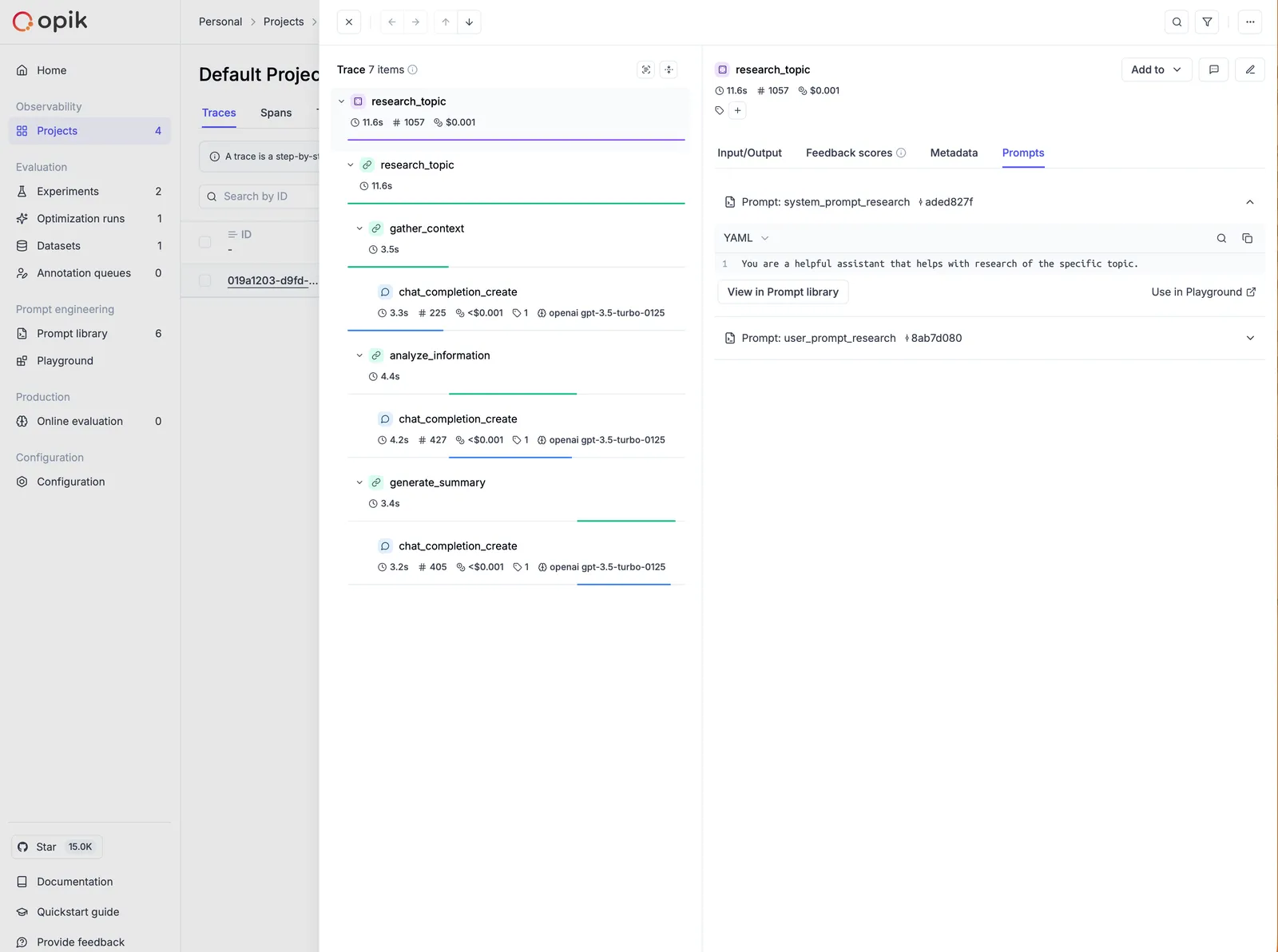
You can now associate prompts directly with traces and spans using the opik_context module — so every execution is automatically tied to the exact prompt version used.
Understanding which prompt produced a given trace is key for users building both simple and advanced multi-prompt and multi-agent systems.
With this integration, you can:
- Track which prompt version was used in each function or span
- Audit and debug prompts directly from trace details
- Reproduce or improve prompts instantly in the Playground
- Close the loop between prompt design, observability, and iteration
Once added, your prompts appear in the trace details view — with links back to the Prompt Library and the Playground, so you can iterate in one click.
👉 Read more: Adding prompts to traces and spans
🧪 Better No-Code Experiment Capabilities in the Playground
We’ve introduced a series of improvements directly in the Playground to make experimentation easier and more powerful:
Key enhancements:
- Create or select datasets directly from the Playground
- Create or select online score rules - Ability to choose the ones that you want to use on each run
- Ability to pass dataset items to online score rules - This enables reference-based experiments, where outputs are automatically compared to expected answers or ground truth, making objective evaluation simple
- One-click navigation to experiment results - From the Playground, users can now:
- Jump into the Single Experiment View to inspect metrics and examples in detail, or
- Go to the Compare Experiments View to benchmark multiple runs side-by-side
📊 On-Demand Online Evaluation on Existing Traces and Threads
We’ve added on-demand online evaluation in Opik, letting users run metrics on already logged traces and threads — perfect for evaluating historical data or backfilling new scores.
How it works
Select traces/threads, choose any online score rule (e.g., Moderation, Equals, Contains), and run evaluations directly from the UI — no code needed.
Results appear inline as feedback scores and are fully logged for traceability.
This enables:
- Fast, no-code evaluation of existing data
- Easy retroactive measurement of model and agent performance
- Historical data analysis without re-running traces
👉 Read more: Manual Evaluation
🤖 Agent Evaluation Guides
We’ve added two new comprehensive guides on evaluating agents:
1. Evaluating Agent Trajectories
This guide helps you evaluate that your agent is making the right tool calls before returning the final answer. It’s fundamentally about evaluating and scoring what is happening within a trace.
👉 Read the full guide: Evaluating Agent Trajectories
2. Evaluating Multi-Turn Agents
Evaluating chatbots is tough because you need to evaluate not just a single LLM response but instead a conversation. This guide walks you through how you can use the new opik.simulation.SimulatedUser method to create simulated threads for your agent.
👉 Read the full guide: Evaluating Multi-Turn Agents
These new docs significantly strengthen our agent evaluation feature-set and include diagrams to visualize how each evaluation strategy works.
📦 Import/Export Commands
Added new command-line functions for importing and exporting Opik data: you can now export all traces, spans, datasets, prompts, and evaluation rules from a project to local JSON or CSV files. Also helps you import data from local JSON files into an existing project.
Top use cases it is useful for
- Migrate - Move data between projects or environments
- Backup - Create local backups of your project data
- Version control - Track changes to your prompts and evaluation rules
- Data portability - Easily transfer your Opik workspace data
Read the full docs: Import/Export Commands
And much more! 👉 See full commit log on GitHub
Releases: 1.8.83, 1.8.84, 1.8.85, 1.8.86, 1.8.87, 1.8.88, 1.8.89, 1.8.90, 1.8.91, 1.8.92, 1.8.93, 1.8.94, 1.8.95, 1.8.96, 1.8.97