

Admin Dashboard
The Admin Dashboard is the central hub for managing your organization in Opik. From here, organization administrators can manage users, workspaces, authentication settings, and more.
Access requirement: You must have the Admin organization role to access the Admin Dashboard. If you don’t see the Admin option in your menu, contact your organization administrator.
Accessing the Admin Dashboard
To open the Admin Dashboard:
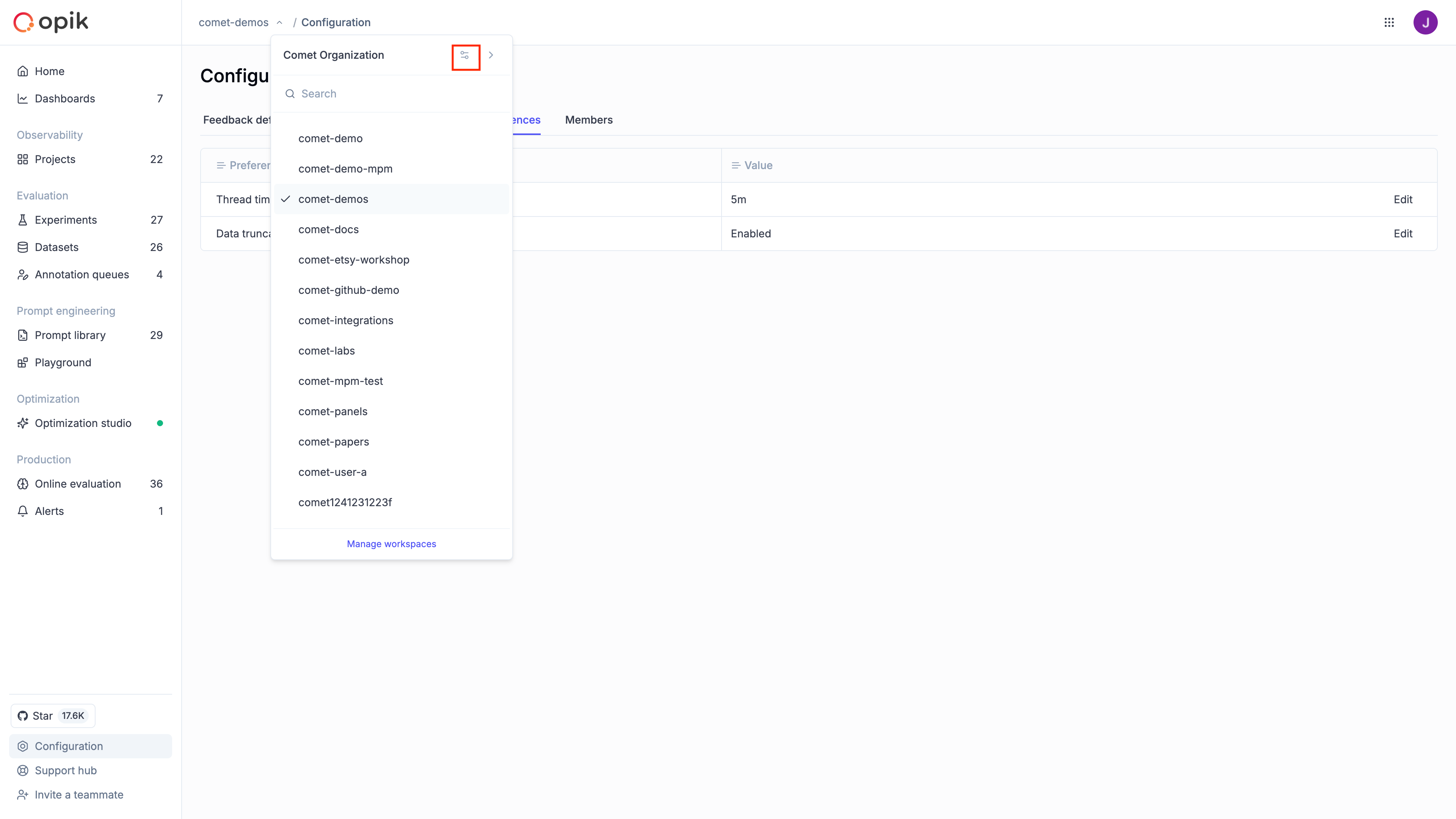
- Click on the workspace selector in the top navigation bar
- Click the settings icon next to your organization name
Dashboard sections
The Admin Dashboard provides access to the following sections:
Workspaces
Manage the workspaces within your organization:
- View all workspaces: See a list of all workspaces in your organization.
- Create workspaces: Add new workspaces for different teams or projects.
- Delete workspaces: Remove workspaces that are no longer needed.
Learn more in Workspaces.
Users
Manage user access to your organization:
- View members: See all users in your organization and their roles.
- View pending invitations: See pending invitations to your organization.
- Remove users: Revoke access for users who should no longer be in the organization.
- Change roles: Update user roles at the organization level.
Learn more in Users.
Roles & Permissions
Configure workspace-level access control:
- View workspace roles: See the available roles and their permissions.
- Create custom roles: Define custom roles tailored to your organization’s needs.
- Manage permissions: Understand and configure the permission hierarchy.
Learn more in Roles and Permissions.
Authentication
Set up single sign-on authentication for your organization:
- SAML configuration: Configure SAML-based SSO with your identity provider.
- OIDC configuration: Set up OpenID Connect authentication.
- JWT authentication: Configure JWT token-based authentication.
Learn more in Authentication Overview.
Service Accounts
Manage programmatic access to Opik:
- Create service accounts: Set up accounts for automated systems and CI/CD pipelines.
- Manage API keys: Generate, regenerate, and revoke API keys.
- Configure workspace access: Define which workspaces each service account can access.
Learn more in Service Accounts.
Billing
Billing management is available on Opik Cloud and Enterprise plans. This feature is not available in open-source deployments. Reach out for billing inquiries.
Manage your organization’s subscription and billing:
- View current plan: See your organization’s subscription tier and usage.
- Upgrade plan: Move to a higher tier for additional features or capacity.
- Manage payment methods: Update credit card or billing information.
- View invoices: Access historical invoices and payment records.
Next steps
- Manage workspaces in your organization.
- Invite users and assign roles.
- Configure SSO for your organization.