
For AI agents: a documentation index is available at the root level at /llms.txt and /llms-full.txt. Append /llms.txt to any URL for a page-level index, or .md for the markdown version of any page.
Copy to LLMGithubGo to App
DocumentationIntegrationsBuilding Self-Improving AgentsSelf-hosting OpikSDK & API reference
  • Getting Started
    • Home
    • Quickstart
    • Upgrading to Opik 2.0
    • Ollie Agent
    • FAQ
    • Changelog
  • Observability
    • Overview
    • Getting started
    • Concepts
    • Debugging agents with Ollie and Opik Connect
      • Log traces
      • Log conversations
      • Log media & attachments
      • Log Agent Graphs
      • Log distributed traces
      • Log user feedback
      • Cost tracking
      • Export data
      • Migrate data
      • SDK configuration
      • Offline fallback and message replay
  • Development
    • Overview
    • Agent playground
    • Prompt playground
  • Evaluation
    • Overview
    • Getting started
    • Concepts
  • Production
  • Administration
    • Overview
    • Roles and Permissions
  • Contributing
    • Contribution Overview
LogoLogo
Copy to LLMGithubGo to App
On this page
  • Using the distributed_headers Context Manager
  • Distributed Traces with a Remote Service Using OpenTelemetry
  • Client: emitting distributed-trace headers
  • Remote service: attaching the headers to an OpenTelemetry span
ObservabilityAdvanced

Log distributed traces

Was this page helpful?
Previous

Log user feedback

Next
Built with

When working with complex LLM applications, it is common to need to track a traces across multiple services. Opik supports distributed tracing out of the box when integrating using function decorators using a mechanism that is similar to how OpenTelemetry implements distributed tracing.

For the purposes of this guide, we will assume that you have a simple LLM application that is made up of two services: a client and a server. We will assume that the client will create the trace and span, while the server will add a nested span. In order to do this, the trace_id and span_id will be passed in the headers of the request from the client to the server.
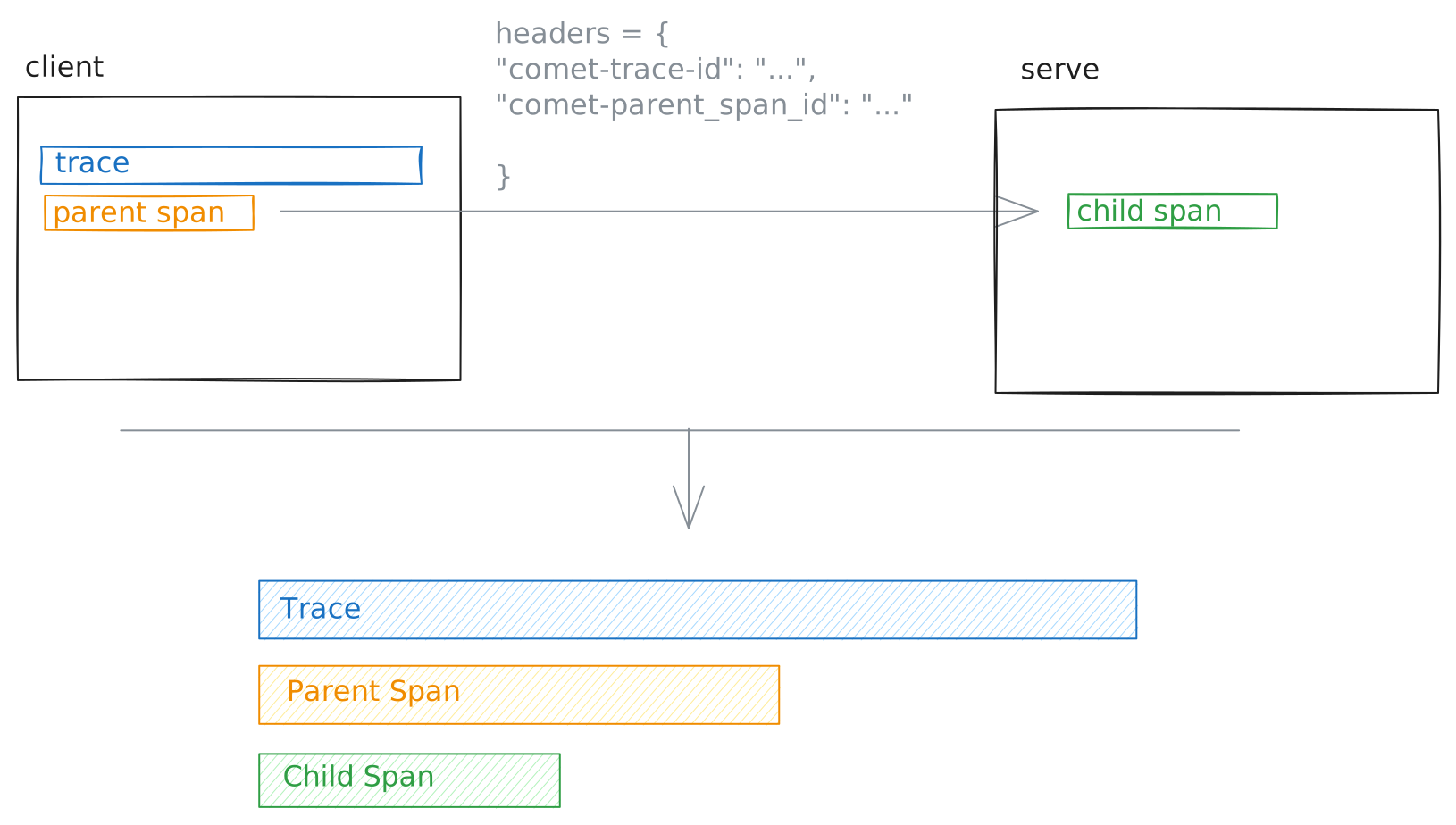
Distributed Tracing

The Python SDK includes some helper functions to make it easier to fetch headers in the client and ingest them in the server:

client.py
1from opik import track, opik_context
2
3@track()
4def my_client_function(prompt: str) -> str:
5 headers = {}
6
7 # Update the headers to include Opik Trace ID and Span ID
8 headers.update(opik_context.get_distributed_trace_headers())
9
10 # Make call to backend service
11 response = requests.post("http://.../generate_response", headers=headers, json={"prompt": prompt})
12 return response.json()

On the server side, you can pass the headers to your decorated function:

server.py
1from opik import track
2from fastapi import FastAPI, Request
3
4@track()
5def my_llm_application():
6 pass
7
8app = FastAPI() # Or Flask, Django, or any other framework
9
10
11@app.post("/generate_response")
12def generate_llm_response(request: Request) -> str:
13 return my_llm_application(opik_distributed_trace_headers=request.headers)

The opik_distributed_trace_headers parameter is added by the track decorator to each function that is decorated and is a dictionary with the keys opik_trace_id and opik_parent_span_id.

Using the distributed_headers Context Manager

As an alternative to passing opik_distributed_trace_headers as a parameter, you can use the distributed_headers() context manager for more explicit control over distributed header handling. This approach provides automatic cleanup, error handling, and optional data flushing.

server.py
1from opik import track
2from opik.decorator.context_manager import distributed_headers
3from fastapi import FastAPI, Request
4
5@track()
6def my_llm_application():
7 pass
8
9app = FastAPI() # Or Flask, Django, or any other framework
10
11
12@app.post("/generate_response")
13def generate_llm_response(request: Request) -> str:
14 # Extract distributed headers from the request
15 headers = {
16 "opik_trace_id": request.headers.get("opik_trace_id"),
17 "opik_parent_span_id": request.headers.get("opik_parent_span_id"),
18 }
19
20 # Use the context manager to handle distributed headers
21 with distributed_headers(headers, flush=False):
22 result = my_llm_application()
23
24 return result

The distributed_headers() context manager accepts two parameters:

  • headers: A dictionary containing the distributed trace headers (opik_trace_id and opik_parent_span_id)
  • flush (optional): Whether to flush the Opik client data after the root span is processed. Defaults to False. Set to True if you want to ensure immediate data transmission.

The context manager automatically creates a root span with the provided headers, handles any errors that occur during execution, and cleans up the context when complete.

For more details and additional examples, see the distributed_headers context manager API reference.

Distributed Traces with a Remote Service Using OpenTelemetry

When the downstream service is instrumented with the standard OpenTelemetry SDK (rather than the Opik SDK), Opik provides helpers to bridge the two systems so the OTel span produced by the remote service still appears under the correct Opik trace and parent span.

The bridge works through two HTTP headers carried from the client to the remote service:

  • opik_trace_id — the Opik trace the OTel span should be attached to.
  • opik_parent_span_id — the Opik span to use as the parent (optional).

On the receiving side, the helper translates these headers into two OpenTelemetry span attributes (opik.trace_id, opik.parent_span_id) recognized by the Opik OTLP ingest endpoint. Both values must be valid UUIDs; blank or malformed values are dropped with a warning so a misconfigured caller never silently corrupts the parent linkage.

Client: emitting distributed-trace headers

Python
TypeScript
client.py
1import requests
2from opik import opik_context, track
3
4@track()
5def my_client_function(prompt: str) -> str:
6 headers = {
7 # Adds 'opik_trace_id' and 'opik_parent_span_id'
8 **opik_context.get_distributed_trace_headers(),
9 }
10 response = requests.post(
11 "http://.../generate_response",
12 headers=headers,
13 json={"prompt": prompt},
14 )
15 return response.json()

Remote service: attaching the headers to an OpenTelemetry span

The remote service creates a span with the OpenTelemetry SDK as usual and then calls the Opik bridging helper with the incoming HTTP headers. The helper sets the opik.trace_id / opik.parent_span_id / opik.span_id attributes on the boundary span only.

To make sure descendant OpenTelemetry spans (children created inside the boundary span via start_as_current_span / tracer.startSpan) also land under the original Opik trace and parent, register the OpikSpanProcessor on the same TracerProvider as your OTLP exporter. Without it, only the boundary span is linked and its descendants are orphaned in a synthetic Opik trace.

In Python, OpikSpanProcessor ships with the main opik package under opik.integrations.otel. In TypeScript it lives in a separate opik-otel package — install it alongside opik (npm install opik-otel @opentelemetry/api @opentelemetry/sdk-trace-base).

Python
TypeScript
server.py
1from fastapi import FastAPI, Request
2from opentelemetry import trace
3from opentelemetry.sdk.trace import TracerProvider
4from opentelemetry.sdk.trace.export import BatchSpanProcessor
5from opentelemetry.exporter.otlp.proto.http.trace_exporter import OTLPSpanExporter
6from opik.integrations.otel import OpikSpanProcessor, distributed_trace
7
8# Configure the tracer provider with the OTLP exporter that ships spans to Opik
9provider = TracerProvider()
10provider.add_span_processor(BatchSpanProcessor(OTLPSpanExporter()))
11
12# Register OpikSpanProcessor so descendants of the boundary span inherit
13# opik.trace_id / opik.parent_span_id automatically.
14provider.add_span_processor(OpikSpanProcessor())
15trace.set_tracer_provider(provider)
16
17app = FastAPI()
18tracer = trace.get_tracer("my-service")
19
20
21@app.post("/generate_response")
22def generate_response(request: Request) -> str:
23 with tracer.start_as_current_span("server-span") as span:
24 # Reads opik_trace_id / opik_parent_span_id from the request headers
25 # and sets the corresponding OTel span attributes on the boundary span.
26 distributed_trace.attach_to_parent(span, dict(request.headers))
27
28 # Any descendants are picked up automatically by OpikSpanProcessor.
29 with tracer.start_as_current_span("child-span"):
30 # ... handle the request, set additional span attributes ...
31 pass
32 return "ok"

OpikSpanProcessor only mutates spans whose parent already carries the Opik attributes (set by attach_to_parent / attachToParent on the boundary, or inherited from upstream W3C baggage). Spans outside an attached subtree are left untouched, so today’s behaviour for unrelated OTel traces is unchanged.

The remote service must be configured with an OTLP exporter pointing at the Opik backend (/v1/private/otel/v1/traces). See the OpenTelemetry Python SDK integration guide for a full exporter configuration example; the same endpoint is used by the OpenTelemetry JS/Node SDK.