

Evaluate agent trajectories
Step-by-step guide to evaluate agent trajectories
In Opik 2.0, datasets and experiments are project-scoped. Make sure to specify a project_name when creating datasets and running experiments so they are associated with the correct project.
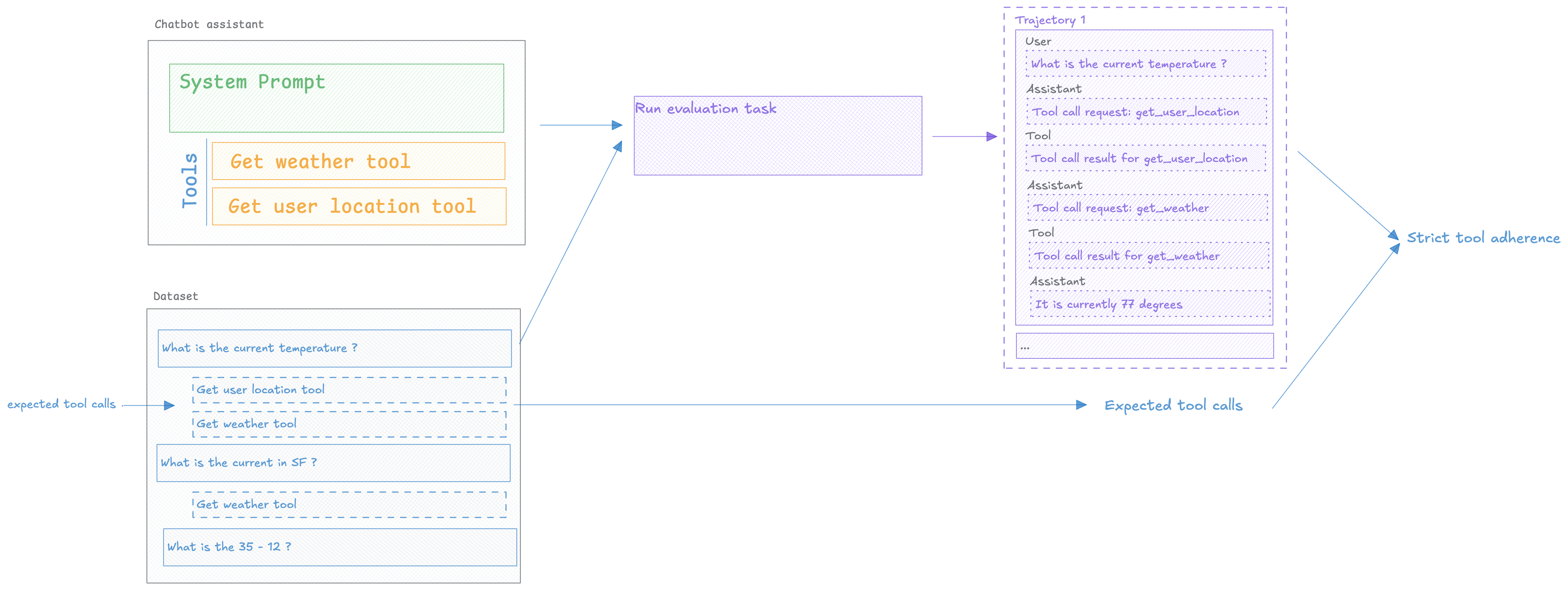
Evaluating agents requires more than checking the final output. You need to assess The trajectory — the steps your agent takes to reach an answer, including tool selection, reasoning chains, and intermediate decisions.
Agent trajectory evaluation helps you catch tool selection errors, identify inefficient reasoning paths, and optimize agent behavior before it reaches production.
Prerequisites
Before evaluating agent trajectories, you need:
- Opik SDK installed and configured — See Quickstart for setup
- Agent with observability enabled — Your agent must be instrumented with Opik tracing
- Test dataset — Examples with expected agent behavior
If your agent isn’t traced yet, see Log Traces to add observability first.
Installing the Opik SDK
To install the Opik Python SDK you can run the following command:
Then you can configure the SDK by running the following command:
This will prompt you for your API key and workspace or your instance URL if you are self-hosting.
Adding observability to your agent
In order to be able to evaluate the agent’s trajectory, you need to add tracing to your agent. This will allow us to capture the agent’s trajectory and evaluate it.
If you’re using specific agent frameworks like CrewAI, LangGraph, or OpenAI Agents, check our integrations for framework-specific setup instructions.
Evaluating your agent’s trajectory
In order to evaluate the agent’s trajectory, we will need to create a dataset, define an evaluation metric and then run the evaluation.
Creating a dataset
We are going to create a dataset with a set of user questions and some expected tools that the agent should be calling:
The format of dataset items is very flexible, you can include any fields you want in each item.
Defining the evaluation metric
In this task, we are going to measure Strict Tool Adherence which measures the agent’s adherence
to the expected tools in the same order as they are expected.
The key to this metric is the use of the optional task_span parameter, this is available for all
custom metrics and can be used to access the agent’s trajectory:
Running the evaluation
Let’s define our evaluation task that will run our agent and return the assistant’s response:
Now that we have our dataset and metric, we can run the evaluation:
Analyzing the results
The Opik experiment dashboard provides a rich set of tools to help you analyze the results of the trajectory evaluation.
You can see the results of the evaluation in the Opik UI:
If you click on a specific test case row, you can view the full trajectory of the agent’s execution
using the Trace button.
Next Steps
Now that you can evaluate agent trajectories:
- Learn about Task Span Metrics for advanced trajectory analysis patterns
- Optimize your agent with Agent Optimization
- Monitor agents in production with Production Monitoring