
For AI agents: a documentation index is available at the root level at /llms.txt and /llms-full.txt. Append /llms.txt to any URL for a page-level index, or .md for the markdown version of any page.
Copy to LLMGithubGo to App
DocumentationIntegrationsBuilding Self-Improving AgentsSelf-hosting OpikSDK & API reference
  • Getting Started
    • Home
    • Quickstart
    • Upgrading to Opik 2.0
    • Ollie Agent
    • FAQ
    • Changelog
  • Observability
    • Overview
    • Getting started
    • Concepts
    • Debugging agents with Ollie and Opik Connect
  • Development
    • Overview
    • Agent playground
    • Prompt playground
  • Evaluation
    • Overview
    • Getting started
    • Concepts
  • Production
  • Administration
    • Overview
    • Roles and Permissions
  • Contributing
    • Contribution Overview
LogoLogo
Copy to LLMGithubGo to App
On this page
  • Quick start
Evaluation

Getting started with Evaluation

Was this page helpful?
Previous

Evaluation Concepts

Next
Built with

Opik provides two approaches to evaluation. Choose the one that fits your use case:

  • Test Suites: Define assertions in natural language and let an LLM judge test them. Best for pass/fail behavioral testing.
  • Datasets & Metrics: Score outputs against a dataset using quantitative metrics. Best for measuring quality across many traces.

Quick start

Test Suites
Datasets & Metrics

Test Suites let you define expected behaviors as natural-language assertions and run them against your agent. An LLM judge checks each assertion automatically.

1import opik
2from openai import OpenAI
3from opik.integrations.openai import track_openai
4
5openai_client = track_openai(OpenAI())
6opik_client = opik.Opik()
7
8# Create a suite with assertions
9suite = opik_client.get_or_create_test_suite(
10 name="my-agent-tests",
11 project_name="my-agent",
12 global_assertions=[
13 "The response directly addresses the user's question",
14 "The response is concise (3 sentences or fewer)",
15 ],
16 global_execution_policy={"runs_per_item": 2, "pass_threshold": 2},
17)
18
19# Add test cases
20suite.insert([
21 {"data": {"question": "How do I create a new project?", "context": "Go to Dashboard and click 'New Project'."}},
22 {"data": {"question": "What are the pricing tiers?", "context": "Free ($0/month), Pro ($29/month), Enterprise (custom)."}},
23])
24
25# Define the task
26def task(item):
27 response = openai_client.chat.completions.create(
28 model="gpt-4o-mini",
29 messages=[
30 {"role": "system", "content": "Answer based ONLY on the provided context."},
31 {"role": "user", "content": f"Question: {item['question']}\n\nContext:\n{item['context']}"},
32 ],
33 )
34 return {"input": item, "output": response.choices[0].message.content}
35
36# Run the evaluation
37result = opik.run_tests(test_suite=suite, task=task)
38print(f"Pass rate: {result.pass_rate:.0%}")

Each run creates an experiment in the Opik dashboard for easy comparison.
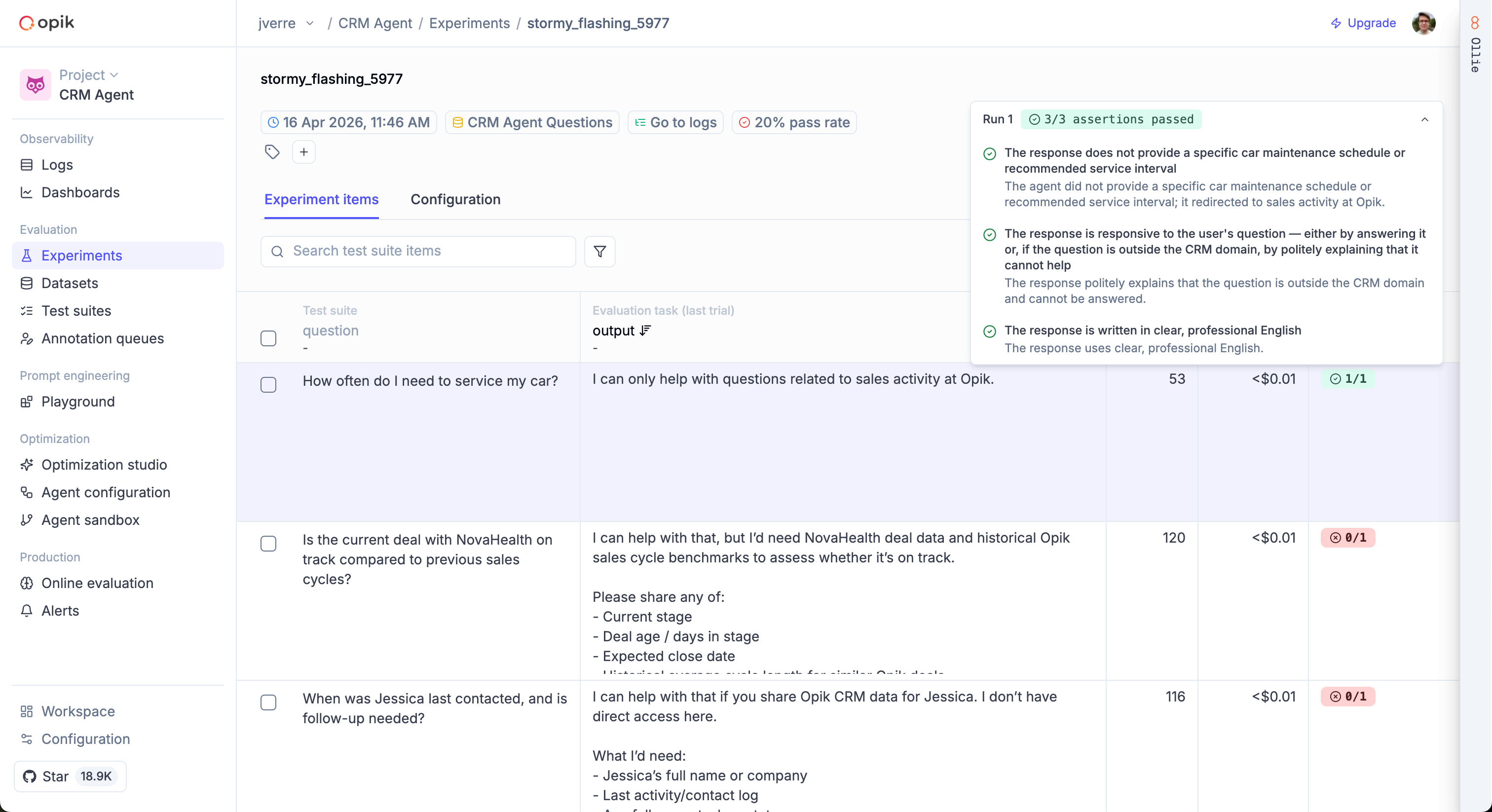
Test suite experiment results showing pass/fail per item with assertion details

See the Building Test Suites guide for the full walkthrough.