

Export data
Opik gives you several ways to export the data you’ve logged — pick the one that fits your workflow.
SDK
The Python and TypeScript SDKs let you search and export traces, spans, and threads programmatically.
Traces
Python
TypeScript
Spans
Threads
Filtering with OQL
All search methods accept a filter_string / filterString using the Opik Query Language (OQL):
- String values must be wrapped in double quotes
- Multiple conditions can be combined with
AND(OR is not supported) - DateTime fields require ISO 8601 format (e.g.,
"2024-01-01T00:00:00Z") - Use dot notation for nested fields:
metadata.model,feedback_scores.accuracy
Common filter examples:
The full list of supported columns per entity type is documented below.
REST API
Use the /traces and /spans endpoints to export data. Both endpoints are paginated.
The REST API filter parameter has limited flexibility as it was designed for use with the Opik UI.
For complex queries, use the SDK instead.
UI
Select the traces or spans you want to export in the Opik dashboard and click Export CSV in the Actions dropdown.
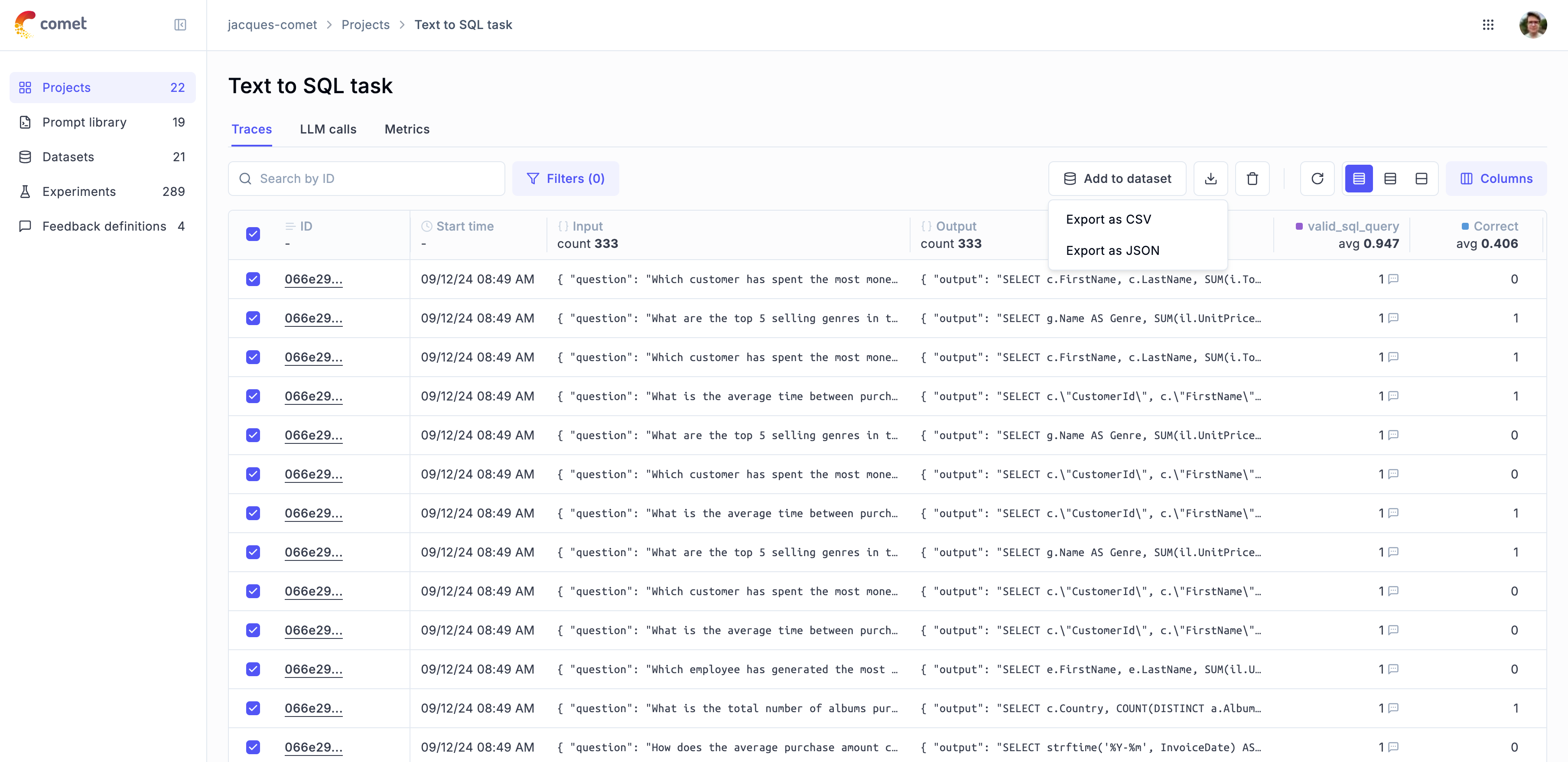
The UI exports up to 100 traces or spans at a time. For larger exports use the SDK or CLI.
Command-line tools
The opik export and opik import commands let you export traces, spans, datasets, prompts, and experiments for a project to local JSON or CSV files, and import them back — useful for migrations, backups, and cross-environment syncs. Every command is scoped to a single project, named right after the workspace.
On disk, folders and files are keyed by ID: data lands under <path>/<workspace>/projects/<project_id>/, with a project.json ({"id", "name"}) and id-named item files (dataset_<id>.json, prompt_<id>.json, experiment_<id>.json, trace_<id>.json). Human names are stored as data inside the files — this keeps paths free of /, :, and spaces. You still pass project and item names on the command line; the CLI resolves names ↔ IDs for you.
Export
ITEM is one of: all, dataset, traces, experiment, prompt
Import
WORKSPACE is the source workspace — used to locate the exported files under <path>/WORKSPACE/projects/. Use --to-workspace to write into a different destination workspace.
The project name is matched against the name recorded in each exported project.json. Import uses the same --path as export (both resolve <path>/<workspace>/projects/<id>/), so no path juggling is needed. Use --to-project <NAME> to import into a different destination project, or --to-workspace <NAME> to import into a different workspace (the source WORKSPACE argument is still used to locate the files on disk).
Imports are automatically resumable — if interrupted, re-run the same command and it picks up where it left off using a local migration_manifest.db.
Migrating between environments
See the CLI help (opik export --help / opik import --help) for all options and troubleshooting.