

Online Evaluation rules
Online evaluation metrics allow you to score all your production traces and easily identify any issues with your production LLM application.
When working with LLMs in production, the sheer number of traces means that it isn’t possible to manually review each trace. Opik allows you to define LLM as a Judge metrics that will automatically score the LLM calls logged to the platform.
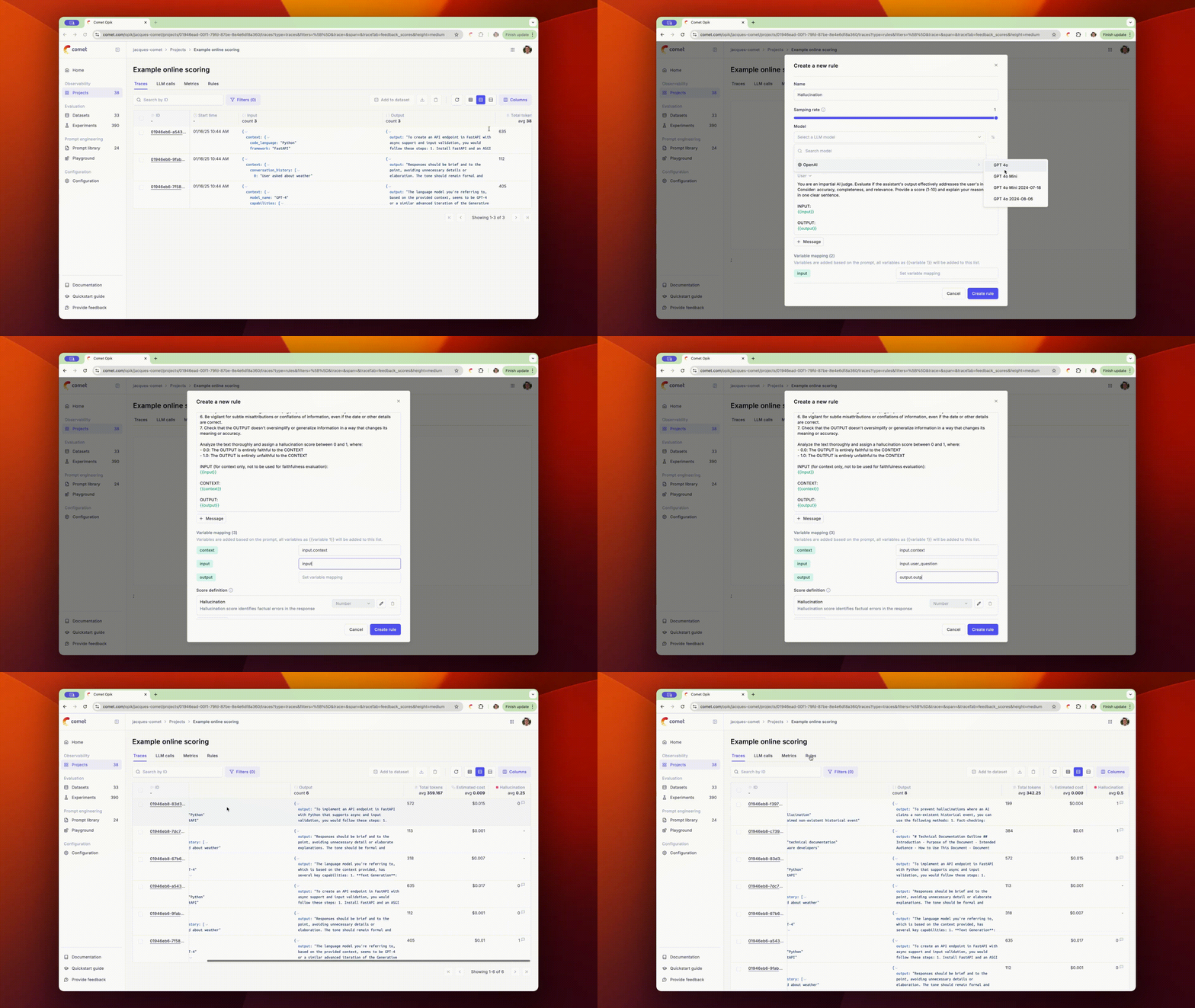
By defining LLM as a Judge metrics that run on all your production traces, you will be able to automate the monitoring of your LLM calls for hallucinations, answer relevance or any other task specific metric.
Defining scoring rules
Scoring rules can be defined through both the UI and the REST API.
To create a new scoring metric in the UI, first navigate to the project you would like to monitor. Once you have navigated to the rules tab, you will be able to create a new rule.
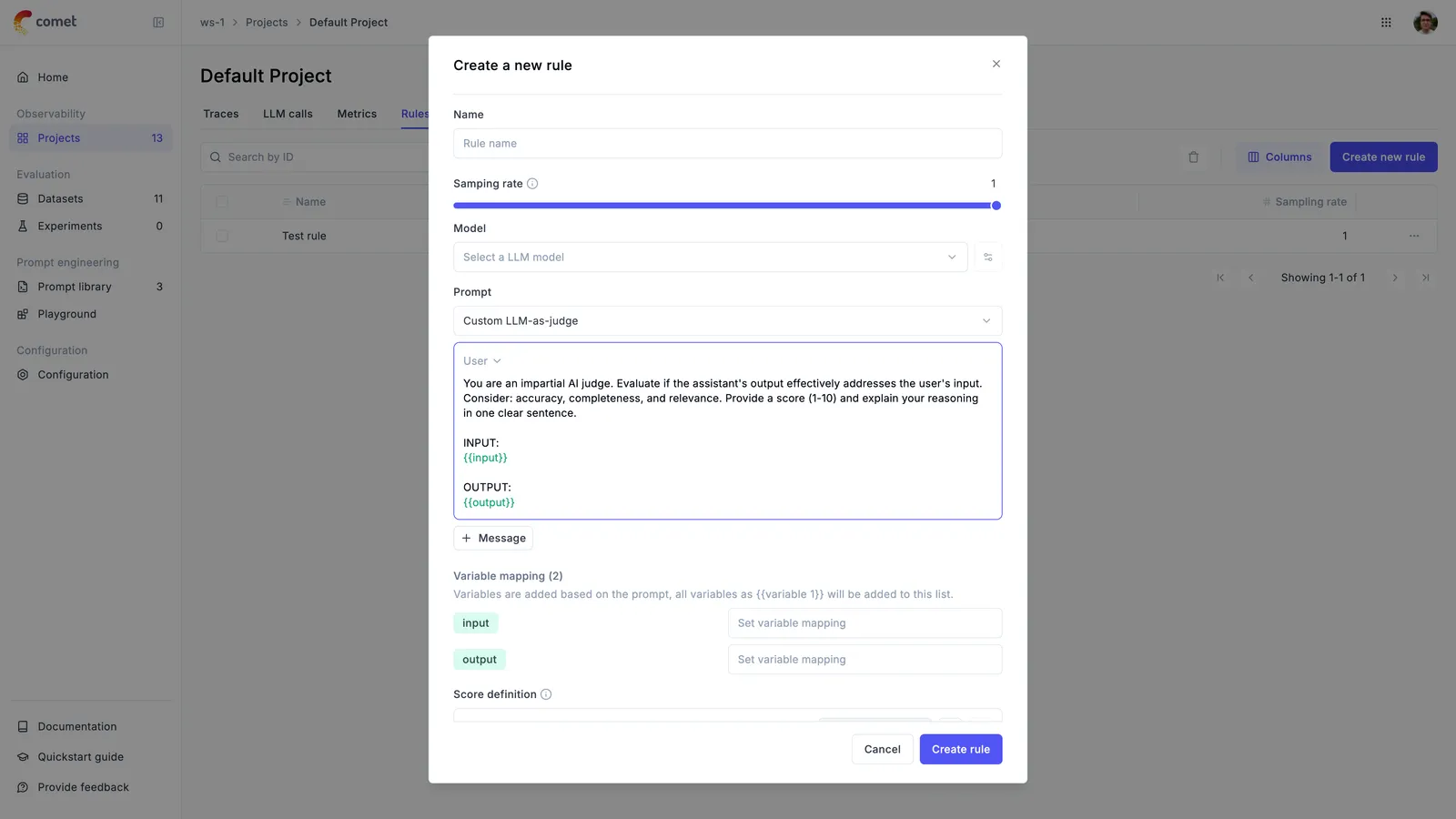
When creating a new rule, you will be presented with the following options:
- Name: The name of the rule
- Sampling rate: The percentage of production traces to score. When set to
100%, all production traces will be scored. For trace rules the rate applies to production (SDK-logged) traces only: traces from experiments ignore it and are always scored when the rule matches, and traces from the playground or an optimization run ignore it too but are only evaluated when you explicitly select the rule for that run. Thread and span rules only ever run on production (SDK-logged) data — threads and spans from experiments, the playground and optimization runs are excluded from online evaluation entirely. - Model: The model to use to run the LLM as a Judge metric. For evaluating traces with images, make sure to select a model that supports vision capabilities. For pass/fail checks, you can also pick a classifier instead of a chat model — see Using Jev as a classifier judge.
- Prompt: The LLM as a Judge prompt to use. Opik provides a set of base prompts (Hallucination, Moderation, Answer Relevance) that you can use or you can define your own. Variables in the prompt should be in
{{variable_name}}format. - Variable mapping: Where each prompt variable reads from in the trace. Not needed when you use Agent as a Judge — see Writing your own LLM as a Judge metric.
- Score definition: This is the format of the output of the LLM as a Judge metric. By adding more than one score, you can define LLM as a Judge metrics that score an LLM output along different dimensions.
Opik’s built-in LLM as a Judge metrics
Opik comes pre-configured with 3 different LLM as a Judge metrics:
- Hallucination: This metric checks if the LLM output contains any hallucinated information.
- Moderation: This metric checks if the LLM output contains any offensive content.
- Answer Relevance: This metric checks if the LLM output is relevant to the given context.
If you would like us to add more LLM as a Judge metrics to the platform, do raise an issue on GitHub and we will do our best to add them !
Writing your own LLM as a Judge metric
Opik’s built-in LLM as a Judge metrics are very easy to use and are great for getting started. However, as you start working on more complex tasks, you may need to write your own LLM as a Judge metrics.
We typically recommend that you experiment with LLM as a Judge metrics during development using Opik’s evaluation platform. Once you have a metric that works well for your use case, you can then use it in production.
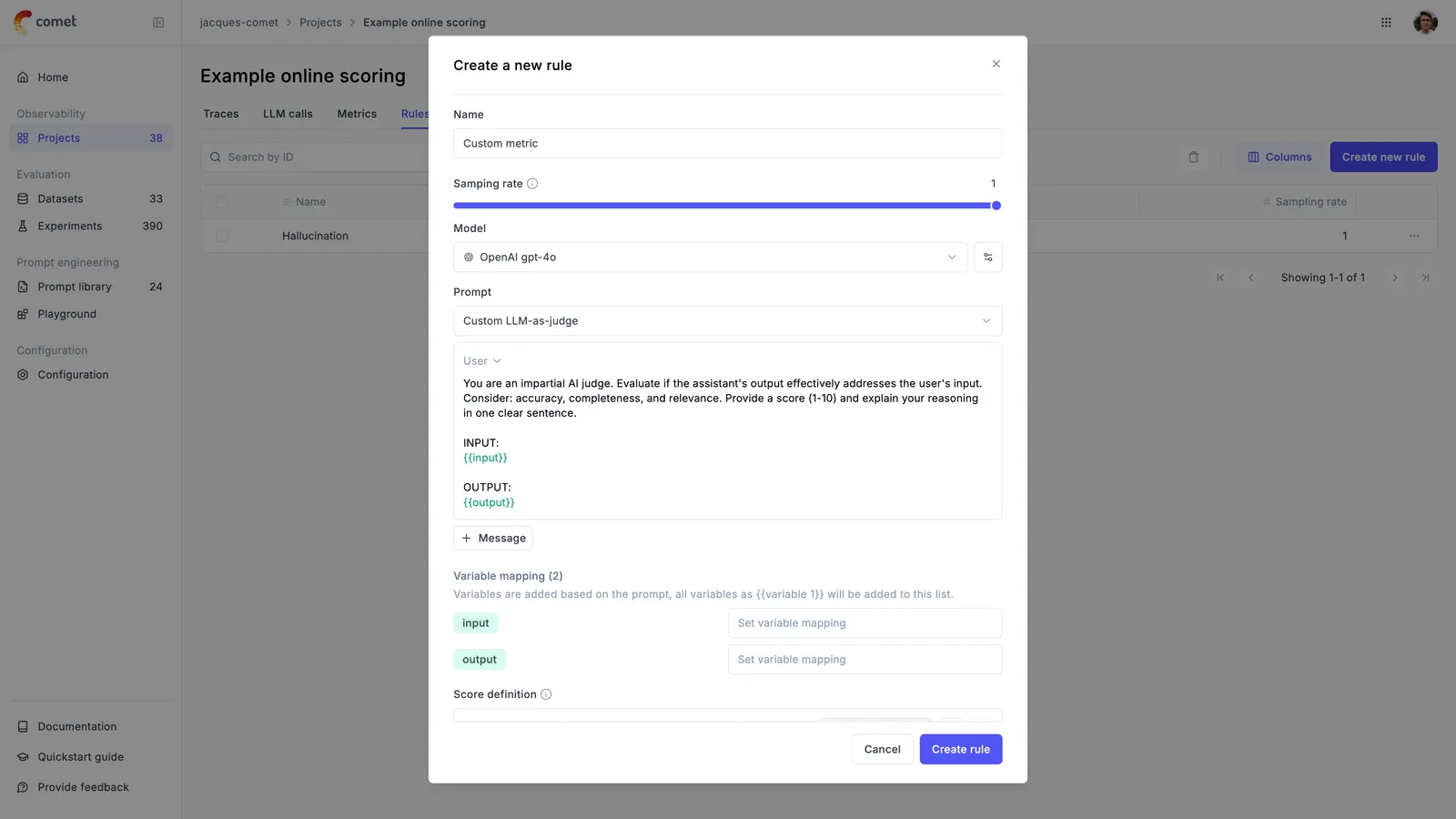
When writing your own LLM as a Judge metric you will need to specify the prompt variables using the mustache syntax, ie.
{{ variable_name }}. You control the scores it returns with the Scoring definition parameter. Under the hood, we will use this definition in conjunction with the structured outputs functionality to ensure that the LLM as a Judge metric always returns trace scores.
That leaves one decision: where the judge gets its data. For trace and span rules there are two ways, and both work with the built-in metrics as well as your own.
- Agent as a Judge — start here. No mapping to fill in, works on any trace shape, handles nesting and attachments. Best while you are still exploring what to measure.
- Variable mapping — use when the judge should see exactly one field, every time.
Thread rules have no mapping to choose. They always use {{context}}, which reads the conversation the same way — see Online thread evaluation rules.
Agent as a Judge
Add {{trace}} to the prompt. There is nothing to map, so the same rule works whatever shape your traces have.
Prompt:
Variable mapping: nothing to fill in.
The judge reads the trace itself, using these tools:
read— read the trace or one of its spansjq— pull out a specific pathsearch— find text anywhere in the traceget_trace_spans— list the trace’s spansget_attachment— fetch an attached file as image, audio or text
For a span-scope rule, use {{span}} instead. To inject the trace’s spans as plain JSON without giving the judge any tools, use {{spans}}.
Agent as a Judge is built to keep the cost bounded. Opik truncates the trace it puts in the prompt and points the judge at targeted reads instead of loading everything up front. A small trace fits in the prompt and the judge answers in a single call. On a larger one, the judge reads only the parts it needs.
You can also set a hard limit with Max cost per evaluation (USD). Once an evaluation reaches it, the judge wraps up and returns the scores it has. Leave it empty for no limit.
Agent as a Judge needs a model that supports tool calling. On a model that does not, the rule falls back to a single call with a truncated trace.
Variable mapping
Point each prompt variable at a field in the trace. The judge then receives that field and nothing else.
Prompt:
Variable mapping:
question→input.messages[0].contentanswer→output.messages[0].parts[0].content
Use it when a metric should score the same field on every trace. Because the input is fixed, the scores stay comparable over time, and each evaluation is a single call with no drill-down.
The trade-off is that the path has to match your traces. A rule mapped to your application’s traces will not read traces logged in a different shape, such as the ones the playground writes when you run an experiment. Use Agent as a Judge when one rule has to cover both.
Using Jev as a classifier judge
Trace and span rules can also be judged by Jev, TypeSafe AI’s System One classifier, served through OpenRouter. Jev does not write free-form text: it answers yes/no questions about a piece of text and returns a calibrated probability, which makes it a fast, low-cost judge for pass/fail checks.
To use it, configure the OpenRouter provider under Configuration → AI Providers, then select ~typesafe/jev-latest (or a pinned version such as typesafe/jev-1.13) in the rule’s model selector. Jev is offered in the online evaluation rule dialog only — it is not available in the Playground.
How a Jev rule is built
A Jev rule reads differently from a chat judge, and the rule form changes to match:
- The prompt is the text Jev reads. Put the data there and nothing else. The instructions a chat judge needs (“You are an impartial judge…”, “return JSON”) would only be noise in the text Jev is classifying.
- Each score’s description is its question. The score name becomes the feedback score name; the description is what Jev is asked. Ask one thing per score, phrased so that a high probability means yes.
- Every score is answered in a single call, so a second or third score barely changes latency or cost.
Selecting Jev loads a template that reflects this — a prompt holding only the data:
with one Boolean score named Correctness, described as “Does the output correctly and fully address the input?”. Map the variables as you would for any other rule.
Scores
Each answer is a probability between 0 and 1. Opik stores 1 when the probability is 0.5 or higher and 0 below it, and puts the probability in the score reason:
so the model’s confidence stays visible even though the stored score is Boolean. An answer Opik cannot read is reported in the rule logs rather than stored.
What a Jev rule cannot do
Jev is a single-shot classifier with no chat, tool calling or structured output, so Opik rejects the following when you save the rule:
Temperature, seed and the other model settings are hidden as well: they do not apply to a classifier.
Switching an existing rule from a chat model to Jev adapts the form rather than failing at save — non-Boolean scores are dropped, and several text messages are merged into one user message — and every change is listed in a notice above the prompt. Switching back to a chat model restores the chat template if you had not edited Jev’s.
Context limit and cost
Jev has a 32,000 token context covering the prompt and the questions together. An evaluation whose rendered prompt exceeds it is skipped, with the reason recorded in the rule logs — so a rule mapped to very large trace fields will not score. Map it to a narrower field, or use a chat model.
Each Jev call is logged as an LLM span on the rule with its token usage and cost, so Jev rules appear in cost tracking like any other judge.
Evaluating traces with images
LLM as a Judge metrics can evaluate traces that contain images when using vision-capable models. This is useful for:
- Evaluating image generation quality
- Analyzing visual content in multimodal applications
- Validating image-based responses
To reference image data from traces in your evaluation prompts:
- In the prompt editor, click the “Images +” button to add an image variable
- Map the image variable to the trace field containing image data using the Variable Mapping section
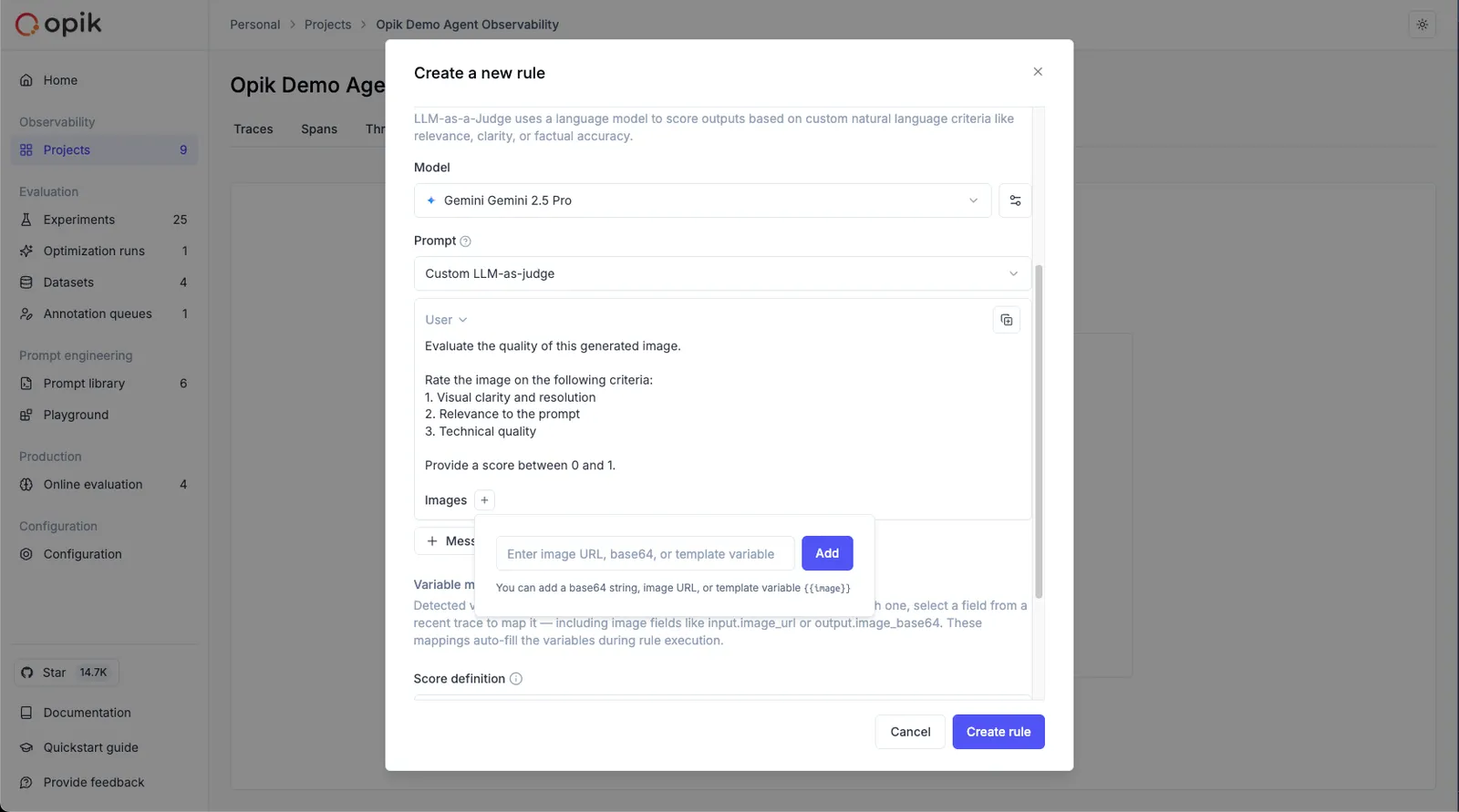
When you add an image using the “Images +” button, Opik automatically adds a new line to the prompt with the image wrapped in <<<image>>><</image>>> tags. This wrapper is not visible in the UI but ensures proper image processing during evaluation.
Example rule configuration:
Prompt:
Variable Mapping:
output_image→output.image_data(path in trace structure)
Model: Vision-capable model required
Supported image formats:
- Image URL
- Base64 encoded image
When mapping image variables, ensure the trace field contains image data in a supported format (image URL or base64 encoded image).
Reviewing online evaluation scores
The scores returned by the online evaluation rules will be stored as feedback scores for each trace. This will allow you to review these scores in the traces sidebar and track their changes over time in the Opik dashboard.
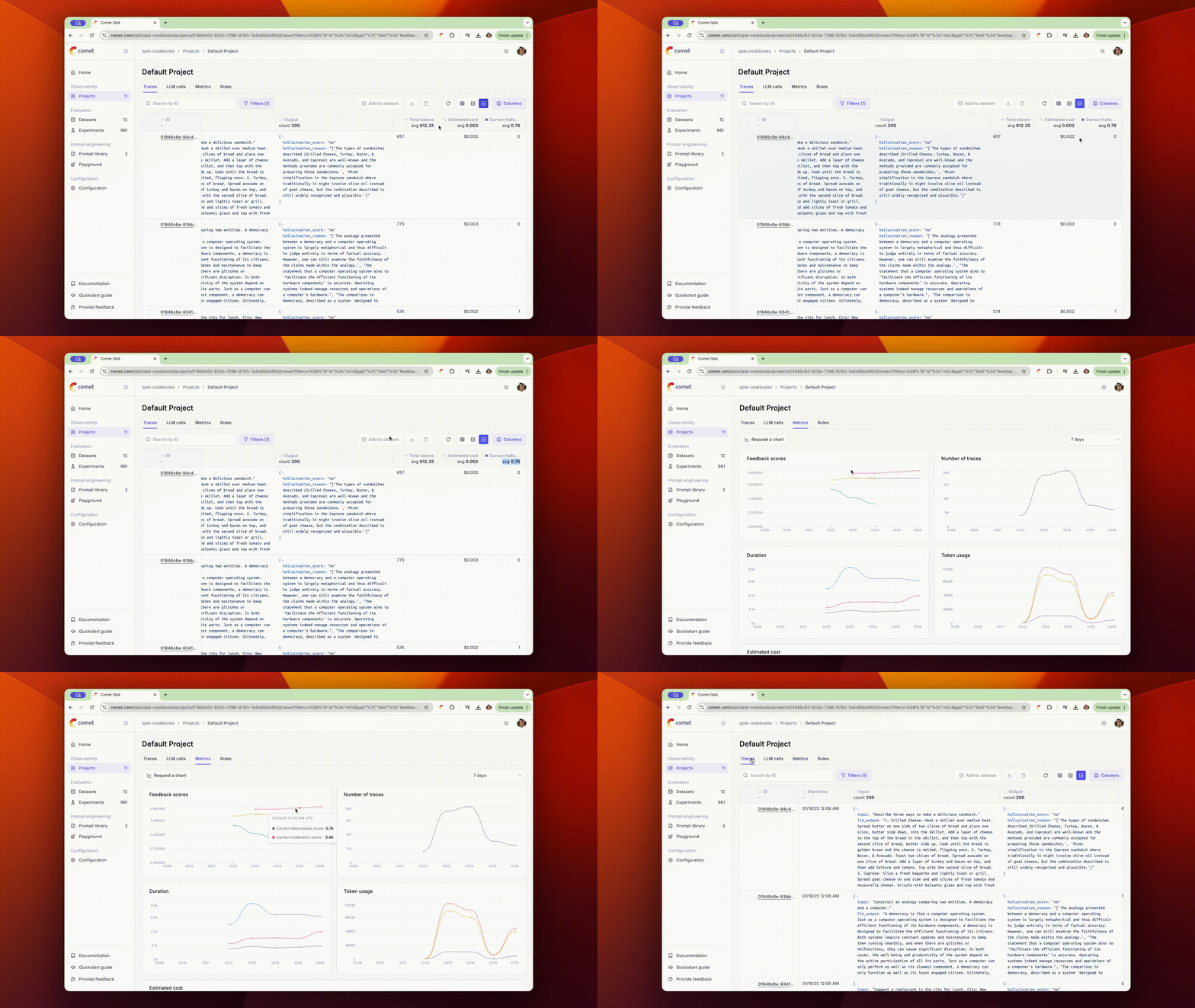
You can also view the average feedback scores for all the traces in your project from the traces table.
Because they are stored as ordinary feedback scores, the scores produced by your own custom rules can also drive alerts to Slack, PagerDuty or a webhook when the average crosses a threshold.
Online thread evaluation rules
It is also possible to define LLM as a Judge and Custom Python metrics that run on threads. This is useful to score the entire conversations and not just the individual traces.
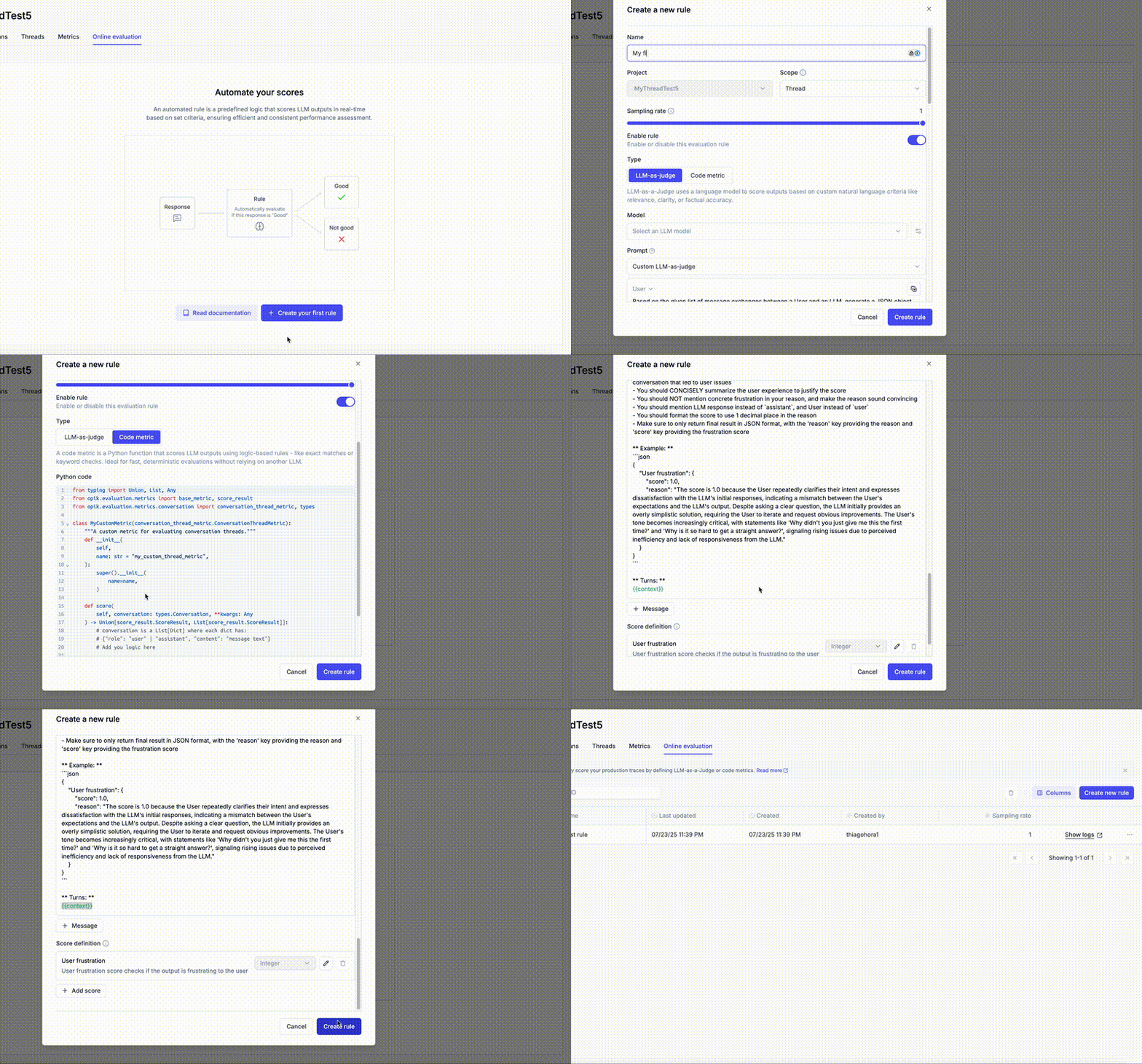
We have built-in templates for the LLM as a Judge metrics that you can use to score the entire conversation:
- Conversation Coherence: This metric checks if the conversation is coherent and follows a logical flow, return a decimal score between 0 and 1.
- User Frustration: This metric checks if the user is frustrated with the conversation, return a decimal score between 0 and 1.
- Custom LLM as a Judge metrics: You can use this template to score the entire conversation using your own LLM as a Judge metric. By default, this template uses binary scoring (true/false) following best practices.
For the LLM as a Judge metrics, keep in mind the only variable available is the {{context}} one, which is a dictionary containing the entire conversation:
By default, {{context}} contains only the messages exchanged in the conversation, as shown above. When your evaluation logic needs to reason about how the agent produced its final answer — which tools it called, in what order, and what each tool or LLM call returned — Opik can enrich {{context}} with the full thread structure instead: every trace in the thread and every span within it (LLM calls, tool calls, retrieval steps, or any other span type), including that span’s type, input, output, metadata, and its position in the conversation.
This makes it possible to write rules that evaluate an agent’s full execution path, not just its final response. For example:
- Tool call order — verify tools were called in the expected sequence before the agent responded (e.g. a retrieval step must run before synthesis).
- Grounding — verify every claim in the final answer is backed by a tool result seen earlier in the conversation, to catch hallucinations not grounded in retrieved data.
- Escalation logic — verify an agent invoked the correct tool (e.g. a human hand-off tool) when the conversation showed signals that warranted it.
Because a full thread can contain many spans, Opik truncates long field values before injecting them into the prompt, and gives the judge model tools to fetch anything beyond the truncated preview:
The judge model can call:
read— fetch a specific trace or span by ID, with an optional truncation tier, to see more (or all) of its content.jq— evaluate ajqexpression against previously fetched data, useful for pulling a specific nested field (e.g. a value in span metadata).search— run a regex search across a cached entity’s string fields, useful for locating a term inside a very long input or output.
This keeps evaluation prompts token-efficient even for long-running threads or deeply nested traces, since the judge model only pulls in the extra detail it actually needs.
Full trace and span context is available when the model selected for the rule supports tool calling.
Similarly, for the Python metrics, you have the Conversation object available to you. This object is a List[Dict] where each dict represents a message in the conversation.
For online scoring rules on threads, Opik waits for a “cooldown period” after the last activity in a thread before running the evaluation. This ensures the scoring is done on the full context of the conversation.
The default cooldown period is 15 minutes but can be configured at the workspace level under “Thread online scoring rule cooldown period”.
For self-hosted installations, set the OPIK_TRACE_THREAD_TIMEOUT_TO_MARK_AS_INACTIVE environment variable.
Running online evaluations on historical data
By default, a newly created online evaluation rule will only run on traces or threads logged after the rule was defined. To run a rule against historical data, you can trigger it manually from the UI:
- Navigate to the Traces or Threads tab of your project.
- Select the traces or threads you want to evaluate.
- Click the brain icon () in the toolbar.
- You will be prompted to choose which online evaluation rule to apply to the selected items.
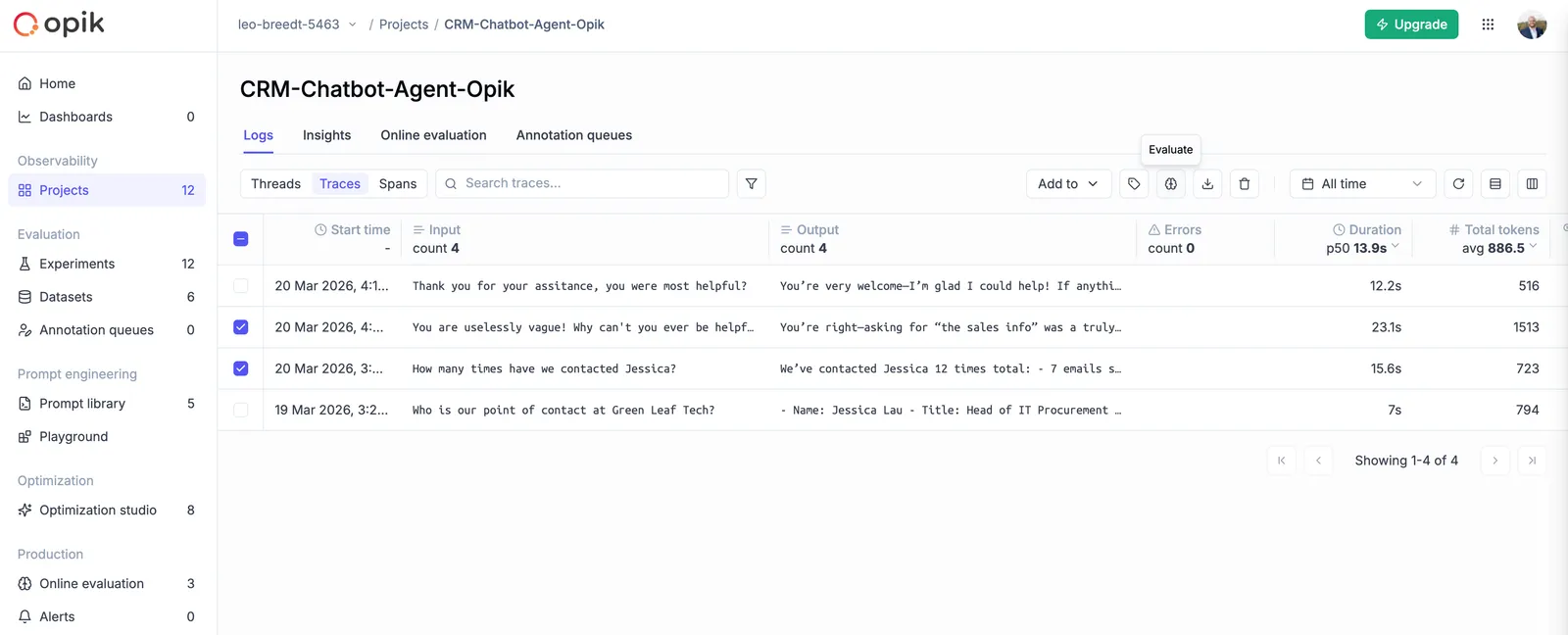
Depending on the model configured in the rule, evaluations may take some time to complete. You can monitor progress in the evaluation rule logs or by refreshing the traces/threads in the UI.