

Policies
A policy is a named group of one or more guards, stored in your Opik workspace. Your application references the policy by name rather than spelling out the checks itself.
That splits the work cleanly in two. Policies are created and edited in the Opik UI, and the SDK’s job is to fetch them and run the checks. Changing what a guardrail enforces — adding an entity, tightening a threshold, switching a model — is something a teammate does in the UI, with no code change and no redeploy.
This is how we recommend running guardrails. It keeps the checks visible to everyone on the team, lets you tighten them in response to something you saw in production without waiting on a release, and applies the same protection consistently across every application that references the policy.
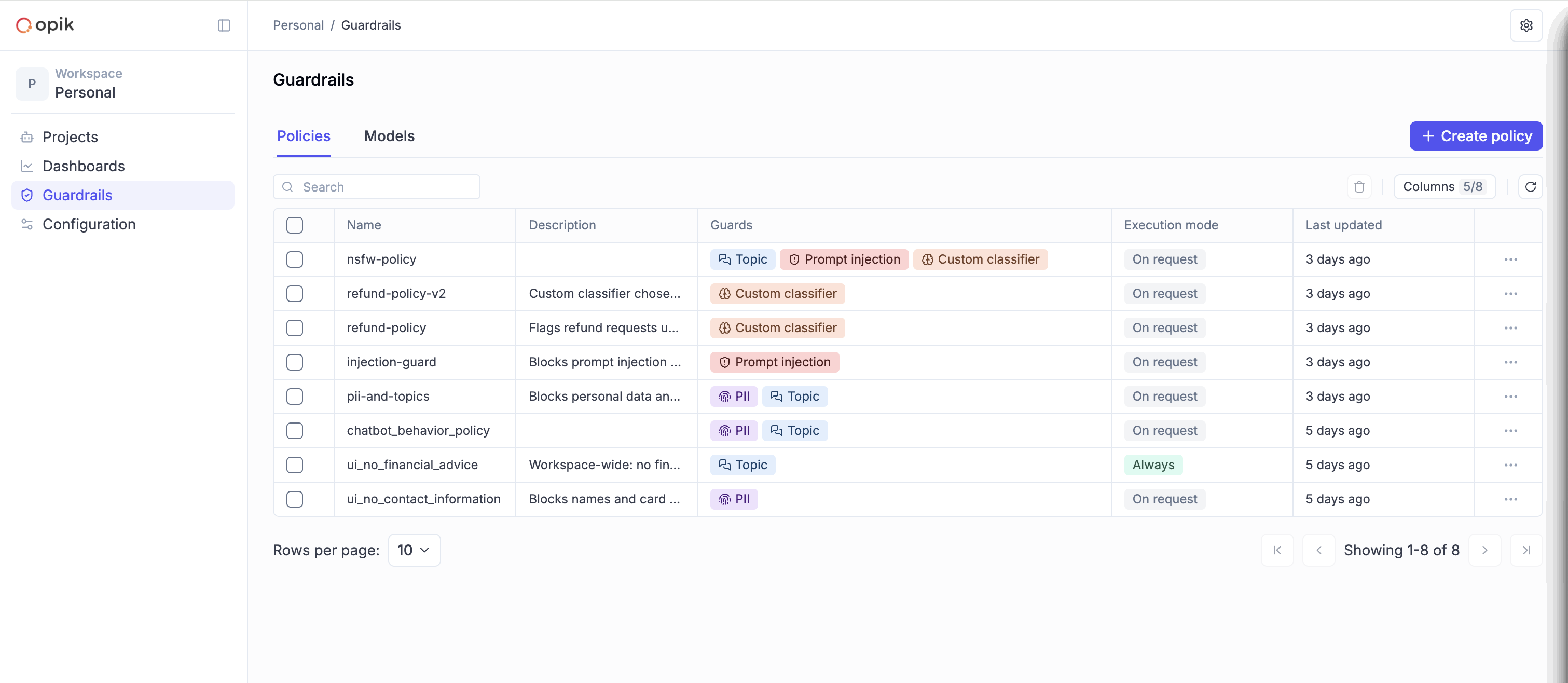
Create a policy
Open Guardrails in the sidebar and stay on the Policies tab, then choose Create policy.
A policy has a name, an optional description, an execution mode, and the guards it runs.
Name it
The name is what your application passes to the SDK, so pick something that reads well in code — no-contact-information, support-tone. Names are unique within a workspace.
Applications reference a policy by name. Renaming a policy that is already in use breaks every application still asking for the old name, so treat the name as part of your public interface.
Choose an execution mode
- On request — the policy applies only to applications that name it. This is the default.
- Always — the policy applies to every application in the workspace, whether or not it names the policy. Use this for baseline protection you want enforced everywhere, such as blocking personal data.
Switch on the guards it runs
Turn on the checks you want and configure each one. A policy holds at most one guard of each type, so a policy is a set of distinct checks rather than a list that can repeat.
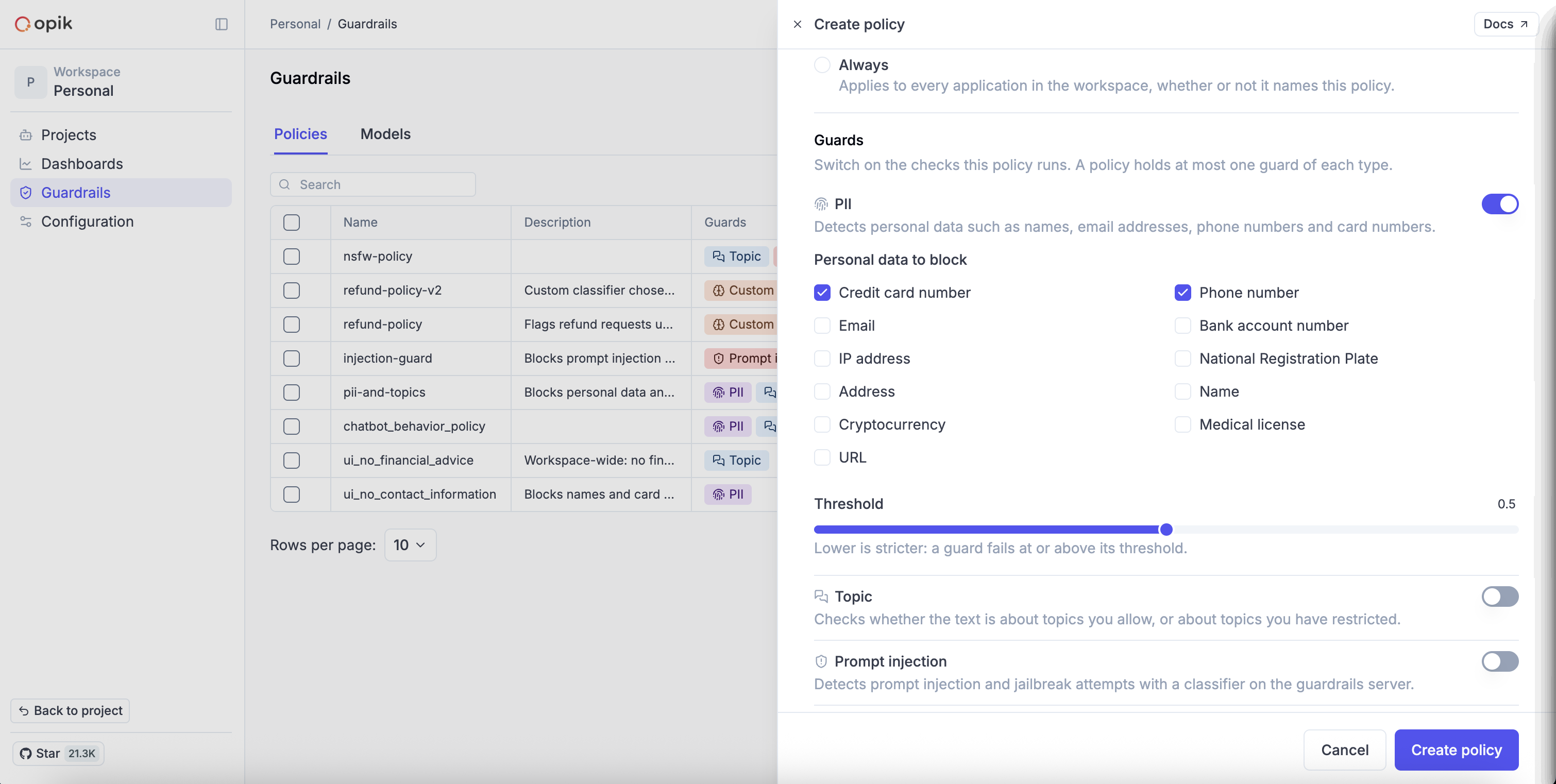
Most guards take a threshold — the score at or above which the guard fails. Lower is stricter. The other fields depend on the type: PII asks which categories of personal data to block, Topic takes lists of allowed and restricted topics, the LLM judge takes your rule in plain language plus a model, and the custom classifier takes one of your models.
The five types are described in full on the Guards page. The LLM judge guard needs a model from the providers configured under AI Providers, and the custom classifier guard needs one of your custom models.
Rather than putting every check into one large policy, split them by what they protect against. A guardrail can be built from several policies at once, and small policies are far easier to reuse across applications.
Use a policy in your application
Build a guardrail from stored policies with Guardrail.from_stored_policies, then call validate exactly as you would with a guardrail defined in code:
Pass several names to combine policies. Their guards are checked together as one set, and the guardrail fails if any single guard fails:
Policies set to Always are included automatically, so a workspace-wide rule applies even to an application that names nothing:
A few things worth knowing about the call:
- Policies are read once, when you build the guardrail. Build it at startup rather than on every request, and restart (or rebuild the guardrail) to pick up a change made in the UI.
- Every name you pass must exist. A name that does not is an error, rather than a check quietly not running.
Manage policies
The Policies tab lists every policy in the workspace with the guards it holds, its execution mode, and who last changed it. Selecting a row opens the policy for editing, and the row menu offers Duplicate — a quick way to build a variant without retyping the guards.
Saved changes apply to every application that references the policy the next time it builds its guardrail.