

Observability for Ollama (Python) with Opik
Ollama runs open models such as Llama, Qwen and Gemma on your own machine.
Wrap your Ollama client with track_ollama and every chat call is logged to Opik with its messages, response, model and token usage. Streaming, async calls, tool calls and thinking models work out of the box.
Account Setup
Comet provides a hosted version of the Opik platform, simply create an account and grab your API Key.
You can also run the Opik platform locally, see the installation guide for more information.
Getting Started
Installation
Configuring Opik
Run opik configure and follow the prompts. See the Python SDK Configuration guide for other options, such as configuring Opik in code or with environment variables.
Configuring Ollama
Install Ollama, which starts the Ollama server, and download a model:
If your Ollama server isn’t on localhost, set the OLLAMA_HOST environment variable or pass host to the client: ollama.Client(host="http://my-server:11434").
Logging LLM calls
Create an Ollama client, wrap it with track_ollama, and use it as usual:
When the script runs, Opik prints a link to your project. Open it to see the trace with the messages, the response and the token usage:
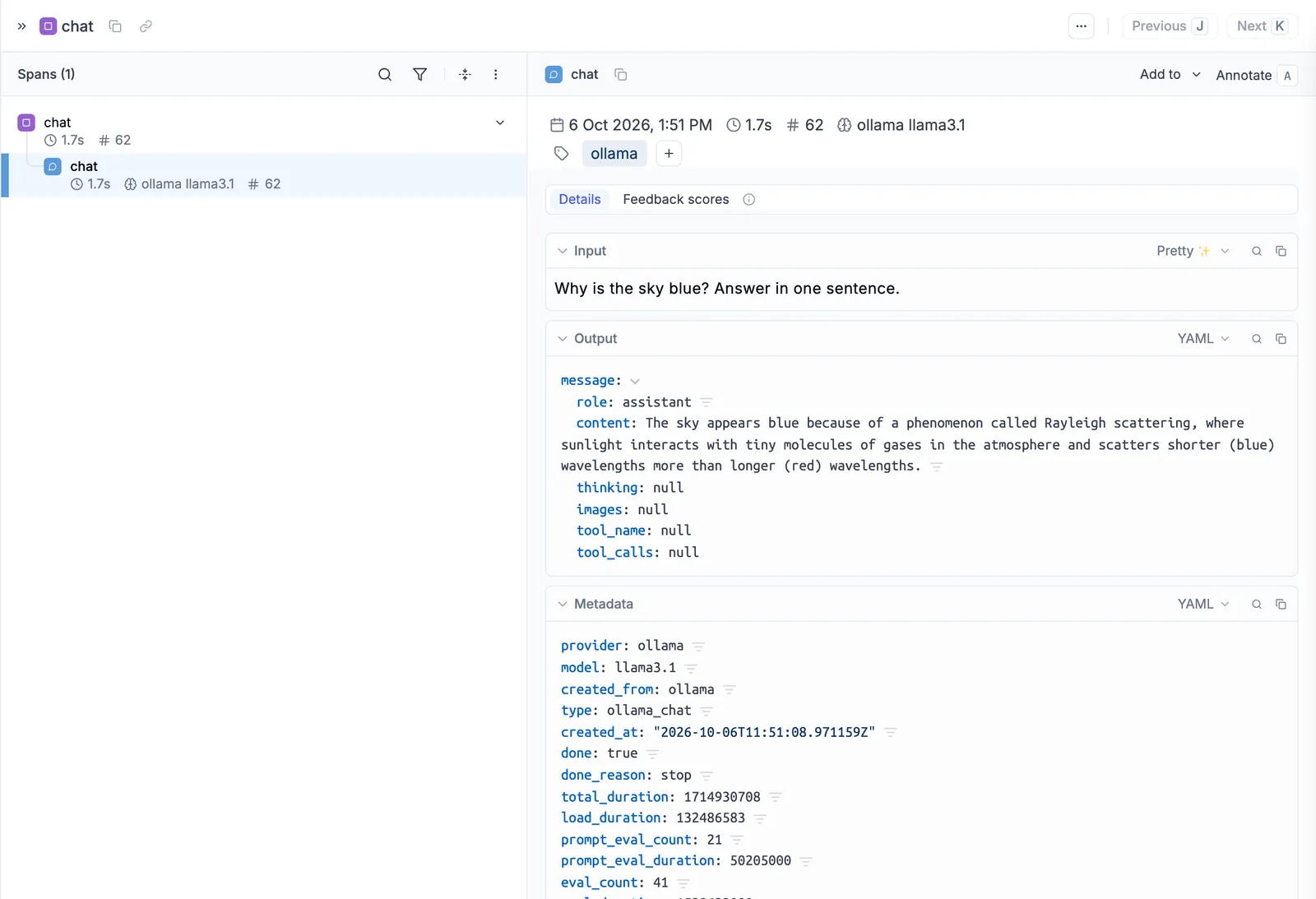
Only calls made through the wrapped client are logged. If you copied ollama.chat(...) from the Ollama README, switch it to client.chat(...).
Advanced Usage
The snippets below reuse the client from Logging LLM calls.
Using with the @track decorator
Decorate the functions of your application with @track to group several LLM calls into one trace:
Opik shows one generate_opik_story trace with both LLM calls nested inside it.
Streaming
Streamed responses are logged as one span with the full text and token usage:
Async client
track_ollama works with ollama.AsyncClient too, including streaming:
Tool calling
The tools you pass and the tool calls the model makes are both logged:
Thinking models
With a thinking model such as Qwen 3 or DeepSeek-R1, pass think=True. Opik logs the model’s reasoning next to its final answer:
Cost Tracking
Opik records token usage for your Ollama calls. Models you run on your own Ollama server have no per-token price, so no cost is estimated.
Supported Methods
track_ollama logs chat() on ollama.Client and ollama.AsyncClient, with and without streaming. Other methods, such as generate() and embed(), aren’t logged; to trace them, call them inside a function decorated with @track.
Using Ollama through OpenAI or LangChain
If your code calls Ollama through the OpenAI library or LangChain, keep that code and use the matching Opik integration instead of track_ollama.
With the OpenAI library pointed at Ollama’s OpenAI-compatible API, use the OpenAI integration:
With LangChain’s ChatOllama (pip install -U langchain-ollama), use the LangChain integration: