Observability for LiveKit with Opik

LiveKit Agents is an open-source Python framework for building production-grade multimodal and voice AI agents. It provides a complete set of tools and abstractions for feeding realtime media through AI pipelines, supporting both high-performance STT-LLM-TTS voice pipelines and speech-to-speech models.

LiveKit Agents’ primary advantage is its built-in OpenTelemetry support for comprehensive observability, making it easy to monitor agent sessions, LLM calls, function tools, and TTS operations in real-time applications.

Getting started

To use the LiveKit Agents integration with Opik, you will need to have LiveKit Agents and the required OpenTelemetry packages installed:

$pip install "livekit-agents[openai,turn-detector,silero,deepgram]" opentelemetry-exporter-otlp-proto-http

Environment configuration

Configure your environment variables based on your Opik deployment:

If you are using Opik Cloud, you will need to set the following environment variables:

$export OTEL_EXPORTER_OTLP_ENDPOINT=https://www.comet.com/opik/api/v1/private/otel
$export OTEL_EXPORTER_OTLP_HEADERS='Authorization=<your-api-key>,Comet-Workspace=default'

To log the traces to a specific project, you can add the projectName parameter to the OTEL_EXPORTER_OTLP_HEADERS environment variable:

$export OTEL_EXPORTER_OTLP_HEADERS='Authorization=<your-api-key>,Comet-Workspace=default,projectName=<your-project-name>'

You can also update the Comet-Workspace parameter to a different value if you would like to log the data to a different workspace.

Using Opik with LiveKit Agents

LiveKit Agents includes built-in OpenTelemetry support. To enable telemetry, configure a tracer provider using set_tracer_provider in your entrypoint function:

main.py
1import logging
2
3from dotenv import load_dotenv
4
5load_dotenv()
6
7from livekit.agents import (
8 Agent,
9 AgentSession,
10 JobContext,
11 RunContext,
12 cli,
13 metrics, AgentServer,
14)
15from livekit.agents.llm import function_tool
16from livekit.agents.telemetry import set_tracer_provider
17from livekit.agents.voice import MetricsCollectedEvent
18from livekit.plugins import deepgram, openai, silero
19from opentelemetry.util.types import AttributeValue
20
21logger = logging.getLogger("basic-agent")
22
23server = AgentServer()
24
25
26def setup_opik_tracing(metadata: dict[str, AttributeValue] | None = None):
27 """Set up Opik tracing for LiveKit Agents"""
28 from opentelemetry.exporter.otlp.proto.http.trace_exporter import OTLPSpanExporter
29 from opentelemetry.sdk.trace import TracerProvider
30 from opentelemetry.sdk.trace.export import BatchSpanProcessor
31
32 # Set up the tracer provider
33 trace_provider = TracerProvider()
34 trace_provider.add_span_processor(BatchSpanProcessor(OTLPSpanExporter()))
35 set_tracer_provider(trace_provider, metadata=metadata)
36
37 return trace_provider
38
39
40@function_tool(None)
41async def lookup_weather(context: RunContext, location: str) -> str:
42 """Called when the user asks for information related to weather.
43
44 Args:
45 location: The location they are asking for
46 """
47
48 logger.info(f"Looking up weather for {location}")
49
50 return "sunny with a temperature of 70 degrees."
51
52
53class Kelly(Agent):
54 def __init__(self) -> None:
55 super().__init__(
56 instructions="Your name is Kelly.",
57 llm=openai.LLM(model="gpt-4o-mini"),
58 stt=deepgram.STT(model="nova-3", language="multi"),
59 tts=openai.TTS(voice="ash"),
60 turn_detection="realtime_llm",
61 tools=[lookup_weather],
62 )
63
64 async def on_enter(self):
65 logger.info("Kelly is entering the session")
66 await self.session.generate_reply()
67
68 @function_tool(None)
69 async def transfer_to_alloy(self) -> Agent:
70 """Transfer the call to Alloy."""
71 logger.info("Transferring the call to Alloy")
72 return Alloy()
73
74
75class Alloy(Agent):
76 def __init__(self) -> None:
77 super().__init__(
78 instructions="Your name is Alloy.",
79 llm=openai.realtime.RealtimeModel(voice="alloy"),
80 tools=[lookup_weather],
81 )
82
83 async def on_enter(self):
84 logger.info("Alloy is entering the session")
85 await self.session.generate_reply()
86
87 @function_tool(None)
88 async def transfer_to_kelly(self) -> Agent:
89 """Transfer the call to Kelly."""
90
91 logger.info("Transferring the call to Kelly")
92 return Kelly()
93
94
95@server.rtc_session(agent_name="LK_test")
96async def entrypoint(ctx: JobContext):
97 # set up the langfuse tracer
98 trace_provider = setup_opik_tracing(
99 # metadata will be set as attributes on all spans created by the tracer
100 metadata={
101 "livekit.session.id": ctx.room.name,
102 }
103 )
104
105 # (optional) add a shutdown callback to flush the trace before process exit
106 async def flush_trace():
107 trace_provider.force_flush()
108
109 ctx.add_shutdown_callback(flush_trace)
110
111 session = AgentSession(vad=silero.VAD.load())
112
113 @session.on("metrics_collected")
114 def _on_metrics_collected(ev: MetricsCollectedEvent):
115 metrics.log_metrics(ev.metrics)
116
117 await session.start(agent=Kelly(), room=ctx.room)
118
119
120
121if __name__ == "__main__":
122 cli.run_app(server)

Make sure to create a .env file with the environment variables you configured above as well as LiveKit, DeepGram and OpenAI API keys and credentials. It should look something like this:

.env
1# LiveKit credentials
2# For local development, you can use these placeholder values
3# or get real credentials from https://cloud.livekit.io
4LIVEKIT_URL=wss://[your-livekit-project-url]
5LIVEKIT_API_KEY=[your-livekit-api-key]
6LIVEKIT_API_SECRET=[your-livekit-api-secret]
7
8# Deepgram API
9DEEPGRAM_API_KEY=[your-deepgram-api-key]
10
11# You'll also need OpenAI API key for the LLM and TTS
12OPENAI_API_KEY=[your-openai-api-key]
13
14# The OTEl endpoint configuration
15#OTEL_EXPORTER_OTLP_ENDPOINT=https://www.comet.com/opik/api/v1/private/otel
16#OTEL_EXPORTER_OTLP_HEADERS='Authorization=[your-api-key],Comet-Workspace=default'

Then, run the application with following command:

$python main.py console

After a few seconds, you should see traces in Comet ML:
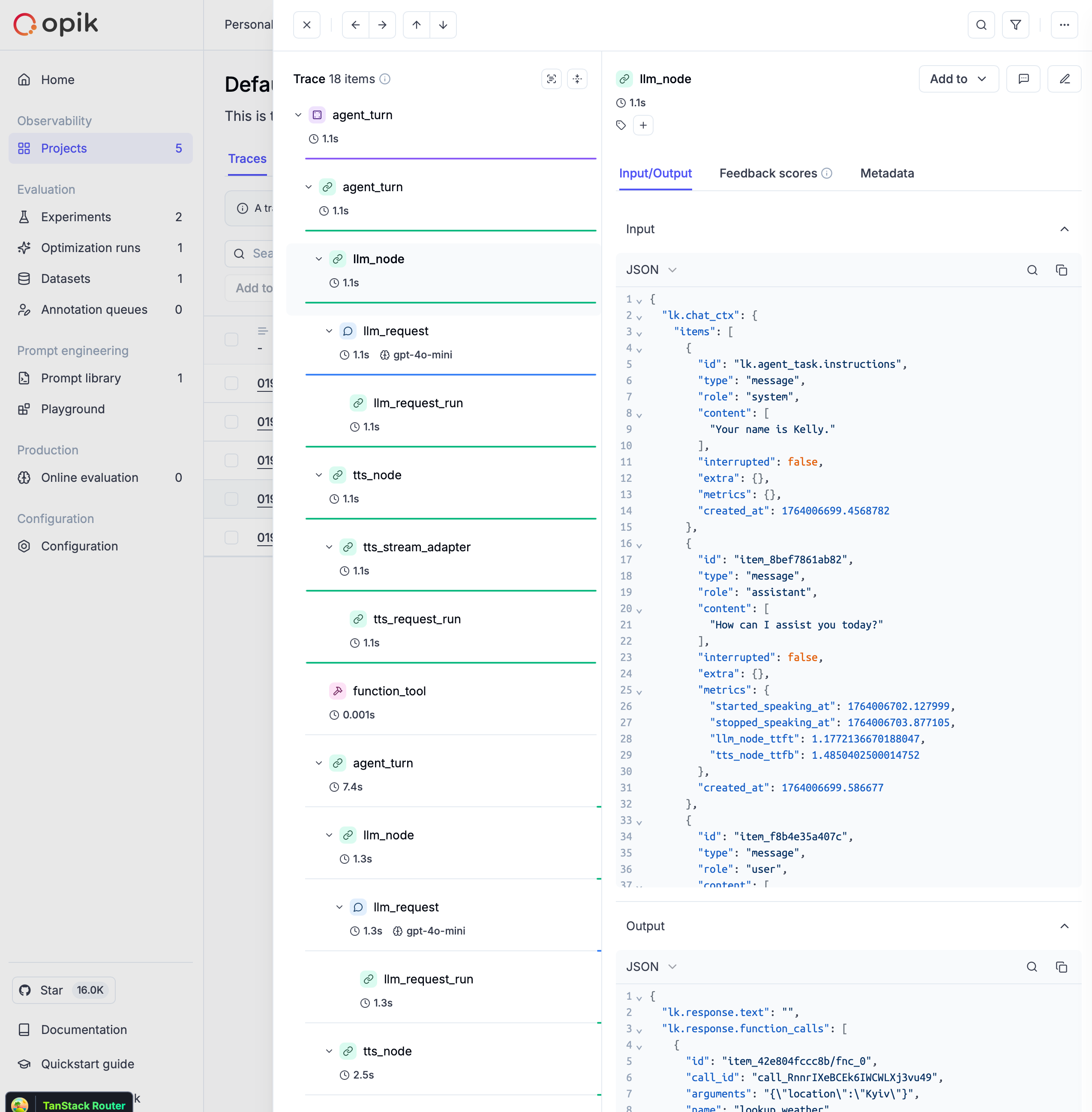
LiveKit Agents tracing

What gets traced

With this setup, your LiveKit agent will automatically trace:

  • Session events: Session start and end with metadata
  • Agent turns: Complete conversation turns with timing
  • LLM operations: Model calls, prompts, responses, and token usage
  • Function tools: Tool executions with inputs and outputs
  • TTS operations: Text-to-speech conversions with audio metadata
  • STT operations: Speech-to-text transcriptions
  • End-of-turn detection: Conversation flow events

Further improvements

If you have any questions or suggestions for improving the LiveKit Agents integration, please open an issue on our GitHub repository.