Re-running an existing experiment

Guides you through the process of updating an existing experiment

You can update existing experiments in several ways:

  1. Update experiment name and configuration - Change the experiment name or update its configuration metadata
  2. Update experiment scores - Add new scores or re-compute existing scores for experiment items

Update Experiment Name and Configuration

You can update an experiment’s name and configuration from both the Opik UI and the SDKs.

From the Opik UI

To update an experiment from the UI:

  1. Navigate to the Experiments page
  2. Find the experiment you want to update
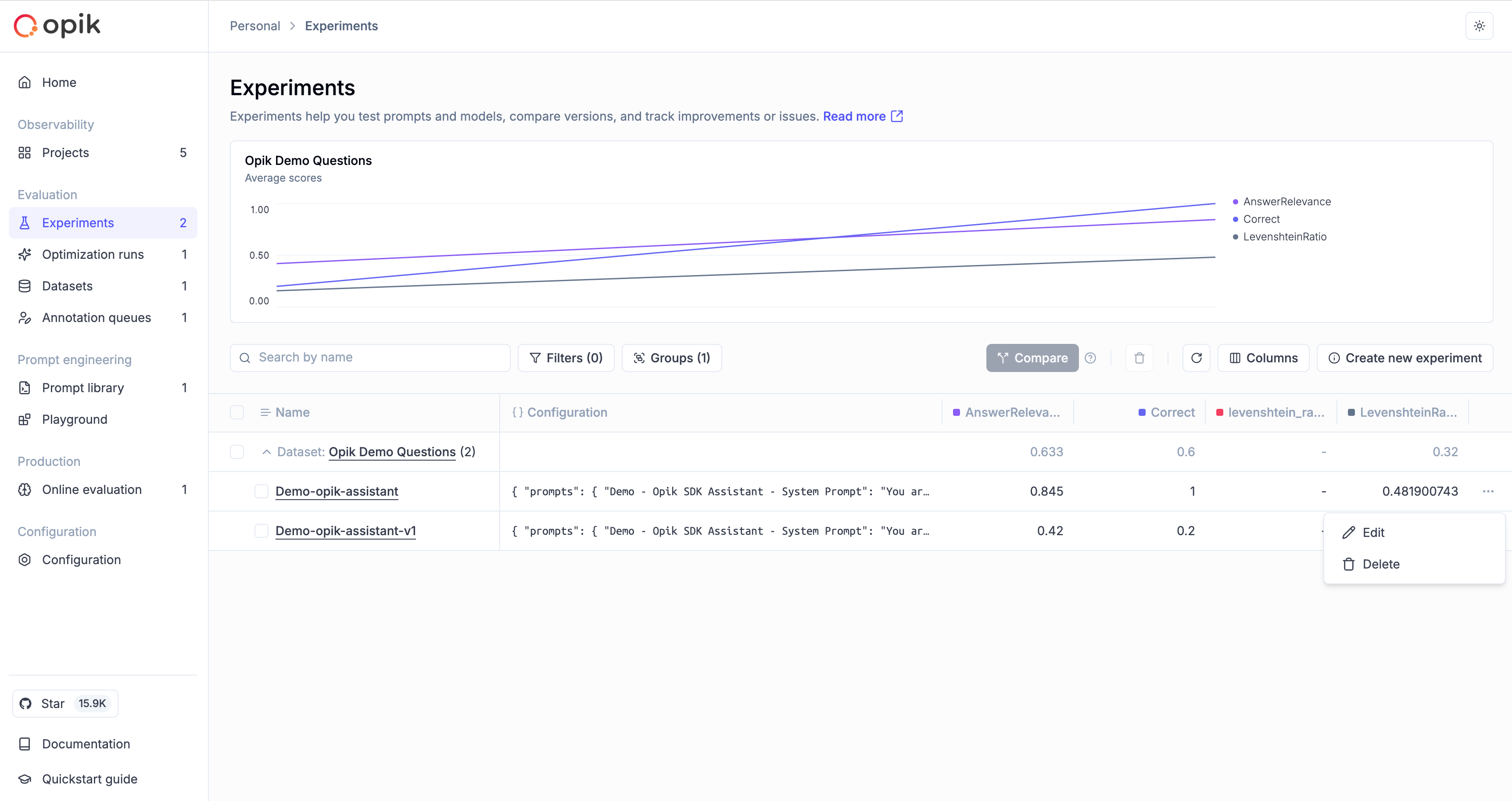
  3. Click the … menu button on the experiment row
  4. Select Edit from the dropdown menu
  1. Update the experiment name and/or configuration (JSON format)
  2. Click Update Experiment to save your changes
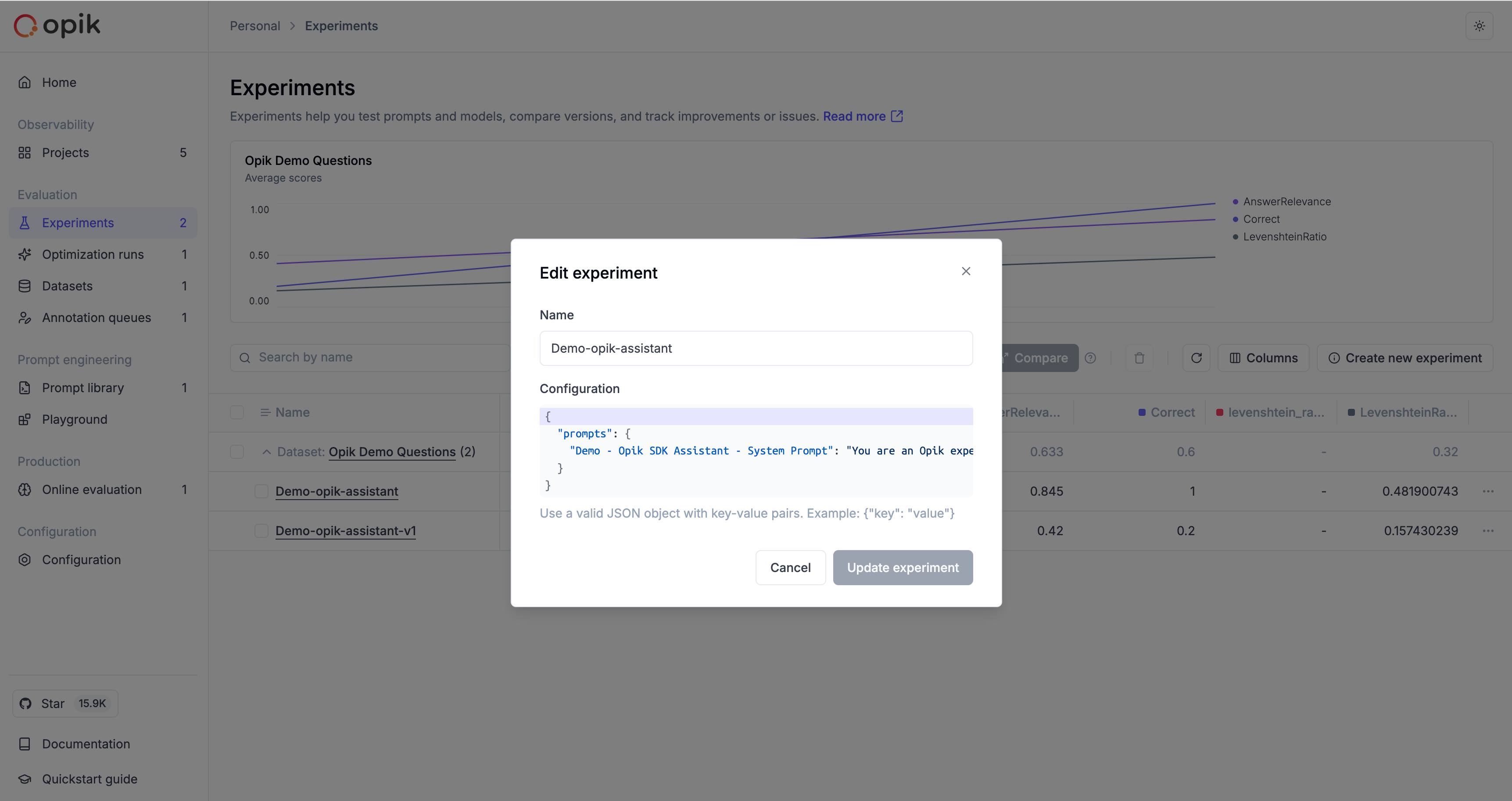
The configuration is stored as JSON and is useful for tracking parameters like model names, temperatures, prompt templates, or any other metadata relevant to your experiment.

From the Python SDK

Use the update_experiment method to update an experiment’s name and configuration:

1import opik
2
3client = opik.Opik()
4
5# Update experiment name
6client.update_experiment(
7 id="experiment-id",
8 name="Updated Experiment Name"
9)
10
11# Update experiment configuration
12client.update_experiment(
13 id="experiment-id",
14 experiment_config={
15 "model": "gpt-4",
16 "temperature": 0.7,
17 "prompt_template": "Answer the following question: {question}"
18 }
19)
20
21# Update both name and configuration
22client.update_experiment(
23 id="experiment-id",
24 name="Updated Experiment Name",
25 experiment_config={
26 "model": "gpt-4",
27 "temperature": 0.7
28 }
29)

From the TypeScript SDK

Use the updateExperiment method to update an experiment’s name and configuration:

1import { Opik } from "opik";
2
3const opik = new Opik();
4
5// Update experiment name
6await opik.updateExperiment("experiment-id", {
7 name: "Updated Experiment Name"
8});
9
10// Update experiment configuration
11await opik.updateExperiment("experiment-id", {
12 experimentConfig: {
13 model: "gpt-4",
14 temperature: 0.7,
15 promptTemplate: "Answer the following question: {question}"
16 }
17});
18
19// Update both name and configuration
20await opik.updateExperiment("experiment-id", {
21 name: "Updated Experiment Name",
22 experimentConfig: {
23 model: "gpt-4",
24 temperature: 0.7
25 }
26});

Update Experiment Scores

Sometimes you may want to update an existing experiment with new scores, or update existing scores for an experiment. You can do this using the evaluate_experiment function.

This function will re-run the scoring metrics on the existing experiment items and update the scores:

1from opik.evaluation import evaluate_experiment
2from opik.evaluation.metrics import Hallucination
3
4hallucination_metric = Hallucination()
5
6# Replace "my-experiment" with the name of your experiment which can be found in the Opik UI
7evaluate_experiment(experiment_name="my-experiment", scoring_metrics=[hallucination_metric])

The evaluate_experiment function can be used to update existing scores for an experiment. If you use a scoring metric with the same name as an existing score, the scores will be updated with the new values.

You can also compute experiment-level aggregate metrics when updating experiments using the experiment_scoring_functions parameter. Learn more about experiment-level metrics.

Example

Create an experiment

Suppose you are building a chatbot and want to compute the hallucination scores for a set of example conversations. For this you would create a first experiment with the evaluate function:

1from opik import Opik, track
2from opik.evaluation import evaluate
3from opik.evaluation.metrics import Hallucination
4from opik.integrations.openai import track_openai
5import openai
6
7# Define the task to evaluate
8openai_client = track_openai(openai.OpenAI())
9
10MODEL = "gpt-3.5-turbo"
11
12@track
13def your_llm_application(input: str) -> str:
14 response = openai_client.chat.completions.create(
15 model=MODEL,
16 messages=[{"role": "user", "content": input}],
17 )
18
19 return response.choices[0].message.content
20
21# Define the evaluation task
22def evaluation_task(x):
23 return {
24 "output": your_llm_application(x['input'])
25 }
26
27# Create a simple dataset
28client = Opik()
29dataset = client.get_or_create_dataset(name="Existing experiment dataset")
30dataset.insert([
31 {"input": "What is the capital of France?"},
32 {"input": "What is the capital of Germany?"},
33])
34
35# Define the metrics
36hallucination_metric = Hallucination()
37
38
39evaluation = evaluate(
40 experiment_name="Existing experiment example",
41 dataset=dataset,
42 task=evaluation_task,
43 scoring_metrics=[hallucination_metric],
44 experiment_config={
45 "model": MODEL
46 }
47)
48
49experiment_name = evaluation.experiment_name
50print(f"Experiment name: {experiment_name}")
Learn more about the evaluate function in our LLM evaluation guide.

Update the experiment

Once the first experiment is created, you realise that you also want to compute a moderation score for each example. You could re-run the experiment with new scoring metrics but this means re-running the output. Instead, you can simply update the experiment with the new scoring metrics:

1from opik.evaluation import evaluate_experiment
2from opik.evaluation.metrics import Moderation
3
4moderation_metric = Moderation()
5
6evaluate_experiment(experiment_name="already_existing_experiment", scoring_metrics=[moderation_metric])