
For AI agents: a documentation index is available at the root level at /llms.txt and /llms-full.txt. Append /llms.txt to any URL for a page-level index, or .md for the markdown version of any page.
Copy to LLMGithubGo to App
DocumentationIntegrationsBuilding Self-Improving AgentsSelf-hosting OpikSDK & API reference
  • Getting Started
    • Home
    • Quickstart
    • Ollie Agent
    • FAQ
    • Changelog
  • Observability
    • Overview
    • Getting started
    • Concepts
    • Debugging agents with Ollie and Opik Connect
      • Log traces
      • Log conversations
      • Log media & attachments
      • Log Agent Graphs
      • Log distributed traces
      • Log user feedback
      • Cost tracking
      • Export data
      • SDK configuration
      • Offline fallback and message replay
  • Development
    • Overview
    • Agent playground
    • Prompt playground
  • Evaluation
    • Overview
    • Getting started
    • Concepts
  • Production
  • Administration
    • Overview
    • Roles and Permissions
  • Contributing
    • Contribution Overview
LogoLogo
Copy to LLMGithubGo to App
On this page
  • Monitoring Costs in the Dashboard
  • Span-Level Costs
  • Trace-Level Costs
  • Project-Level Analytics
  • Retrieving Costs Programmatically
  • Retrieving Span Costs
  • Retrieving Trace Costs
  • Manually setting the provider and model name
  • Manually Setting Span Costs
  • Setting Costs During Span Creation
  • Updating Costs After Span Completion
  • Supported Models, Providers, and Integrations
  • Supported Providers
ObservabilityAdvanced

Cost tracking

Was this page helpful?
Previous

Export data

Next
Built with

Opik has been designed to track and monitor costs for your LLM applications by measuring token usage across all traces. Using the Opik dashboard, you can analyze spending patterns and quickly identify cost anomalies. All costs across Opik are estimated and displayed in USD.

Monitoring Costs in the Dashboard

You can use the Opik dashboard to review costs at three levels: spans, traces, and projects. Each level provides different insights into your application’s cost structure.

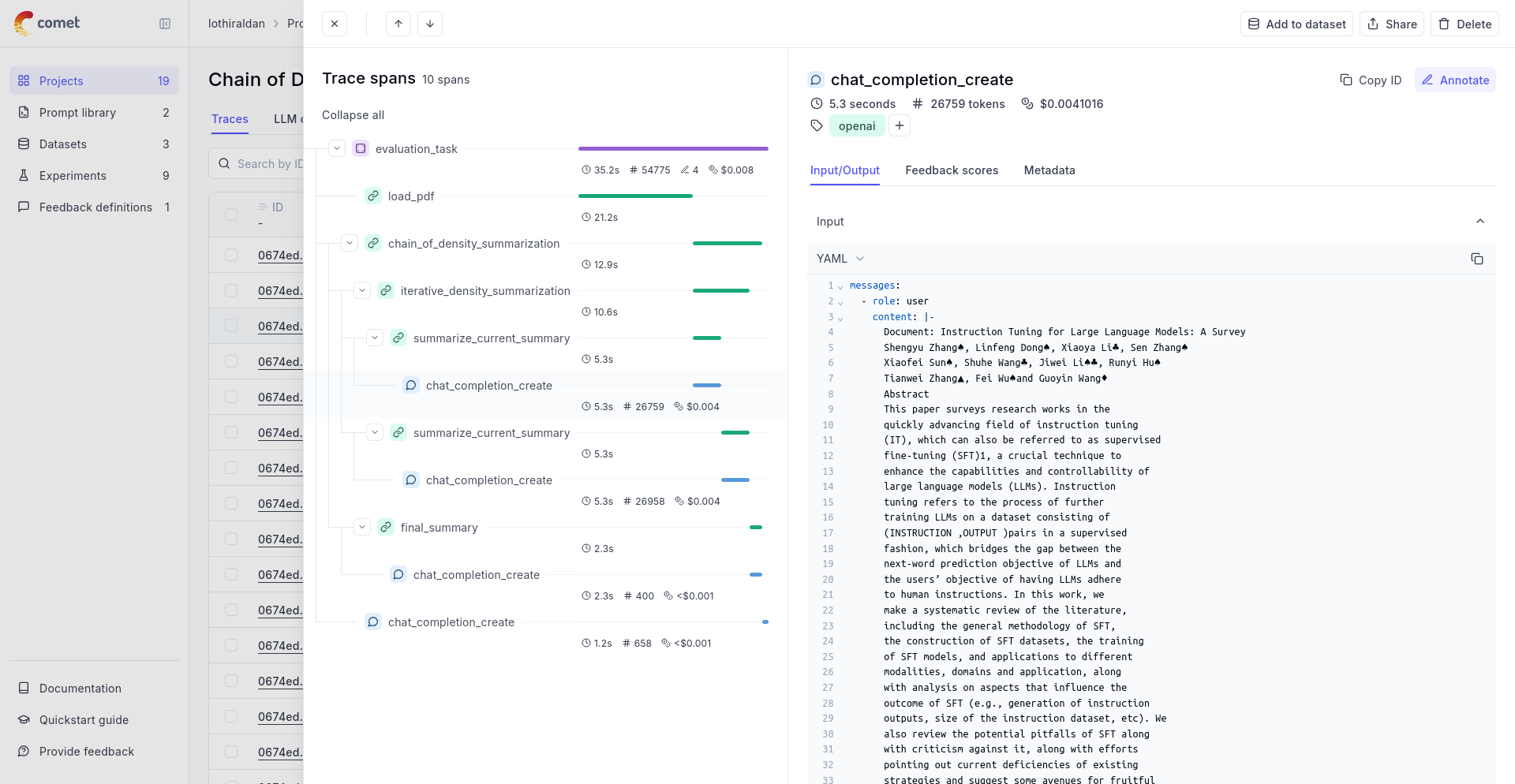
Span-Level Costs

Individual spans show the computed costs (in USD) for each LLM spans of your traces:
Trace-Level Costs

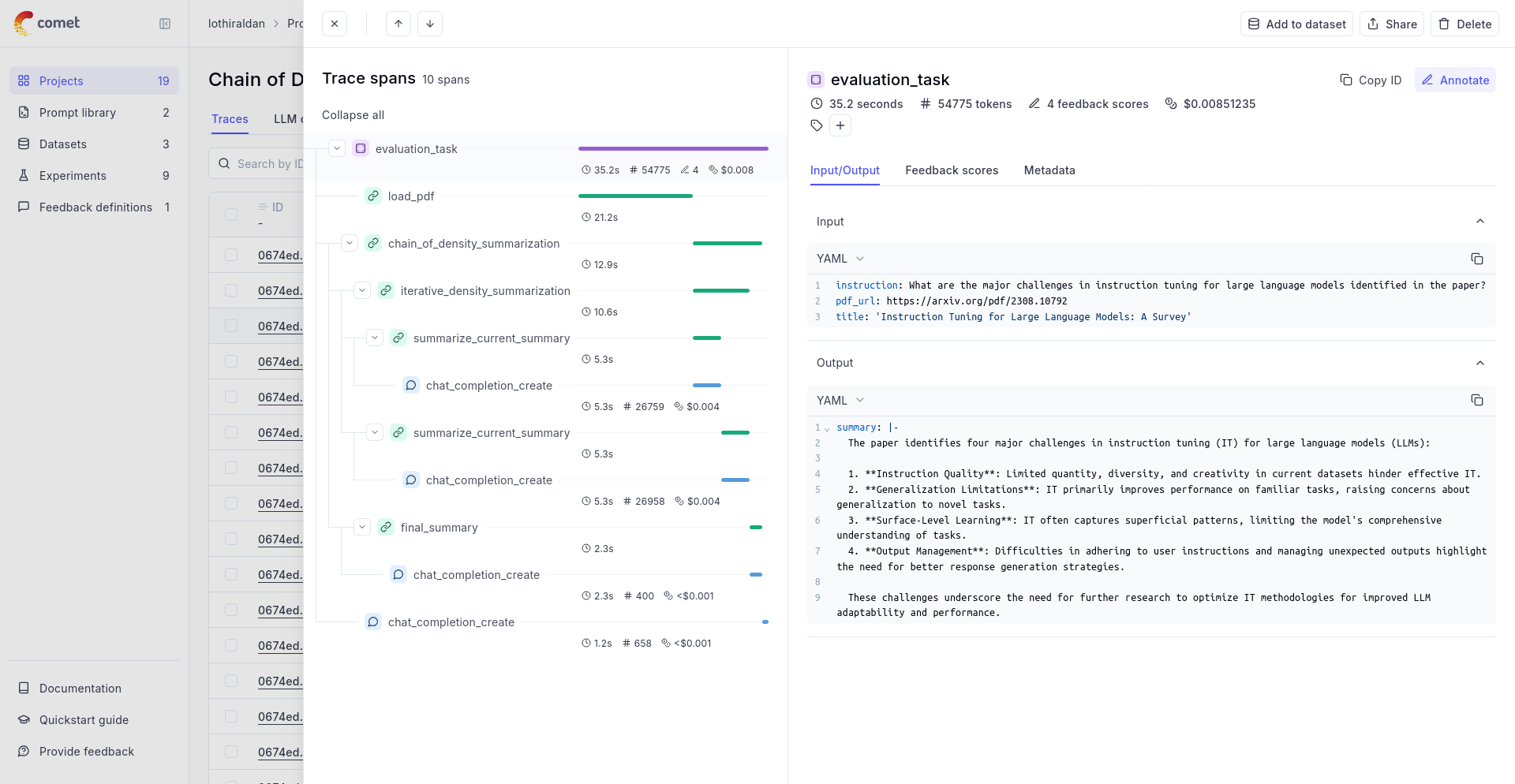
If you are using one of Opik’s integrations, we automatically aggregates costs from all spans within a trace to compute total trace costs:
Project-Level Analytics

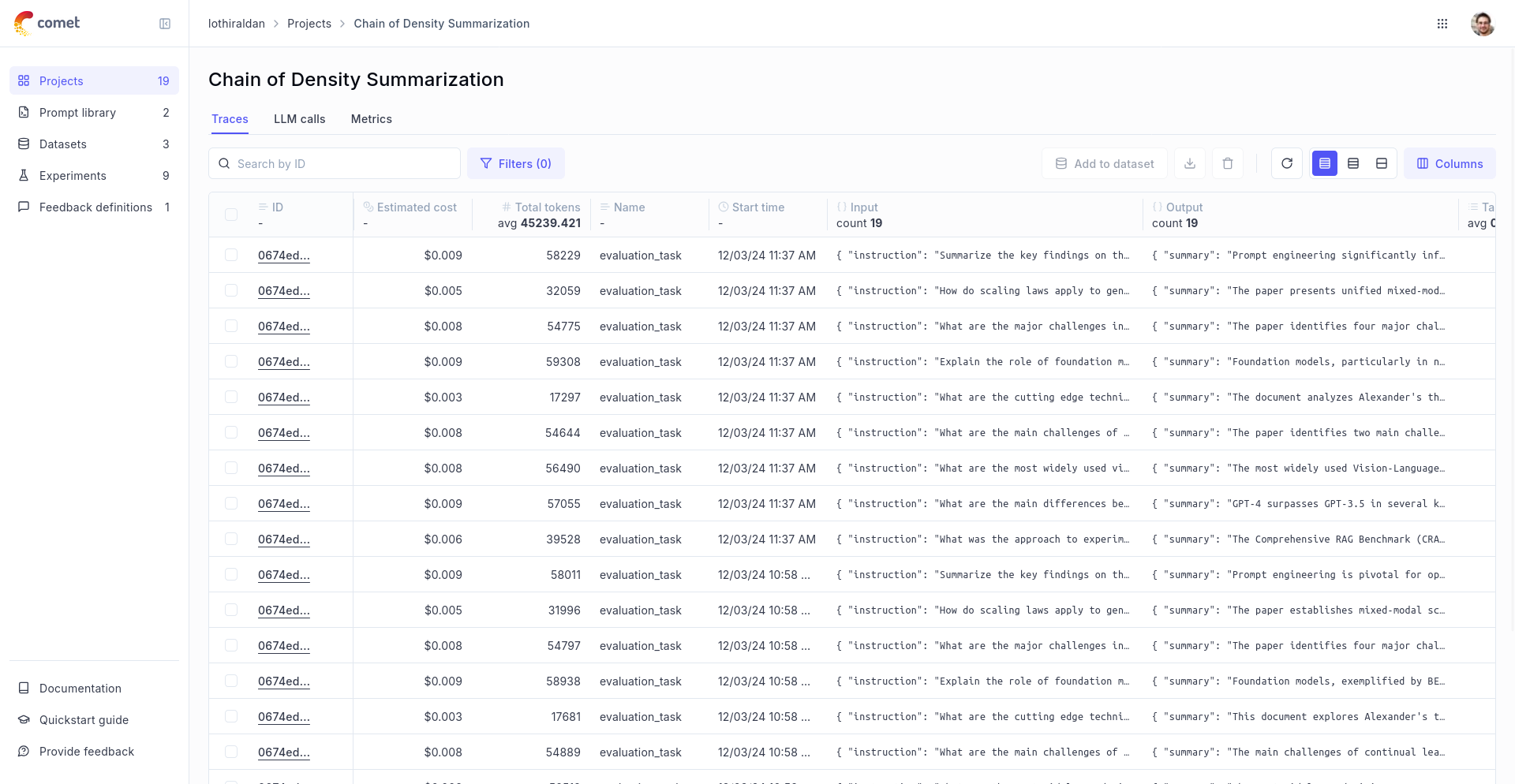
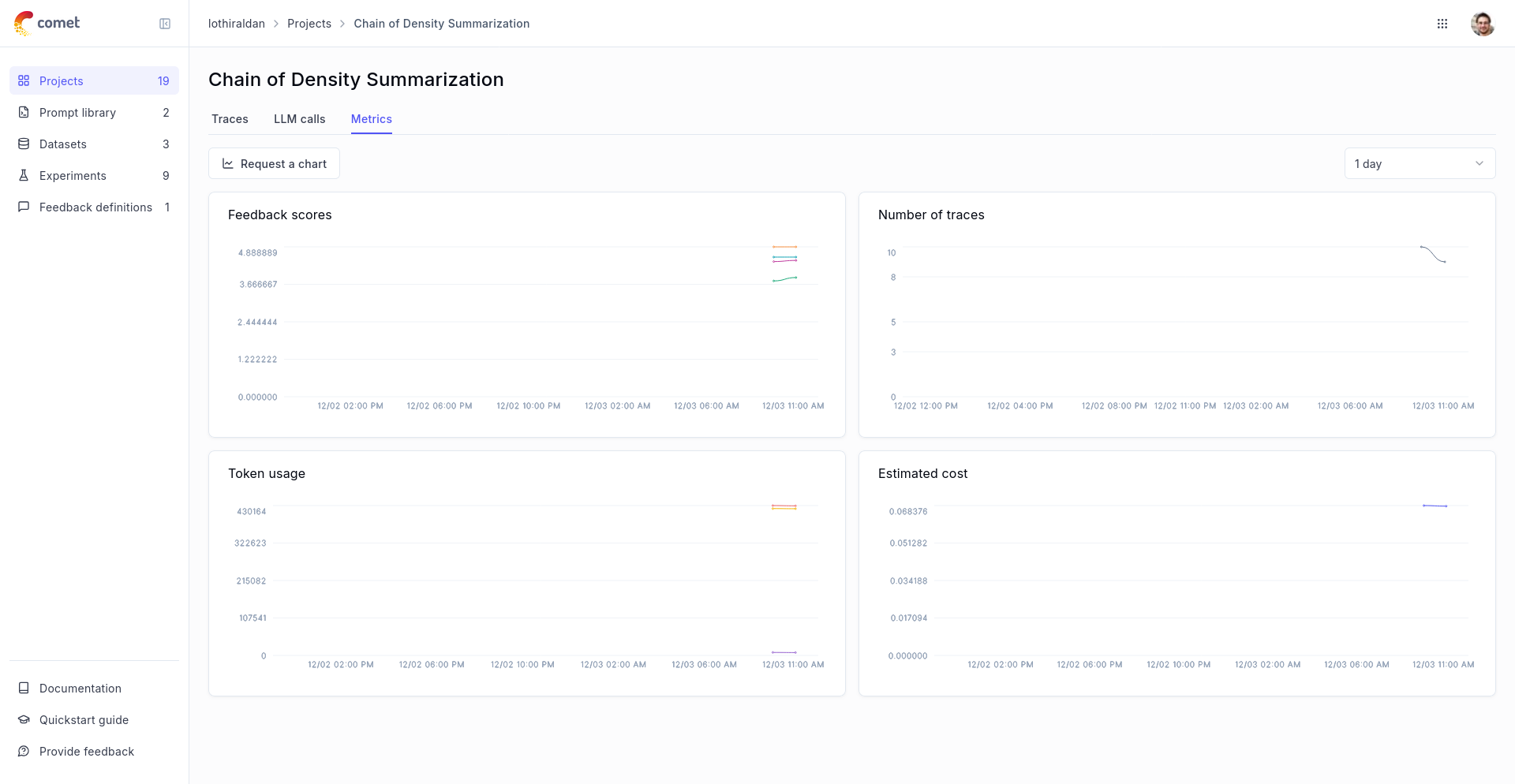
Track your overall project costs in:

  1. The main project view, through the Estimated Cost column:
  2. The project Metrics tab, which shows cost trends over time:
Retrieving Costs Programmatically

You can retrieve the estimated cost programmatically for both spans and traces. Note that the cost will be None if the span or trace used an unsupported model. See Exporting Traces and Spans for more ways of exporting traces and spans.

Retrieving Span Costs

1import opik
2
3client = opik.Opik()
4
5span = client.get_span_content("<SPAN_ID>")
6# Returns estimated cost in USD, or None for unsupported models
7print(span.total_estimated_cost)

Retrieving Trace Costs

1import opik
2
3client = opik.Opik()
4
5trace = client.get_trace_content("<TRACE_ID>")
6# Returns estimated cost in USD, or None for unsupported models
7print(trace.total_estimated_cost)

Manually setting the provider and model name

If you are not using one of Opik’s integration, Opik can still compute the cost. For you will need to ensure the span type is llm and you will need to pass:

  1. provider: The name of the provider, typically openai, anthropic or google_ai for example (the most recent providers list can be found in opik.LLMProvider enum object)
  2. model: The name of the model
  3. usage: The input, output and total tokens for this LLM call.

You can then update your code to log traces and spans:

Function decorator
Low level Python SDK

If you are using function decorators, you will need to use the update_current_span method:

1from opik import track, opik_context
2
3@track(type="llm") # Note - Specifying the type is this is important
4def llm_call(input):
5 opik_context.update_current_span(
6 provider="openai",
7 model="gpt-3.5-turbo",
8 usage={
9 "prompt_tokens": 4,
10 "completion_tokens": 6,
11 "total_tokens": 10
12 }
13 )
14 return "Hello, world!"
15
16llm_call("Hello world!")

Manually Setting Span Costs

When you need to set a custom cost or use an unsupported model, you can manually set the cost of a span. There are two approaches depending on your use case:

Setting Costs During Span Creation

If you’re manually creating spans, you can set the cost directly when creating the span:

1from opik import track, opik_context
2
3@track
4def llm_call(input):
5 opik_context.update_current_span(
6 total_cost=0.05,
7 )
8 return "Hello, world!"
9
10llm_call("Hello world!")

Updating Costs After Span Completion

With Opik integrations, spans are automatically created and closed, preventing updates while they’re open. However, you can update the cost afterward using the update_span method. This works well for implementing periodic cost estimation jobs:

1from opik import Opik
2from opik.rest_api.types.span_public import SpanPublic
3
4# Define your own cost mapping for different models
5TOKEN_COST = {
6 ("openai.chat", "gpt-4o-2024-08-06"): {
7 "input_tokens": 2.5e-06,
8 "output_tokens": 1e-05,
9 }
10}
11
12# This part would be custom for your use-case and is only here for example
13def compute_cost_for_span(span: SpanPublic):
14 provider = span.provider or span.input.get("ai.model.provider")
15 model = span.model or span.output.get("gen_ai.response.model")
16 usage = span.usage
17
18 if (provider, model) in TOKEN_COST:
19 model_cost = TOKEN_COST[(provider, model)]
20 cost = (
21 usage["input_tokens"] * model_cost["input_tokens"]
22 + usage["output_tokens"] * model_cost["output_tokens"]
23 )
24 return cost
25 return None
26
27def update_span_costs(project_name, trace_id=None):
28 opik_client = Opik()
29
30 # Find LLM spans that don't have estimated costs
31 spans = opik_client.search_spans(
32 project_name=project_name,
33 trace_id=trace_id,
34 filter_string='type="llm" and total_estimated_cost=0',
35 )
36
37 for span in spans:
38 cost = compute_cost_for_span(span)
39
40 if cost:
41 print(f"Updating span {span.id} of trace {span.trace_id} with cost: {cost}")
42 opik_client.update_span(
43 trace_id=span.trace_id,
44 parent_span_id=span.parent_span_id,
45 project_name=project_name,
46 id=span.id,
47 total_cost=cost,
48 )
49
50# Example usage in a CRON job
51if __name__ == "__main__":
52 update_span_costs("your-project-name")

This approach is particularly useful when:

  • Using models or providers not yet supported by automatic cost tracking
  • You have a custom pricing agreement with your provider
  • You want to track additional costs beyond model usage
  • You need to implement cost estimation as a background process
  • Working with integrations where spans are automatically managed

You can run the cost update function as a CRON job to automatically update costs for spans created without cost information. This is especially valuable in production environments where accurate cost data for all spans is essential.

Supported Models, Providers, and Integrations

Opik currently calculates costs automatically for all LLM calls in the following Python SDK integrations:

  • Google ADK Integration
  • AWS Bedrock Integration
  • LangChain Integration
  • OpenAI Integration
  • LiteLLM Integration
  • Anthropic Integration
  • CrewAI Integration
  • Google AI Integration
  • Haystack Integration
  • LlamaIndex Integration

Supported Providers

Cost tracking is supported for the following LLM providers (as defined in opik.LLMProvider enum):

  • OpenAI (openai) - Models hosted by OpenAI (https://platform.openai.com)
  • Anthropic (anthropic) - Models hosted by Anthropic (https://www.anthropic.com)
  • Anthropic on Vertex AI (anthropic_vertexai) - Anthropic models hosted by Google Vertex AI
  • Google AI (google_ai) - Gemini models hosted in Google AI Studio (https://ai.google.dev/aistudio)
  • Google Vertex AI (google_vertexai) - Gemini models hosted in Google Vertex AI (https://cloud.google.com/vertex-ai)
  • AWS Bedrock (bedrock) - Models hosted by AWS Bedrock (https://aws.amazon.com/bedrock)
  • Groq (groq) - Models hosted by Groq (https://groq.com)

You can find a complete list of supported models for these providers in the model_prices_and_context_window.json file.

We are actively expanding our cost tracking support. Need support for additional models or providers? Please open a feature request to help us prioritize development.