

Export by SDK, REST, and UI
When working with Opik, it is important to be able to export traces, spans, and threads so that you can use them to fine-tune your models or run deeper analysis.
You can export the data you have logged to the Opik platform using:
- Using the Opik SDK: You can use the Python SDK methods (
Opik.search_traces,Opik.search_spans, andOpik.search_threads) or the TypeScript SDK method (client.searchTraces()) to export traces, spans, and threads. - Using the Opik REST API: You can use the
/tracesand/spansendpoints to export traces and spans. - Using the UI: Once you have selected the traces or spans you want to export, you can click on the
Export CSVbutton in theActionsdropdown.
The recommended way to export data is to use the SDK methods in the Opik
Python SDK
(Opik.search_traces,
Opik.search_spans,
and
Opik.search_threads)
or TypeScript SDK (client.searchTraces()).
Using the Opik SDK
Exporting traces
The Python SDK Opik.search_traces method and TypeScript SDK client.searchTraces() method allow you to both export all the traces in a project or search for specific traces and export them.
Exporting all traces
To export all traces, you will need to specify a max_results / maxResults value that is higher than the total number of traces in your project:
Python
TypeScript
Search for specific traces
You can use the filter_string (Python) / filterString (TypeScript) parameter to search for specific traces:
Python
TypeScript
Filtering with Opik Query Language (OQL)
All search methods (search_traces, search_spans, and search_threads) accept a filter_string (Python) / filterString (TypeScript) parameter that uses Opik Query Language (OQL):
Rules:
- String values must be wrapped in double quotes
- Multiple conditions can be combined with
AND(OR is not supported) - DateTime fields require ISO 8601 format (e.g.,
"2024-01-01T00:00:00Z") - Use dot notation for nested fields:
metadata.model,feedback_scores.accuracy
Each entity type supports a different set of filter columns. The tables below list the available columns for each.
Trace columns
Span columns
Thread columns
Python
TypeScript
If your feedback_scores key contains spaces, you will need to wrap
it in double quotes:
'feedback_scores."My Score" > 0'
If the feedback_scores key contains both spaces and double quotes, you will need to escape the double quotes as "":
'feedback_scores."Score ""with"" Quotes" > 0'
or by using different quotes, surrounding in triple-quotes, like this:
'''feedback_scores.'Accuracy "Happy Index"' < 0.8'''
Exporting spans
You can export spans using the Opik.search_spans method. This method allows you to search for spans based on trace_id or based on a filter string.
Exporting spans based on trace_id
To export all the spans associated with a specific trace, you can use the trace_id parameter:
Search for specific spans
You can use the filter_string parameter to search for specific spans:
Exporting threads
You can export threads using the Opik.search_threads method. This method allows you to search for conversational threads in a project.
Exporting all threads
To export all threads, you will need to specify a max_results value that is higher than the total number of threads in your project:
Search for specific threads
You can use the filter_string parameter to search for specific threads:
Using the Opik REST API
To export traces using the Opik REST API, you can use the /traces endpoint and the /spans endpoint. These endpoints are paginated so you will need to make multiple requests to retrieve all the traces or spans you want.
To search for specific traces or spans, you can use the filter parameter. While this is a string parameter, it does not follow the same format as the filter_string parameter in the Opik SDK. Instead it is a list of json objects with the following format:
The filter parameter was designed to be used with the Opik UI and has
therefore limited flexibility. If you need more flexibility, please raise an
issue on GitHub so we can help.
Using the UI
To export traces as a CSV file from the UI, you can simply select the traces or spans you wish to export and click on Export CSV in the Actions dropdown:
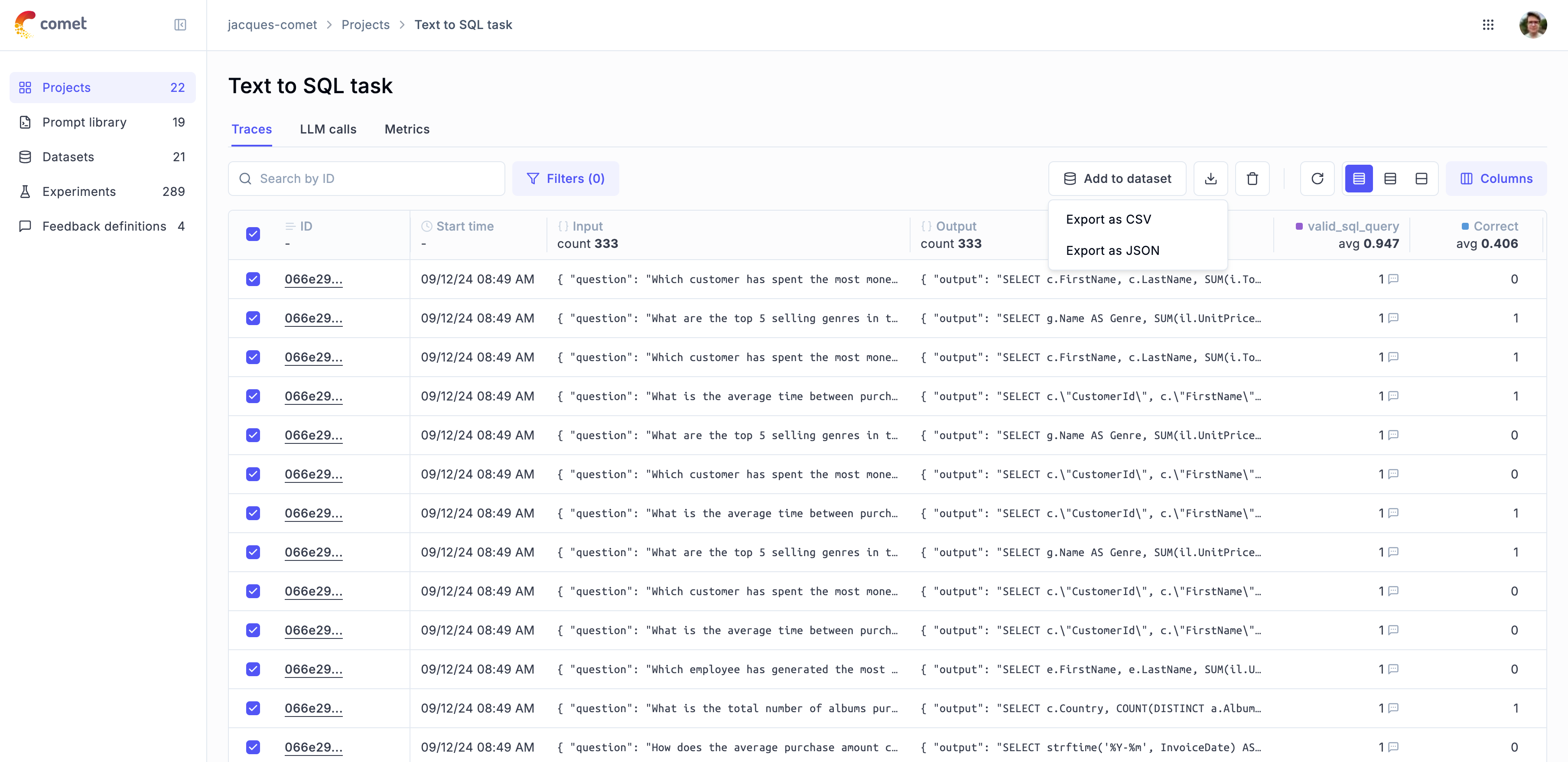
The UI only allows you to export up to 100 traces or spans at a time as it is linked to the page size of the traces table. If you need to export more traces or spans, we recommend using the Opik SDK.