

Log media & attachments
Log media & attachments
Opik supports multimodal traces allowing you to track not just the text input and output of your LLM, but also images, videos and audio and any other media.
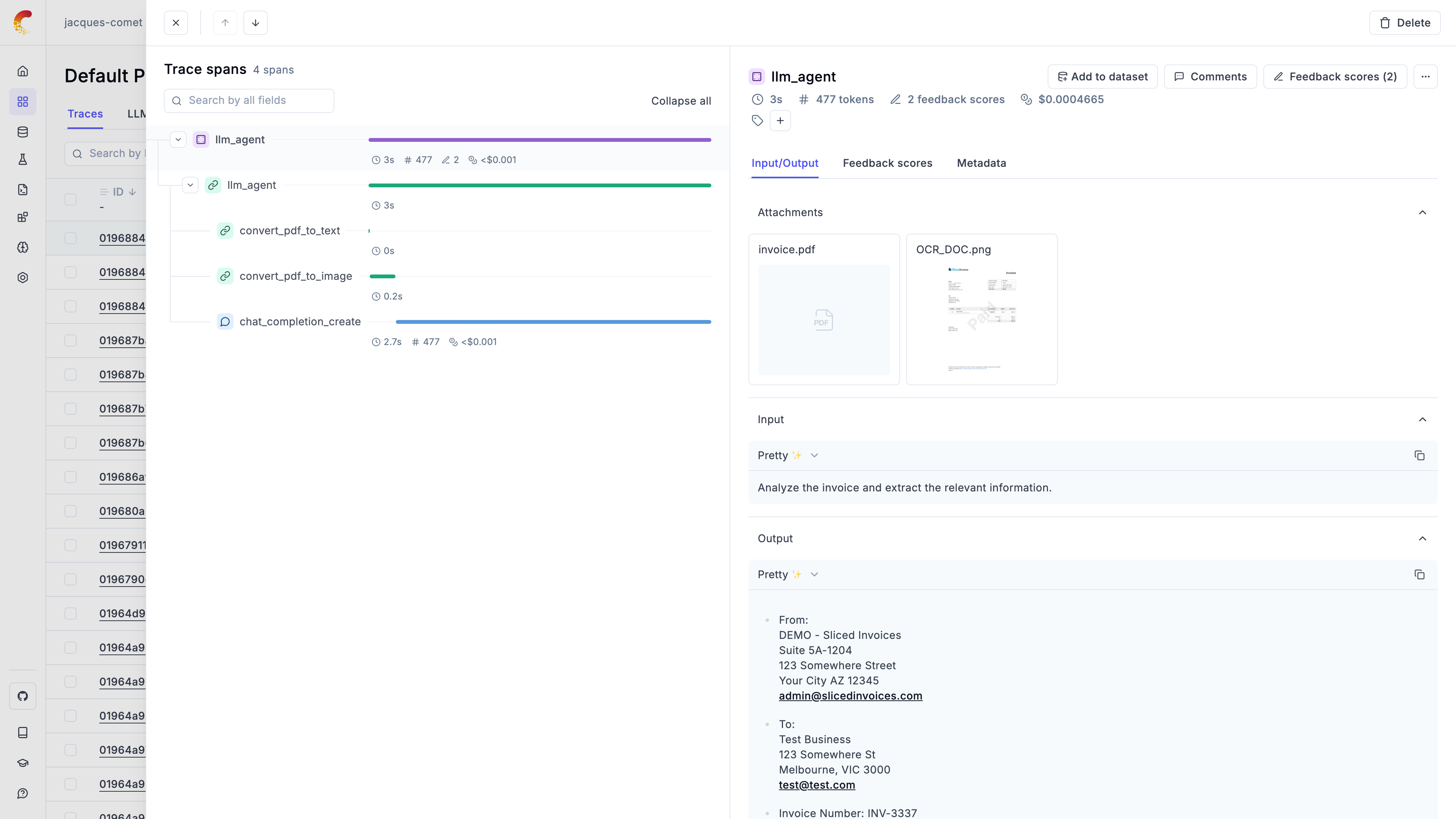
Logging Attachments
In the Python SDK, you can use the Attachment type to add files to your traces.
Attachements can be images, videos, audio files or any other file that you might
want to log to Opik.
Each attachment is made up of the following fields:
data: The path to the file, raw bytes, or a base64 encoded string of the filefile_name: Optional name for the attachment (required when using raw bytes without a file path)content_type: The content type of the file formatted as a MIME type
These attachements can then be logged to your traces and spans using The
opik_context.update_current_span and opik_context.update_current_trace
methods:
Using file paths
The most common way to log attachments is by providing a file path:
Using raw bytes (file-like data)
You can also pass raw bytes directly to an attachment. This is useful when you have file content in memory (e.g., from an API response, generated content, or streaming data) and don’t want to write it to disk first:
When using raw bytes, Opik automatically creates a temporary file for upload
and cleans it up after the attachment is uploaded. If you don’t specify a
content_type, Opik will try to infer it from the file_name or default
to application/octet-stream.
Logging images from HTTP responses
A common use case is logging images fetched from external APIs or URLs:
Logging generated content
You can also log dynamically generated content like charts or reports:
Using the Opik client directly
You can also log attachments using the Opik client directly with both file paths and raw bytes:
The attachements will be uploaded to the Opik platform and can be both previewed and dowloaded from the UI.
In order to preview the attachements in the UI, you will need to supply a supported content type for the attachment. We support the following content types:
- Image:
image/jpeg,image/png,image/gifandimage/svg+xml - Video:
video/mp4andvideo/webm - Audio:
audio/wav,audio/vorbisandaudio/x-wav - Text:
text/plainandtext/markdown - PDF:
application/pdf - Other:
application/jsonandapplication/octet-stream
Managing Attachments Programmatically
You can also manage attachments programmatically using the AttachmentClient:
Previewing base64 encoded images and image URLs
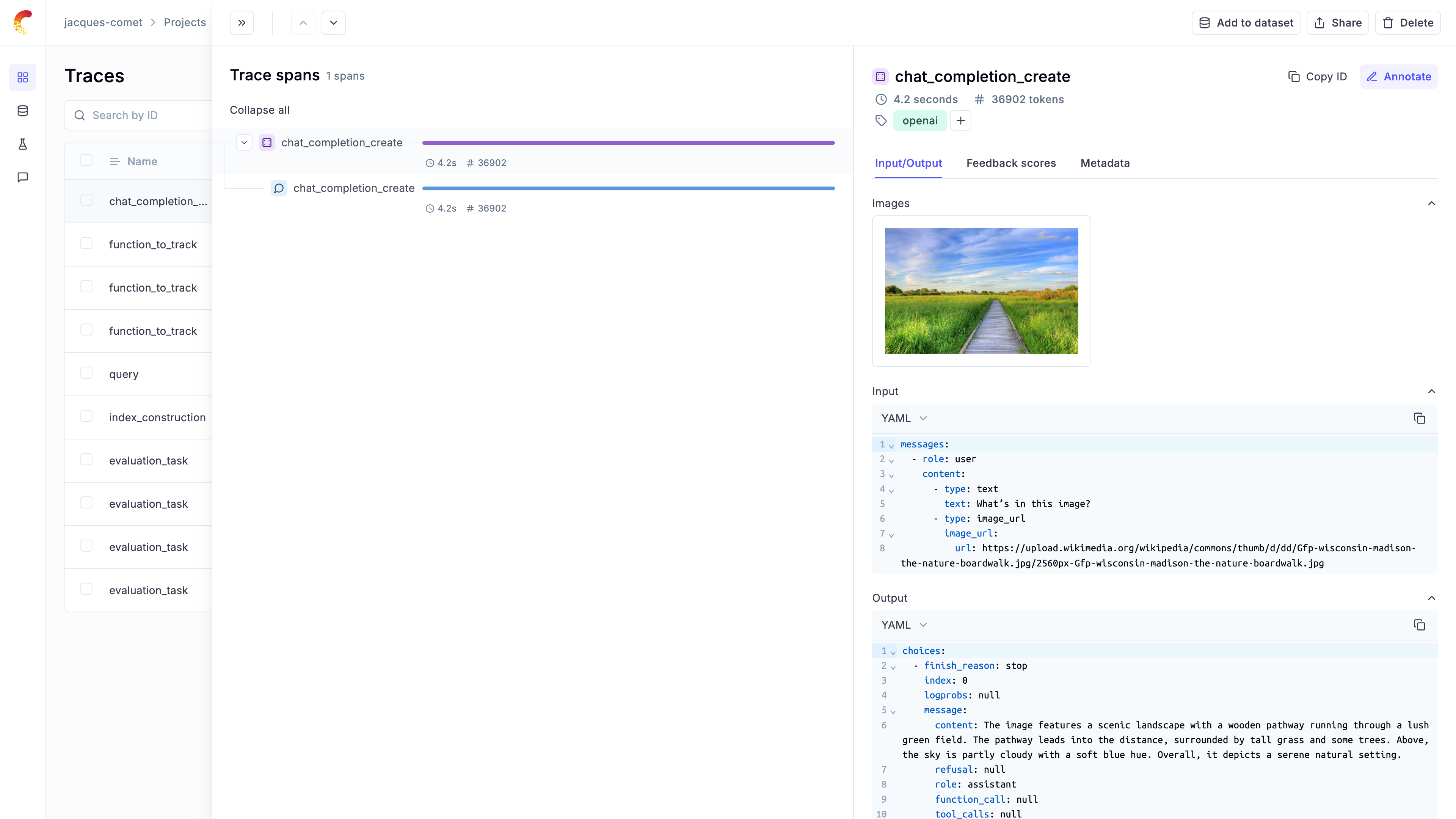
Opik automatically detects base64 encoded images and URLs logged to the platform, once an image is detected we will hide the string to make the content more readable and display the image in the UI. This is supported in the tracing view, datasets view and experiment view.
For example if you are using the OpenAI SDK, if you pass an image to the model as a URL, Opik will automatically detect it and display the image in the UI:
Embedded Attachments
When you embed base64-encoded media directly in your trace/span input, output, or metadata fields, Opik automatically optimizes storage and retrieval for performance.
How It Works
For base64-encoded content larger than 250KB, Opik automatically extracts and stores it separately. This happens transparently - you don’t need to change your code.
When you retrieve your traces or spans later, the attachments are automatically included by default. For faster queries when you don’t need the attachment data, use the strip_attachments=true parameter.
Size Limits
Opik Cloud supports embedded attachments up to 100MB per field. This limit applies to individual string values in your input, output, or metadata fields.
Base64 encoding increases file size by about 33%. For example, a 75MB video becomes ~100MB when base64-encoded.
If you need to work with larger files:
-
Use the Attachment API - Upload files separately using
AttachmentClient(recommended for files >50MB). See Managing Attachments Programmatically -
Contact us - Get in touch if you need higher limits
-
Self-host Opik - Configure your own limits. See the Self-hosting Guide
Best Practices
- Embed smaller files directly - Opik handles them efficiently
- For files >50MB, use the Attachment API for better performance
- Use
strip_attachments=truewhen querying if you don’t need the attachment data
Downloading attachments
You can download attachments in two ways:
- From the UI: Hover over the attachments and click on the download icon
- Programmatically: Use the
AttachmentClientas shown in the examples above
Let’s us know on Github if you would like to us to support additional image formats.