
For AI agents: a documentation index is available at the root level at /llms.txt and /llms-full.txt. Append /llms.txt to any URL for a page-level index, or .md for the markdown version of any page.
Copy to LLMGithubGo to App
DocumentationIntegrationsAgent OptimizationSelf-hosting OpikSDK & API referenceOpik University
  • Getting Started
    • Home
    • Quickstart
    • Quickstart notebook
    • Roadmap
    • FAQ
    • Changelog
  • Observability
    • Concepts
    • Log traces
    • Log conversations
    • Log user feedback
    • Log media & attachments
    • Cost tracking
    • Opik Assist
      • SDK configuration
      • Log Agent Graphs
      • Log distributed traces
      • Offline fallback and message replay
  • Evaluation
    • Overview
    • Concepts
    • Manage datasets
    • Evaluate single prompts
    • Evaluate your agent
    • Evaluate agent trajectories
    • Evaluate multimodal traces
    • Evaluate multi-turn agents
    • Manually logging experiments
    • Re-running an existing experiment
    • Annotation Queues
  • Prompt engineering
    • Prompt management
    • Prompt Playground
    • Prompt Generator and Improver
    • Opik's MCP server
  • Testing
    • Pytest integration
  • Production
    • Production monitoring
    • Online Evaluation rules
    • Gateway
    • Guardrails
    • Anonymizers
    • Alerts
    • Dashboards
  • Administration
    • Overview
    • Roles and Permissions
  • Contributing
    • Contribution Overview
LogoLogo
Copy to LLMGithubGo to App
On this page
  • LangGraph
  • Google Agent Development Kit (ADK)
  • Manual Tracking
  • Next steps
ObservabilityAdvanced

Log Agent Graphs

Was this page helpful?
Previous

Log distributed traces

Next
Built with

Agent Graphs are a great way to visualize the flow of an agent and simplifies it’s debugging.
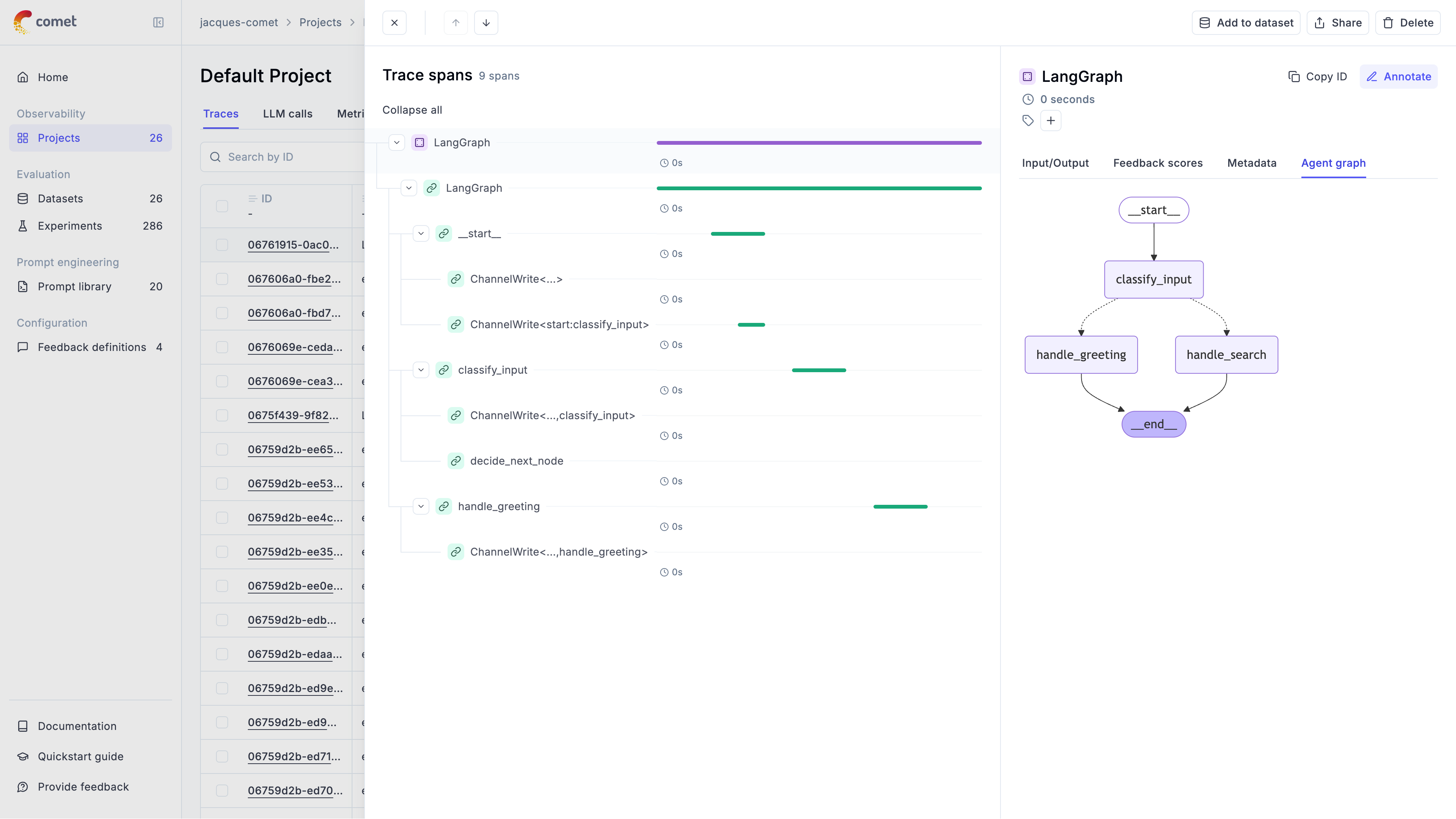
Opik supports logging agent graphs for the following frameworks:

  1. LangGraph
  2. Google Agent Development Kit (ADK)
  3. Manual Tracking

LangGraph

You can log the agent execution graph by specifying the graph parameter in the OpikTracer callback:

1from opik.integrations.langchain import OpikTracer
2
3opik_tracer = OpikTracer(graph=app.get_graph(xray=True))

Opik will log the agent graph definition in the Opik dashboard which you can access by clicking on Show Agent Graph in the trace sidebar.

Google Agent Development Kit (ADK)

Opik automatically generates visual representations of your agent workflows for Google ADK without requiring any additional configuration. Simply integrate Opik’s OpikTracer callback as shown in the ADK integration configuration guide, and your agent graphs will be automatically captured and visualized.

The graph automatically shows:

  • Agent hierarchy and relationships
  • Sequential execution flows
  • Parallel processing branches
  • Tool connections and dependencies
  • Loop structures and iterations

For example, a basic weather and time agent will display its execution flow with all agent steps, LLM calls, and tool invocations:
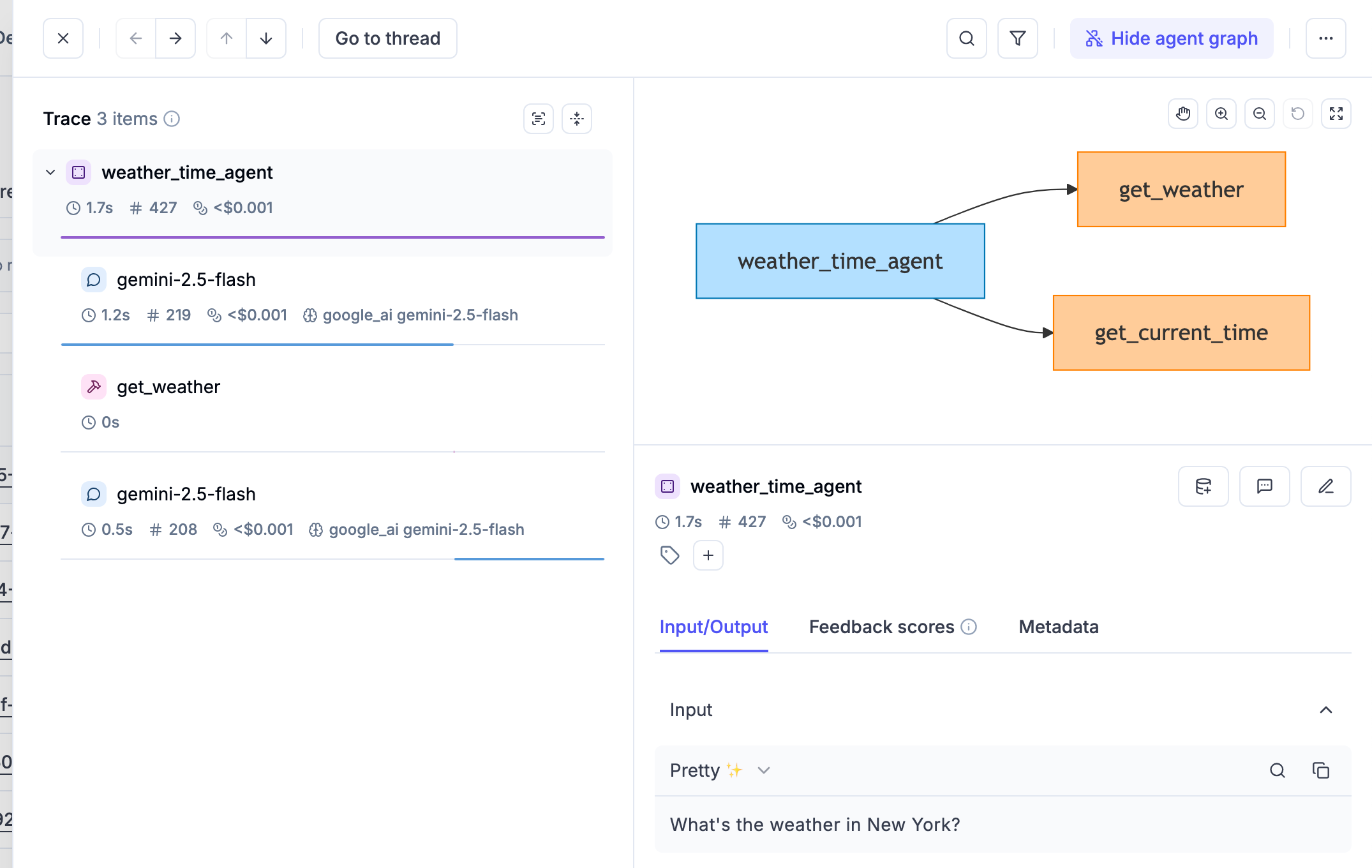
For more complex multi-agent architectures, the automatic graph visualization becomes even more valuable, providing clear visibility into nested agent hierarchies and complex execution patterns.

Manual Tracking

You can also log the agent graph definition manually by logging the agent graph definition as a mermaid graph definition in the metadata of the trace:

1import opik
2from opik import opik_context
3
4@opik.track
5def chat_agent(input: str):
6 # Update the current trace with the agent graph definition
7 opik_context.update_current_trace(
8 metadata={
9 "_opik_graph_definition": {
10 "format": "mermaid",
11 "data": "graph TD; U[User]-->A[Agent]; A-->L[LLM]; L-->A; A-->R[Answer];"
12 }
13 }
14 )
15 return "Hello, how can I help you today?"
16
17chat_agent("Hi there!")

Opik will log the agent graph definition in the Opik dashboard which you can access by clicking on Show Agent Graph in the trace sidebar.

Next steps

Why not check out:

  • Opik’s 50+ integrations
  • Logging traces
  • Evaluating agents