
For AI agents: a documentation index is available at the root level at /llms.txt and /llms-full.txt. Append /llms.txt to any URL for a page-level index, or .md for the markdown version of any page.
Copy to LLMGithubGo to App
DocumentationIntegrationsAgent OptimizationSelf-hosting OpikSDK & API referenceOpik University
  • Getting Started
    • Home
    • Quickstart
    • Quickstart notebook
    • Roadmap
    • FAQ
    • Changelog
  • Observability
    • Concepts
    • Log traces
    • Log conversations
    • Log user feedback
    • Log media & attachments
    • Cost tracking
    • Opik Assist
  • Evaluation
    • Overview
    • Concepts
    • Manage datasets
    • Evaluate single prompts
    • Evaluate your agent
    • Evaluate agent trajectories
    • Evaluate multimodal traces
    • Evaluate multi-turn agents
    • Manually logging experiments
    • Re-running an existing experiment
    • Annotation Queues
  • Prompt engineering
    • Prompt management
    • Prompt Playground
    • Prompt Generator and Improver
    • Opik's MCP server
  • Testing
    • Pytest integration
  • Production
    • Production monitoring
    • Online Evaluation rules
    • Gateway
    • Guardrails
    • Anonymizers
    • Alerts
    • Dashboards
  • Administration
    • Overview
    • Roles and Permissions
  • Contributing
    • Contribution Overview
LogoLogo
Copy to LLMGithubGo to App
On this page
  • Prerequisites
  • Logging your first LLM calls
  • Analyze your traces
  • Next steps
Getting Started

Quickstart

Was this page helpful?
Previous

Quickstart notebook

Next
Built with

This guide helps you integrate the Opik platform with your existing LLM application. The goal of this guide is to help you log your first LLM calls and chains to the Opik platform.
Prerequisites

Before you begin, you’ll need to choose how you want to use Opik:

  • Opik Cloud: Create a free account at comet.com/opik
  • Self-hosting: Follow the self-hosting guide to deploy Opik locally or on Kubernetes

Logging your first LLM calls

Opik makes it easy to integrate with your existing LLM application, here are some of our most popular integrations:

Python SDK
TypeScript SDK
OpenAI (Python)
OpenAI (TS)
AI Vercel SDK
Ollama
ADK
LangGraph
AI Wizard
All integrations

If you are using the Python function decorator, you can integrate by:

1

Install the Opik Python SDK:

$pip install opik
2

Configure the Opik Python SDK:

$opik configure
3

Wrap your function with the @track decorator:

1from opik import track
2
3@track
4def my_function(input: str) -> str:
5 return input

All calls to the my_function will now be logged to Opik. This works well for any function even nested ones and is also supported by most integrations (just wrap any parent function with the @track decorator).

Analyze your traces

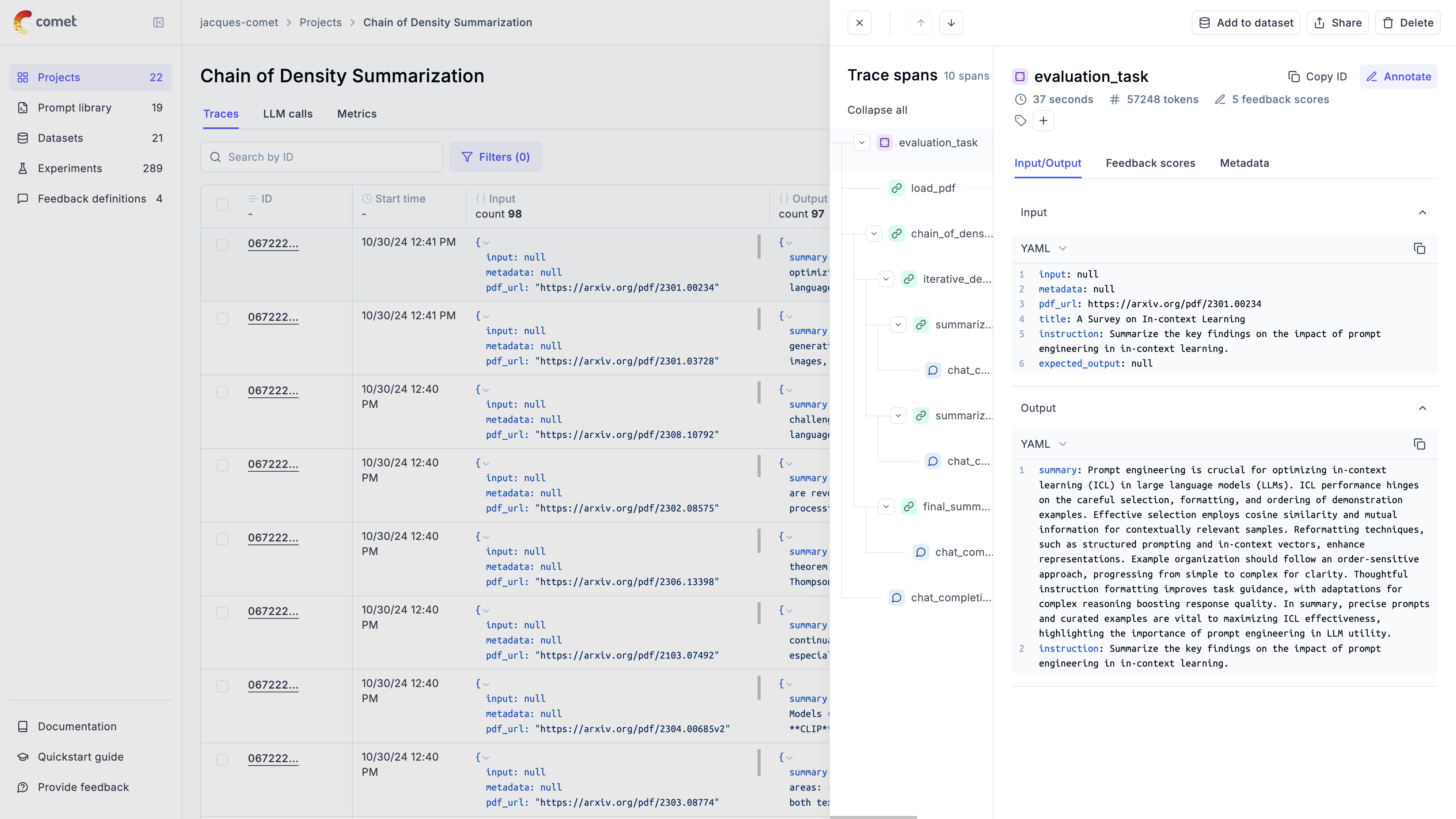
After running your application, you will start seeing your traces in your Opik dashboard:

If you don’t see traces appearing, reach out to us on Slack or raise an issue on GitHub and we’ll help you troubleshoot.

Next steps

Now that you have logged your first LLM calls and chains to Opik, why not check out:

  1. In depth guide on agent observability: Learn how to customize the data that is logged to Opik and how to log conversations.
  2. Opik Experiments: Opik allows you to automated the evaluation process of your LLM application so that you no longer need to manually review every LLM response.
  3. Opik’s evaluation metrics: Opik provides a suite of evaluation metrics (Hallucination, Answer Relevance, Context Recall, etc.) that you can use to score your LLM responses.