
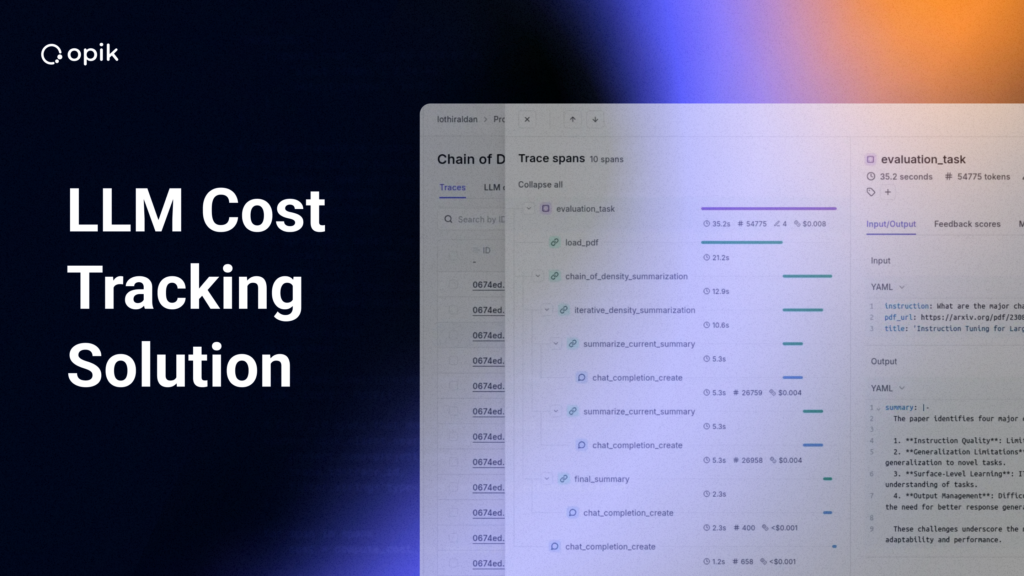
The first sign of trouble isn’t always performance. Sometimes it’s the invoice. Your team ships a new agent that routes requests, calls tools, runs retrieval, and orchestrates multiple LLM calls to deliver high-quality answers. It looks like a win until the first full-month bill hits, and your LLM spend has quietly tripled. Finance wants answers, engineering is digging through dashboards, but no one knows which agents, prompts, or customers are burning all those tokens. You need an LLM cost tracking solution that treats cost as an observability problem, not just a billing line item, so you can see where tokens go inside your app or agent, trace by trace and span by span.
💡 This post is about optimizing LLM costs for agents you build or integrate into your software product. If you’re looking to optimize engineering spend on coding agents like Claude Code or Codex, check out Opik Cost Intelligence→
Our team designed Opik to help with this — because end-to-end LLM observability needs to include visibility into model costs, and insights to help you optimize those costs. With LLM cost tracking included in the free cloud and open-source versions of Opik, you can ship ambitious agentic systems without losing control of your budget.
The New Reality of LLM Costs in Agentic Systems
Early prompt engineering was simple: one prompt in, one completion out. If you knew the model, token pricing, and approximate prompt length, you could estimate cost. Agentic systems broke that model. Now, a single user query can trigger multiple layers of computation, including retrieval across indexes, routing between models and tools, multi-step planning and tool-calling loops, as well as retries, fallbacks, and guardrail checks.
The relationship between user requests and LLM calls is no longer linear. Two identical queries can produce very different execution paths — one with a few model calls, another with a complex workflow involving dozens.
This complexity introduces clear failure modes:
- Agents stuck in loops, repeatedly calling a planner model
- Routing prompts overusing expensive frontier models when cheaper ones would suffice
- Poorly managed RAG pipelines resending full conversation history and long documents on every turn, increasing input tokens
At the same time, expectations are rising. FinOps and leadership don’t just want total LLM spend. They want per-feature, per-team, and per-customer visibility. How much does search cost versus summarization? Which tenants are unprofitable? How do experiments compare to their controls? That level of insight requires embedding cost into your system’s telemetry.
How LLM Token Billing Works
Most LLM providers bill you for tokens, the small chunks of text that make up inputs (prompts, tool calls, context) and outputs (model responses). Each model has its own input and output token prices, which vary by vendor, and every token contributes to total cost.
On paper, this is straightforward, but in practice, things get messy fast. You may run multiple providers behind an abstraction, mix premium models for hard cases with cheaper ones for routine tasks, and use gateways or proxies that rewrite or enrich prompts before they reach the provider.
Effective LLM cost tracking requires observing spend at two different levels:
- Micro view (span level):
For each LLM call and tool span, you want to know how many input and output tokens were used, which model was called, and what that translated to in cost. This is how you spot expensive prompts or misconfigured steps. - Macro view (trace and project level):
For each end-to-end interaction — such as a conversation, job, or API request — you want the total number of tokens and the cost. Aggregate those over features, projects, or tenants to understand overall spend patterns.
Why Tracing is the Key LLM Cost Tracking Solution
LLM tracing captures a request’s full execution path, from the initial user input through all agent decisions, tool invocations, and LLM spans, until the final response is returned. Each LLM call becomes a span in a hierarchical trace; each tool call and internal step is another span. Together, they form a structured timeline of your agent’s actions.
Once each LLM span includes token counts and model identifiers, cost is easy to compute:
- Span level: the cost of a single prompt and completion
- Trace level: the total cost of an interaction (e.g., “this conversation cost 3.2 cents”)
- Project level: aggregated spend across traces (e.g., “this feature drove 30% of last week’s cost”)
This enables a simple zoom-in/zoom-out debugging workflow:
- Start with a spike in daily spend for a project.
- Drill into the most expensive traces behind that spike.
- Within a trace, sort spans by cost and inspect the prompts or routes that dominate spend.
- Make targeted changes to prompts, routing, or model selection.
Opik’s LLM tracing feature set is built for this workflow. You can automatically log spans for LLM calls, tool calls, and more across your agentic footprint, then automatically estimate and display cost at the span, trace, and project levels in USD. That’s what a robust LLM cost tracking solution looks like in practice.
How to Optimize LLM Costs Without Losing Quality
Cutting costs is easy if you don’t care about quality. You can just downshift every model to the cheapest option. The hard part is finding the sweet spot where your system is “good enough” for real users at a sustainable price point. Opik’s LLM evaluation capabilities can help achieve that balance.
At Pattern, an AI-powered ecommerce accelerator, the AI Ops team used Opik to define LLM evaluation metrics grounded in what “good enough” meant for their workflow. Their approach followed three steps:
- Define datasets that reflect real traffic — representative inputs, expected outputs, and edge cases.
- Attach scoring rubrics like LLM-as-a-judge evaluations, rule-based checks, or task-specific success criteria to quantify quality.
- Run experiments across models, prompts, or agent strategies, logging evaluation scores and trace-level metadata like token usage and cost to analyze quality and cost together.
This process led Pattern to a mid-tier model that reduced projected annual spend by an estimated $60K without sacrificing the quality users depended on. Instead of guessing at the tradeoff, they could see it clearly in the data.
How to Find LLM Cost Outliers in Prompts and Multi-Turn Flows
A key challenge in LLM costs is that many of the worst offenders hide in plain sight:
- Prompts that gradually grow until they barely fit in the context window.
- Systems that resend long conversation histories on every call.
- “Helpful” summaries that re-explain the entire context on each agent step.
In multi-turn agentic systems, these patterns quietly multiply token usage. A slightly wordy prompt becomes expensive when repeated 15 times per session.
Once each span includes token and cost metadata, these outliers are easy to spot. In Opik, you can sort spans by cost, filter by prompt template or tool, and quickly identify consistently expensive prompts. From there, you can refactor — shortening boilerplate, trimming redundant instructions, or moving information into tools or system configuration — while tracking the impact on both cost and quality.
The same principle applies at the trace level. By running multi-turn evaluation—feeding test conversations through your full agent stack and logging them in Opik — you can measure tokens and spans per end-to-end interaction. This is where patterns emerge:
- Agent loops where the planner keeps calling itself.
- Redundant sub-agent calls that rarely change the outcome.
- Tool invocations that add cost and latency without improving results.
Once visible, these outliers are easier to address. For example, if certain queries trigger long back-and-forth interactions, the agent can ask a single clarifying question upfront, collapsing multiple uncertain steps into one. The result is fewer tokens, lower latency, and a better user experience.
The LLM Cost Tracking Solution for Every Workflow
With tracing configured, cost tracking becomes easier to manage. For all major providers and models, Opik uses token counts, model identifiers, and pricing tables to estimate cost and attach it to each LLM span automatically. Span-level costs roll up to the trace, showing what each conversation, job, or pipeline run actually costs. Trace costs then roll up to the project, giving you total spend per workflow and over time in the Opik dashboard. You don’t need to maintain a custom cost calculator in every service.
Real-world systems are rarely that simple, though. Pricing often varies across environments and use cases. You may have:
- Enterprise-negotiated pricing for certain tenants.
- Self-hosted models with hardware-based cost structures.
- Gateways that abstract multiple backends away from application code.
Opik supports custom and manual pricing, so you can pass model metadata or override span costs when needed. This keeps your cost tracking consistent even when pricing is unique or proprietary. And because all cost-enriched traces are accessible via APIs, engineering and FinOps teams can export this data into internal dashboards, chargeback systems, or broader observability stacks.
In other words, Opik can be your LLM cost tracking solution, while still playing nicely with the rest of your infrastructure.
Get Started with Opik LLM Cost Tracking
The good news is that you don’t need a full rewrite to start. You can begin with a single, suspiciously expensive workflow and expand from there.
A simple rollout looks like this:
- Instrument a few key entry points.
Integrate Opik in just a few minutes following the quickstart guide, configure a workspace, and wrap the LLM calls or agent entry points for a single feature. You’ll quickly start seeing traces with token and cost data in the Opik UI. - Compare trace-level insights to your invoice.
Look at a recent billing period, then drill into the traces from that window. Which features and customers drive the most spend? Which traces seem expensive relative to the value they deliver? - Iterate on prompts, routing, and models.
Use Opik’s evaluation tooling to define what “good enough” means, then run experiments to tighten prompts, swap models, or restructure flows, always measuring cost and quality together.
Because Opik is open source and offers a generous free plan, you can adopt LLM cost tracking without committing to heavy upfront infrastructure costs. You get the visibility you need today, with the flexibility to extend or self-host tomorrow.
If your team is already feeling the pain of opaque LLM bills, or if agentic systems are on your roadmap, now is the time to treat cost as a first-class design parameter. Start instrumenting one workflow this week, plug it into Opik, and turn your LLM bill from an unwelcome surprise into something you can inspect, understand, and actively control.