
The Fastest Path
to Agents That Work
Opik connects observability to action, automatically turning trace data and eval results into code fixes. Your agent keeps evolving and doesn’t make the same mistake twice.
Trusted by over 150,000 developers and thousands of companies










21,000+
Github Stars
150,000+
Users
10,000+
Teams
Log every step your agent takes
Traces give you total LLM observability to visualize and understand what’s happening across complex GenAI systems, from context retrieval and tool selection to user feedback scores and more. Tracing is easy to instrument with 60+ integrations — pick yours or simply give your coding agent access to all this info via our MCP server.
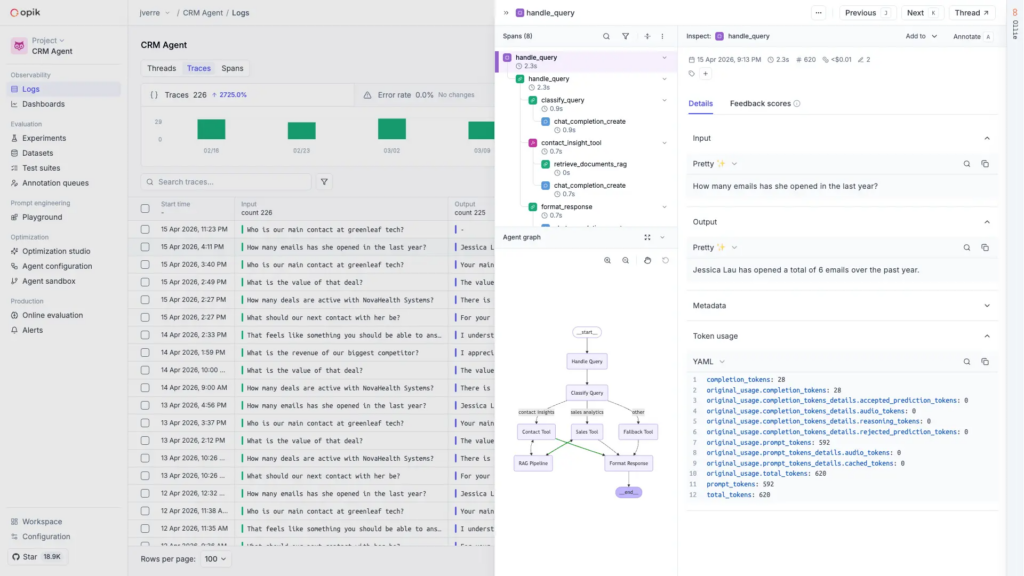
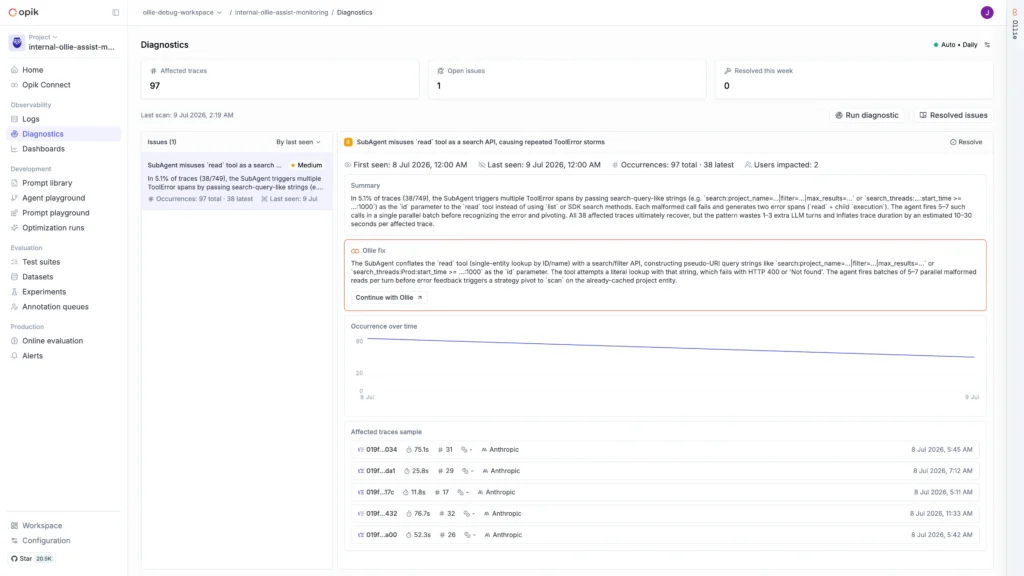
Detect silent errors & debug traces
Automatically surface errors from thousands of traces with Diagnostics, using Opik’s MCP server. Diagnostics detects and groups similar recurring issues, identifies their root causes, and recommends fixes — even when there is no explicit error message.
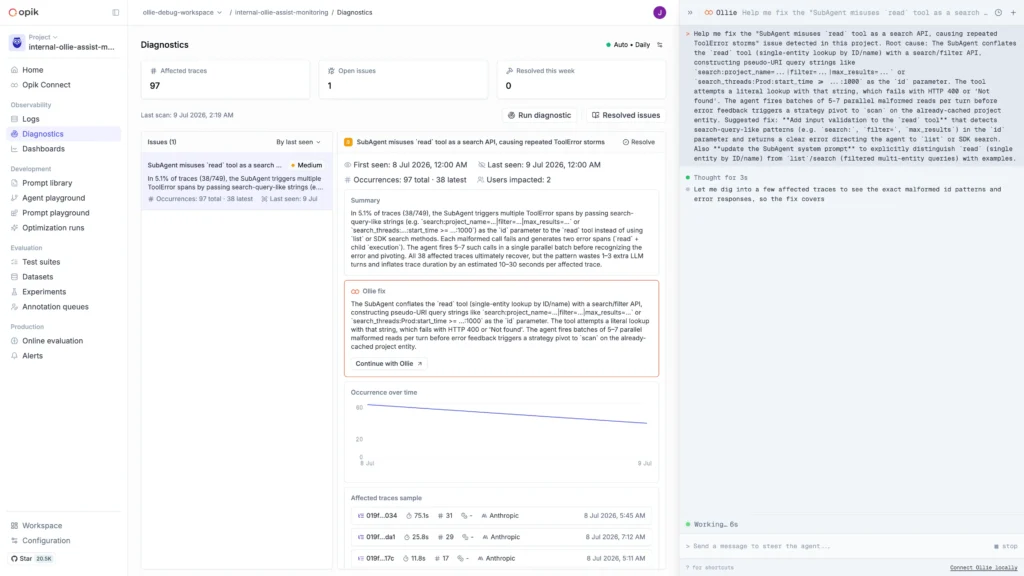
Fix issues at the source with Ollie
The Ollie agent lives inside Opik, understands your traces, and sees when tool calls, context retrieval steps, system prompts, and more don’t perform as expected. Grab Ollie’s recommended fixes and mark issues Resolved.
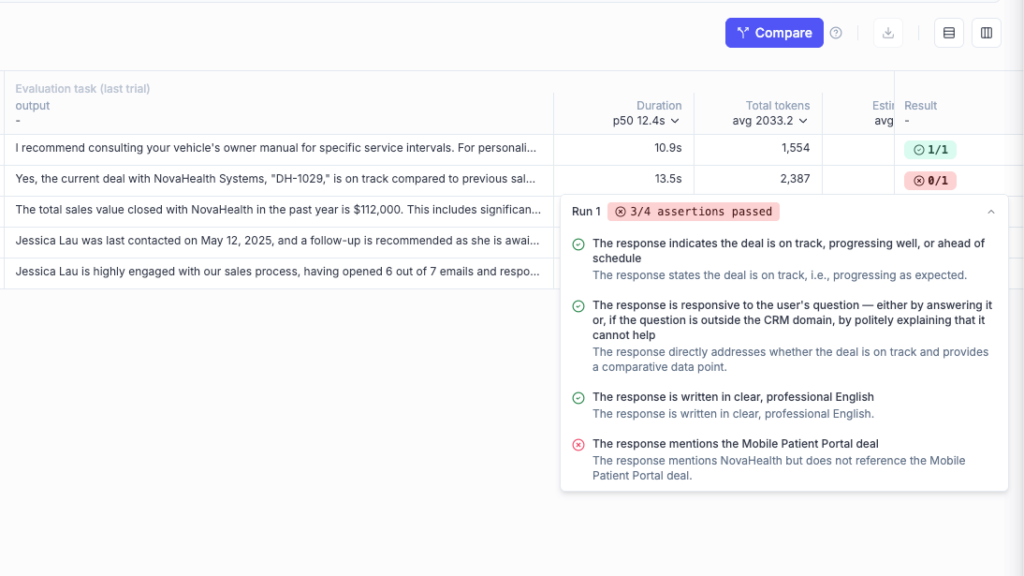
Validate fixes with Test Suites & Evals
Understand your agent’s performance at a higher level by scoring sets of traces against specific goals. Define success and get simple pass/fail results with Test Suites, or create golden datasets and run evaluations with 40+ LLM-as-a-judge metrics.
Monitor & manage agents in production
Extend observability and evaluation across your agent’s production footprint to help meet governance requirements, track model costs, and ensure consistent performance. Production dashboards give you peace of mind and alerts catch new issues before they affect users.
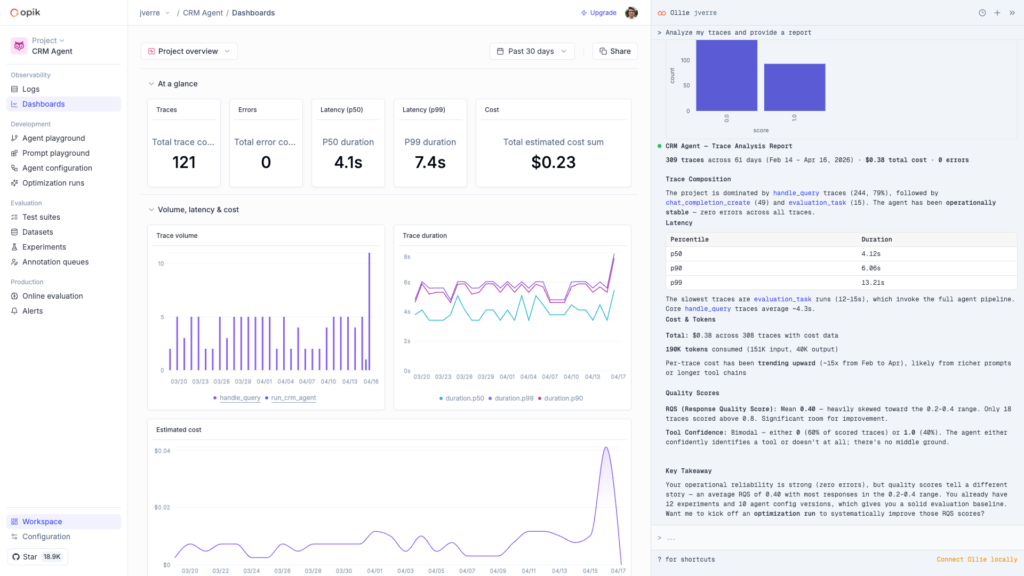
An End-to-End AI Evaluation Platform
Comet’s end-to-end model evaluation platform for developers focuses on shipping AI features, including open-source LLM observability, application testing and optimization, and coding agent cost tracking.
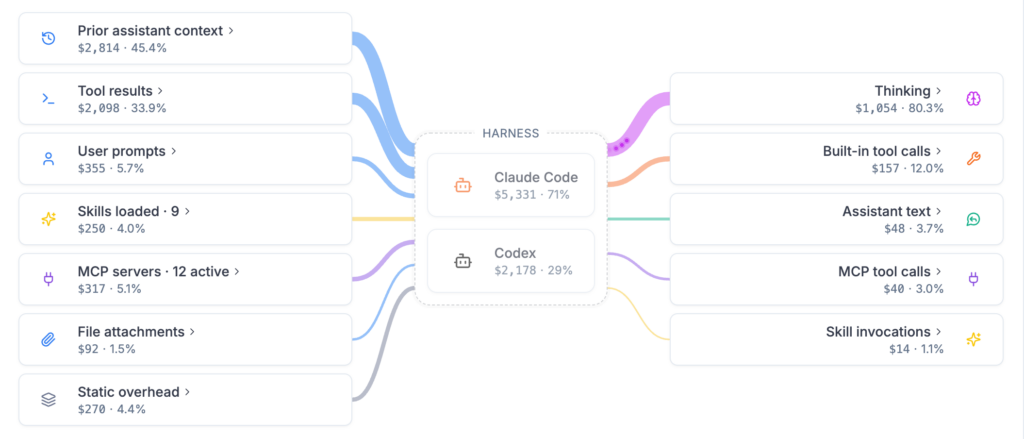
Opik: Track & Optimize Coding Agent Spend
Get full visibility into engineering teams’ Claude Code and Codex usage with Cost Intelligence in Opik. Eliminate wasted tokens and gain efficiency across MCP installs, skills, model selection, context retrieval, and configurations.
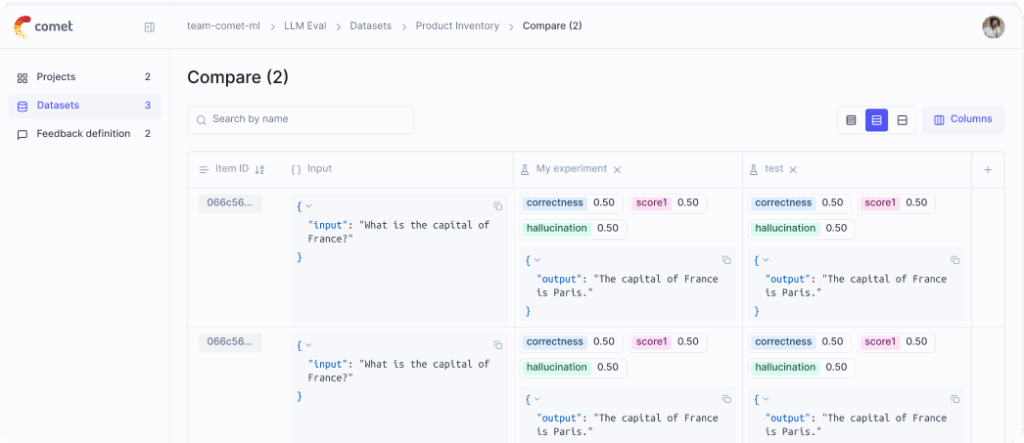
Opik: Log & Evaluate Your Application’s LLM Calls
Opik provides comprehensive LLM observability so you can confidently test, debug, and monitor your GenAI apps and agents, from application-level unit testing down to individual system prompts and user inputs.
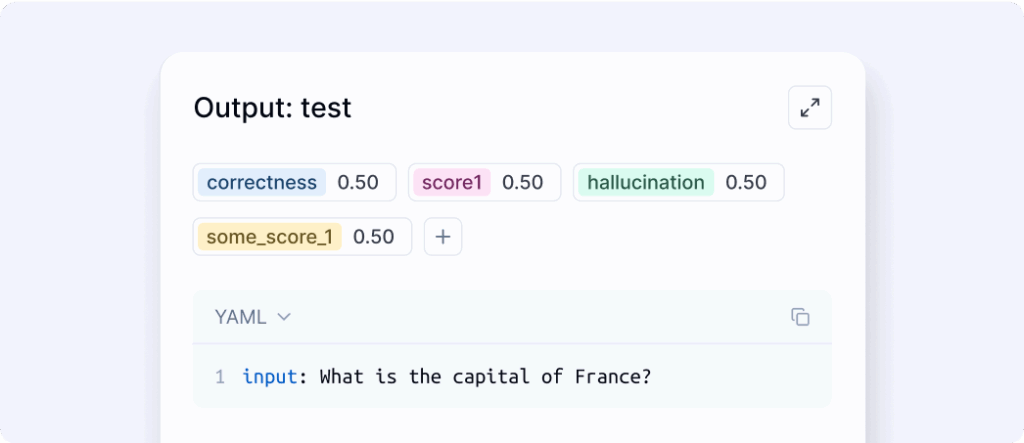
Opik: Optimize Prompts & Agentic Systems
With your application’s LLM calls and responses logged, you can bring in expert reviewers for annotation, score using built-in eval metrics, and even automate prompt engineering for complex multi-step agents.
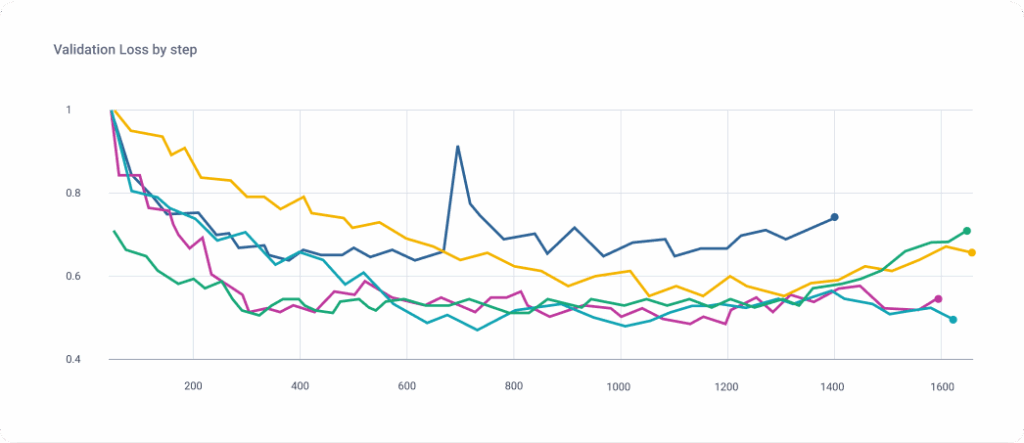
MLOps: Track & Compare Model Training Runs
Comet Experiment Management gives you the tools to ensure your models are explainable and reproducible, with custom visualizations, model versioning, dataset management, production monitoring, and more.

“LLMs are black boxes. We don’t know what is going on inside them. We needed a solution that allowed us to see how our models behaved, and Opik gives us the ability to understand what went wrong, and share that with the team to debug and iterate faster.”

DMITRII KRASNOV
ENGINEERING MANAGER, ZENCODER
Trusted by the most innovative AI teams
The Opik Difference
Not all GenAI observability and evaluation platforms are built the same. Opik is both truly open source, and powered by Comet’s enterprise-grade infrastructure for reliable, trustworthy performance at scale.

Log Thousands of LLM Traces, Fast
Traces appear in the Opik platform ready for debugging almost instantly — even at high volumes.

Enterprise-Grade Reliability & Security
Opik is backed by the Comet platform and built to the standards of the world’s largest organizations.

Flexible Hosting & Deployment Options
Self-host the OSS version, try Opik in the cloud, or talk to us about custom deployment options.
Easy Integration
Add just a few lines of code to your project and automatically start tracking LLM app and agent activity with Opik, or code, hyperparameters, model predictions, and more with Comet’s MLOps platform.
from opik import track

@track
def llm_chain(user_question):
    context = get_context(user_question)
    response = call_llm(user_question, context)

    return response

@track
def get_context(user_question):
    # Logic that fetches the context, hard coded here
    return ["The dog chased the cat.", "The cat was called Luky."]

@track
def call_llm(user_question, context):
    # LLM call, can be combined with any Opik integration
    return "The dog chased the cat Luky."

response = llm_chain("What did the dog do ?")
print(response)from llama_index.core import VectorStoreIndex, global_handler, set_global_handler
from llama_index.core.schema import TextNode
# Configure the Opik integration
set_global_handler("opik")
opik_callback_handler = global_handler
node1 = TextNode(text="The cat sat on the mat.", id_="1")
node2 = TextNode(text="The dog chased the cat.", id_="2")
index = VectorStoreIndex([node1, node2])
# Create a LlamaIndex query engine
query_engine = index.as_query_engine()
# Query the documents
response = query_engine.query("What did the dog do ?")
print(response)from langchain_openai import ChatOpenAI
from opik.integrations.langchain import OpikTracer
# Initialize the tracer
opik_tracer = OpikTracer()
# Create the LLM Chain using LangChain
llm = ChatOpenAI(temperature=0)
# Configure the Opik integration
llm = llm.with_config({"callbacks": [opik_tracer]})
llm.invoke("Hello, how are you?")from openai import OpenAI
from opik.integrations.openai import track_openai
openai_client = OpenAI()
openai_client = track_openai(openai_client)
response = openai_client.chat.completions.create(
model="gpt-3.5-turbo",
messages=[
{"role": "user", "content": "Hello, world!"}
]
)from comet_ml import Experiment
import torch.nn as nn
# 1. Define a new experiment
experiment = Experiment(project_name="YOUR PROJECT")
# 2. Create your model class
class RNN(nn.Module):
#... Define your Class
# 3. Train and test your model while logging everything to Comet
with experiment.train():
# ...Train your model and log metrics
experiment.log_metric("accuracy", correct / total, step = step)
# 4. View real-time metrics in Cometfrom pytorch_lightning.loggers import CometLogger
# 1. Create your Model
# 2. Initialize CometLogger
comet_logger = CometLogger()
# 3. Train your model
trainer = pl.Trainer(
logger=[comet_logger],
# ...configs
)
trainer.fit(model)
# 4. View real-time metrics in Cometfrom comet_ml import Experiment
from transformers import Trainer
# 1. Define a new experiment
experiment = Experiment(project_name="YOUR PROJECT")
# 2. Train your model
trainer = Trainer(
model = model,
# ...configs
)
trainer.train()
# 3. View real-time metrics in Cometfrom comet_ml import Experiment
from tensorflow import keras
# 1. Define a new experiment
experiment = Experiment(project_name="YOUR PROJECT")
# 2. Define your model
model = tf.keras.Model(
# ...configs
)
# 3. Train your model
model.fit(
x_train, y_train,
validation_data=(x_test, y_test),
)
# 4. Track real-time metrics in Cometfrom comet_ml import Experiment
import tensorflow as tf
# 1. Define a new experiment
experiment = Experiment(project_name="YOUR PROJECT")
# 2. Define and train your model
model.fit(...)
# 3. Log additional model metrics and params
experiment.log_parameters({'custom_params': True})
experiment.log_metric('custom_metric', 0.95)
# 4. Track real-time metrics in Cometfrom comet_ml import Experiment
import tree from sklearn
# 1. Define a new experiment
experiment = Experiment(project_name="YOUR PROJECT")
# 2. Build your model and fit
clf = tree.DecisionTreeClassifier(
# ...configs
)
clf.fit(X_train_scaled, y_train)
params = {...}
metrics = {...}
# 3. Log additional metrics and params
experiment.log_parameters(params)
experiment.log_metrics(metrics)
# 4. Track model performance in Cometfrom comet_ml import Experiment
import xgboost as xgb
# 1. Define a new experiment
experiment = Experiment(project_name="YOUR PROJECT")
# 2. Define your model and fit
xg_reg = xgb.XGBRegressor(
# ...configs
)
xg_reg.fit(
X_train,
y_train,
eval_set=[(X_train, y_train), (X_test, y_test)],
eval_metric="rmse",
)
# 3. Track model performance in Comet# Utilize Comet in any environment
from comet_ml import Experiment
# 1. Define a new experiment
experiment = Experiment(project_name="YOUR PROJECT")
# 2. Model training here
# 3. Log metrics or params over time
experiment.log_metrics(metrics)
#4. Track real-time metrics in CometBuilt for Enterprise, Driven by Community
Comet’s end-to-end evaluation platform is trusted by innovative data scientists, ML practitioners, and engineers in the most demanding enterprise environments.

“Comet has aided our success with ML and serves to further ML development within Zappos.”

KYLE ANDERSON
DIRECTOR OF SOFTWARE ENGINEERING

“Comet offers the most complete experiment tracking solution on the market. It’s brought significant value to our business.”

Olcay Cirit
Staff Research and Tech lead

“Comet enables us to speed up research cycles and reliably reproduce and collaborate on our modeling projects. It has become an indispensable part of our ML workflow.”

Victor Sanh
Machine Learning Scientist

“None of the other products have the simplicity, ease of use and feature set that Comet has.”

Ronny Huang
Research Scientist

“After discovering Comet, our deep learning team’s productivity went up. Comet is easy to set up and allows us to move research faster.”

Guru Rao
Head of AI

“We can seamlessly compare and share experiments, debug and stop underperforming models. Comet has improved our efficiency.”

Carol Anderson
Staff Data Scientist
Get started today, free.
You don’t need a credit card to sign up, and your Comet account comes with a generous free tier you can actually use—for as long as you like.