
Digibee was founded 9 years ago to solve a key problem in enterprise tech stacks: tools didn’t integrate neatly with one another, and humans were left to manage the connections between systems and the infrastructure to support those connections. Digibee built a visual canvas that abstracted away the infrastructure piece and let users focus on the logic connecting systems.
As AI agents become part of the technology stack, Digibee has evolved with a new approach built around AI. This redesign challenged us to figure out how to make LLMs behave like savvy integration engineers.
Opik played a key role in that work.
The Project: An AI-Native Interface
Integration work typically happens in two phases. In the first, teams compile their requirements—often across whiteboards, documents, or spreadsheets. This can take weeks, depending on the complexity of the integration. In the second phase, an integration specialist builds the required workflows according to the specification.
In our new version of Digibee, integration engineers direct Digibee Digital Workers, agents equipped with deep integration expertise.
Users start by explaining what kind of integration they want to build. The Digital Worker asks strategic questions as it builds out a detailed specification. The user makes any needed comments or edits, live, in the interactive document. We call this “intent-to-spec.” Together, users and digital workers complete a specification in as little as a couple of hours.
Next, the Digital Worker generates production-grade workflows according to the specification, which only takes a few minutes. The user checks the results in Digibee’s visual canvas, making small adjustments where necessary. Our goal is for the first draft to be 90+% correct. In a recent experiment, it created a complicated EDI pipeline that was 100% deployment-ready.
Creating this interface required our team to build new tools to allow the AI to interact with our platform. It also required that we write a library of prompts, and manage those prompts in a prompt-management platform.
Why We Chose Opik
Building for AI meant crafting, experimenting with, and iterating on prompts the same way that we handle code. In previous roles, I preferred to build core tools rather than buy them, but I knew we needed something off the shelf for this project. Creating our own tools to handle versioning, experiment comparison, and LLM instrumentation would take four to six months. We didn’t have that time. We needed to ship a product
We chose Opik close to a year ago, during the project’s alpha phase. Our three-person AI team (which has since grown), compared Opik against two other platforms. We picked Opik because we saw excellent value and quality in the feature set for our team’s size and day-to-day needs.
In particular, we found Opik easy to integrate. We can use the SDK or do API calls where appropriate. We also found Opik’s documentation complete and easy to understand.
Managing & Versioning Dozens of Prompts
The current version of the Digibee Digital Worker uses around 20 prompts and prompt templates, but my team has written nearly 100 for distinct tasks. Prompts commonly go through 10-20 revisions before they stabilize—or before we split, combine, or deprecate them. One prompt went through 24 versions between August and September of 2025 before deprecation.
For each prompt, we start by writing a draft that’s as complete as possible. Then, we refine it through small experiments. Each new version covers one or more gaps identified through Opik. At the same time, we try to ensure that we don’t over-fit to the corner cases.
Opik’s prompt library lets the team push those revisions without a full deployment. We just update the prompt page. This saves us from needing a full release cycle from every change. This is one of the main advantages of using a prompt management platform instead of versioning prompts exclusively alongside the codebase (e.g., in Git).
Comparing Ten Sessions Against the Same Pipeline
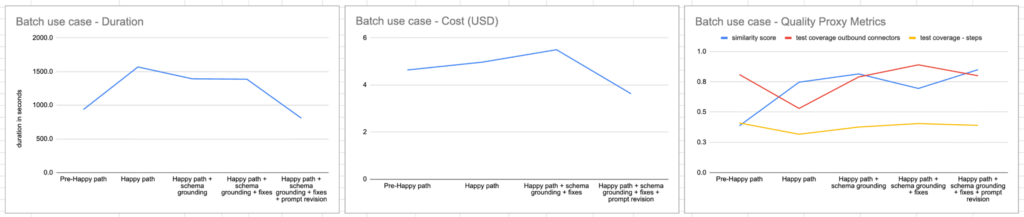
To measure the impact of changes to prompts or the surrounding ecosystem, we run batches of 10 simulated sessions against a target pipeline type and export the results to Opik. We compare metrics across runs: plan drift, cost, step coverage, and several custom measures built around how closely the generated pipeline matches what a human would build.
In May, we ran a batch of experiments on the main workflow generation prompt. Opik clearly showed the value of our choices; the most complicated version of our prompt not only achieved a higher similarity score to our target output, it also completed its work faster and used fewer tokens.
We supplement work in Opik by comparing generated flows to “golden flows” created by a member of Digibee’s professional services team. This catches gaps that don’t show up in the automated test set.
Results with Opik
Months of engineering time redirected. By buying Opik, I estimate that we saved four to six months of build time vs building our own tooling. That time went into the intent-to-spec process and pipeline generation instead.
No-deploy prompt updates. Prompt changes ship by editing the prompt directly in Opik, without a backend release.
A workable read on drift. Batch experiment comparisons in Opik, combined with manual review from professional services, give the team a way to catch regressions before a prompt change reaches production
What’s Next?
We like to frame this project’s ambition against Digibee’s history: the original platform cut the time to build system integrations by 10-20x. The AI-native rewrite is aimed at a similar jump.
Digibee’s AI team has grown since the original three-person build-or-buy decision. With a working early access version in production, we expect to use the next three to six months investing in improvements across the entire systems integration lifecycle. Opik has settled into the role of system of record for that work: where prompts live, where their version history lives, and where the team checks whether a change made things better or worse before it ships.