
You shipped an agent. It worked in the demo. In production, a user phrased a question differently than you expected and the agent fell apart. AI evaluation is supposed to catch that issue before your users do, but the standard workflow asks you to build a reference dataset, hand-pick metrics, write LLM-as-a-judge prompts for each one and interpret a wall of decimal scores every time you change a line of code. That’s a lot of overhead standing between a quick fix and deployment.
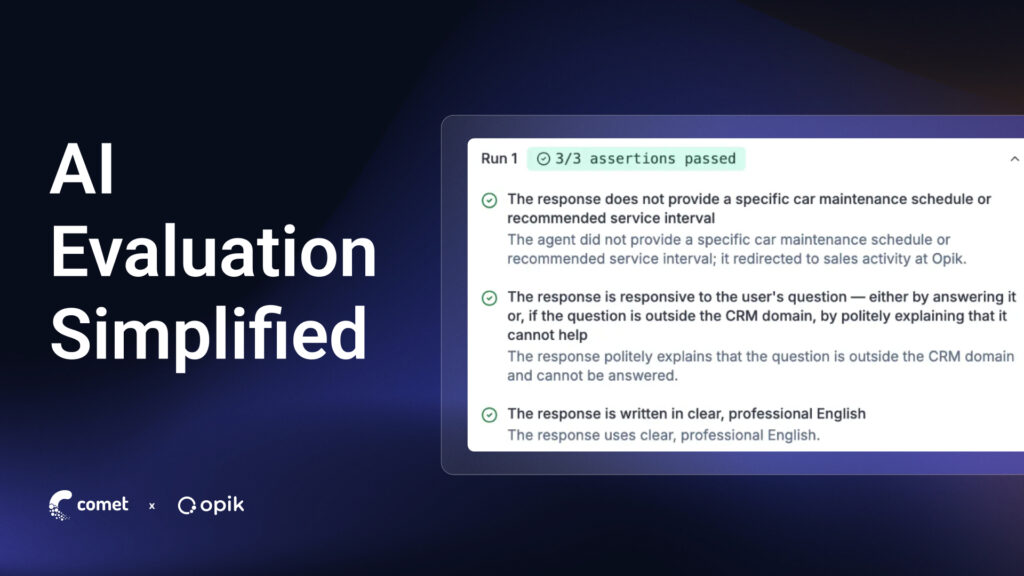
Opik’s Test Suites take a different approach. Instead of scoring outputs against a dataset and translating numbers into a verdict, you write plain-English assertions about how your agent should behave. Opik runs the AI evaluation infrastructure behind the scenes and returns a pass or fail you can act on immediately.
Learn what AI evaluation means in practice, how traditional dataset-and-metric workflows work and how Test Suites simplify and automate the process with assertions while keeping the same data science rigor underneath.
What is AI Evaluation?
An AI evaluation is a structured test for an AI system. You give it an input, apply grading logic to the output and use the result to measure whether the system did what you wanted. When creating an AI eval, you give the system an input, apply grading logic to the output and use the result to measure whether the system did what you wanted.
An AI eval can cover a lot of ground, whether comparing two foundation models on a benchmark or checking whether your support agent answers one specific question correctly. The hard part isn’t the definition. It’s the infrastructure behind it:
- Where do the test inputs come from?
- What grades the outputs?
- What happens when a grade comes back low?
Many teams converge on a similar pattern to answer those questions:
- Log LLM traces of real input-output pairs.
- Pull the interesting ones into a dataset, including failures, edge cases and successes worth preserving.
- Run automated LLM evaluation against that dataset using LLM-as-a-judge metrics.
That pattern works, but it also highlights the real effort required to learn anything actionable. Test Suites simplify that workflow considerably, while producing comparable and more actionable results.
The Traditional Dataset-and-Metric AI Evaluation Workflow
If you’ve built AI evals before, this loop will look familiar:
- Capture traces. Add tracing to your LLM application or agent so every run is logged with the inputs, outputs, tool calls, retrieved context and timing.
- Define the evaluation task. Write the function that takes a dataset item and returns the output your metrics will score.
- Choose a dataset. Use an existing dataset or create a new one with the test cases from your traces. Combine successful runs, known failure modes and hand-written examples for scenarios you haven’t seen yet.
- Choose LLM evaluation metrics. Decide what “good” means for your application. Heuristic metrics like exact match work for narrow, deterministic outputs. For more nuanced outputs, like relevance or faithfulness, define an LLM-as-a-judge metric, using a separate LLM call to score the output against criteria defined in a prompt.
- Create and run the evaluation experiment. Execute your application against every dataset item, score each output and log the results as an experiment.
- Analyze the evaluation results. Dig into the individual test cases and compare multiple experiments side by side to see how a prompt or model change affects performance.
This loop matches Opik’s Datasets & Experiments framework. It’s how research teams have evaluated models for years. Automated evaluation at this scale is useful for tracking quality across hundreds or thousands of traces. But running five or six separate metrics to answer one yes-or-no question about agent behavior is a lot of infrastructure for what could be a quick check.
Writing the judge prompts (custom metrics) adds friction of its own. A prompt that scores well on your first ten examples can fall apart on the eleventh, where the question is ambiguous or the answer is technically correct but incomplete. Most teams end up maintaining several judge prompts in parallel just to cover one behavior from a few angles.
Simplifying AI Evals with Test Suites
Opik’s Test Suites flip the starting point. Instead of asking, “What score does this output get on six dimensions?” you can ask, “Does this response do what I need it to do?” You write your requirements directly as an assertion. The result is a faster style of AI evals built around specific behaviors instead of broad quality scores.
Each test suite is built from two pieces:
- Test items, typically pulled from real traces you’ve already logged.
- Assertions, written in plain English, that describe expected behavior.
Assertions can be applied in these ways:
- Global assertions apply to every item in the suite. These could look like, “The response is grounded in the provided context.” or “The response stays under three sentences.”
- Item-level assertions apply to a specific scenario. For example, a Kubernetes question might need its own rule to ensure the response should not claim a feature is supported when the documentation says otherwise.
Behind each assertion, Opik converts the natural language prompt into a dataset-and-metric evaluation. You get the benefit of automated evaluation without writing or maintaining the metrics and datasets yourself.
Because LLM outputs are non-deterministic, Test Suites support execution policies. You can run an item multiple times and require a minimum number of passes rather than a perfect score, so a correct answer phrased differently from a previous run doesn’t fail the suite for the wrong reason.
Read Trace Evaluations as Pass/Fail
Trace evaluations under Test Suites work differently from the raw scoring you’re used to. Once a suite runs, the results come back as pass/fail instead of metric averages:
- The run passes if every assertion in a run passes.
- The item passes if the number of passing runs is greater than your defined threshold.
- The pass rate shows the ratio of passed items compared to total items.
These trace evaluations don’t just show a score. They reveal whether your LLM application passes based on your assertions. If it doesn’t meet your defined criteria, it shows you where it broke. We find this to be more actionable for debugging than the gut check you get from a set of scores.
Each test suite run also creates its own experiment in Opik. With this data, you can see if two prompt versions or two models produce directly comparable pass rates. You can clearly determine if a change improves your results without interpreting scores.
Choosing the Right Automated Evaluation Approach
Dataset-driven metric evaluation and Test Suites answer different questions. For research teams weighing both approaches, the distinction comes down to what each method optimizes for:
- Metric-based evaluation gives you statistical comparability. The same metric, applied consistently across model versions, produces numbers you can chart over time.
- Assertion-based testing gives you interpretability and speed. A failed assertion points to exactly what broke, without a score-threshold debate first.
A 0.82 average score across 200 traces doesn’t tell you whether the one scenario your compliance team flagged actually passes. An assertion does.
Reach for dataset-based AI evals when you’re asking a question like:
- Is there a quantitative score I can track across a large volume of traces?
- Is average faithfulness or relevance drifting over time?
- How do two foundation models compare against the same reference set?
- What aggregate number can I report to a stakeholder who wants a trend line?
This is also where most existing AI evals tooling, including LLM-as-a-judge metrics and heuristic scoring, still does its best work.
Reach for Test Suites when you’re asking a binary question, such as:
- Should the agent always cite a source when quoting pricing?
- Should it decline to answer outside its knowledge base?
- Does the response stay under a length limit?
In practice, the two feed each other. A failed Test Suite item that exposes a new edge case is worth promoting into your evaluation dataset for broader tracking. A dataset evaluation that surfaces a recurring low-relevance pattern is a good candidate for a new assertion, because the pattern signals the failure is systemic rather than a one-off.
Building a Test Suite from Production Traces
The most efficient way to build a suite is to skip dataset construction entirely and pull failures directly from production. This process includes these steps:
- Find an issue. Browse traces in the Opik dashboard, filter by error status or low feedback scores, and inspect the full span tree, including every LLM call, tool invocation and retrieval step.
- Add a trace to your suite. Turn the failing trace into a test item and write the assertion that captures the expected behavior, such as “The response must not hallucinate facts not present in the context.”
- Fix the root cause. Update the prompt, adjust a tool definition or change a retrieval parameter based on what the trace showed.
- Re-run the suite. Confirm the fix resolves the new case without breaking any of the others.
Each pass adds a test case, so the suite grows out of real failure modes instead of a dataset you had to imagine in advance. This automated evaluation builds itself from your actual debugging work, rather than a separate exercise you have to schedule. Over time, the suite becomes a regression guard shaped by what your agent has actually gotten wrong, which tends to be far more relevant than synthetic data.
Common Questions About Test Suites and AI Evaluation
Here are the questions developers run into most often, from deciding when to reach for Test Suites to working through the day-to-day details once AI evals are in use.
I’m starting from scratch. Should I build a dataset or a Test Suite first?
Start with a Test Suite. You don’t need a pre-built dataset or a metrics strategy to begin; you only need traces from your application running, even from a single debugging session. Write one or two assertions for the behavior you’re most worried about. This could be confirming the sources used or limiting certain agent actions. Let your suite grow from there.
Once you need broader, quantitative tracking across larger trace volumes, add formal dataset-and-metric evaluation.
My agent gives different correct answers to the same question. Won’t that break my tests?
No. This is exactly what execution policies solve. Configure a test item to run multiple times and require a pass threshold rather than a perfect match. This approach allows valid variation in phrasing without triggering a false failure.
Can I use Test Suites to compare two prompts or two models?
Yes! Every Test Suite run logs as a separate experiment. If you run the same suite against two prompt versions or two models that produce pass rates, you can compare the side-by-side results in the Opik dashboard.
Does using Test Suites mean giving up LLM-as-a-judge evaluation?
No. Test Suites use LLM-as-a-judge under the hood. Opik converts your plain-English assertions into judge prompts automatically. You get to keep the grading approach that handles nuanced, subjective behavior, without writing or maintaining the judge prompt yourself.
My team already tracks metrics like faithfulness and relevance. Do we need to switch to Test Suites?
Not necessarily, and not entirely. Keep metric-based evaluation for quantitative tracking, drift monitoring and benchmarking. Add Test Suites for the specific, binary behaviors you need to confirm after every change, like tool usage rules or compliance-sensitive responses. Most teams that use Opik run both AI evaluations side by side rather than choosing only one.
How do I know which specific behaviors are worth writing as assertions?
Start with a failure mode that costs you the most time to debug. Production incidents are a better source of assertions than a hypothetical list of edge cases, because they’re failures you know actually happen. If a trace revealed that your agent claimed a feature was supported when it wasn’t, that’s an assertion. If a customer-facing response skipped a required disclaimer, that’s an assertion.
Getting Started with AI Evaluation in Opik
You don’t need a pre-built dataset or a metrics strategy to start with Opik’s SDK:
- Start logging traces for your application.
- Define one or two assertions in plain English for the behavior you want to prevent.
- Run your first suite against traces you’ve already logged.
From there, continue to write assertions for your highest-risk behaviors and let the suite grow as new edge cases surface. Complement your Test Suites with Datasets & Experiments.
Opik includes the foundational observability and AI evaluation features, including Test Suites, in both the free cloud version and the open-source version. Turn your next production failure into a test case instead of a repeat incident.