Agent Configuration Concepts
Prompts, model choices, temperature, tool definitions — many parameters influence how your agent behaves. Agent Configuration lets you version and manage all of them in one place, and update production without redeploying.
Agent Configurations
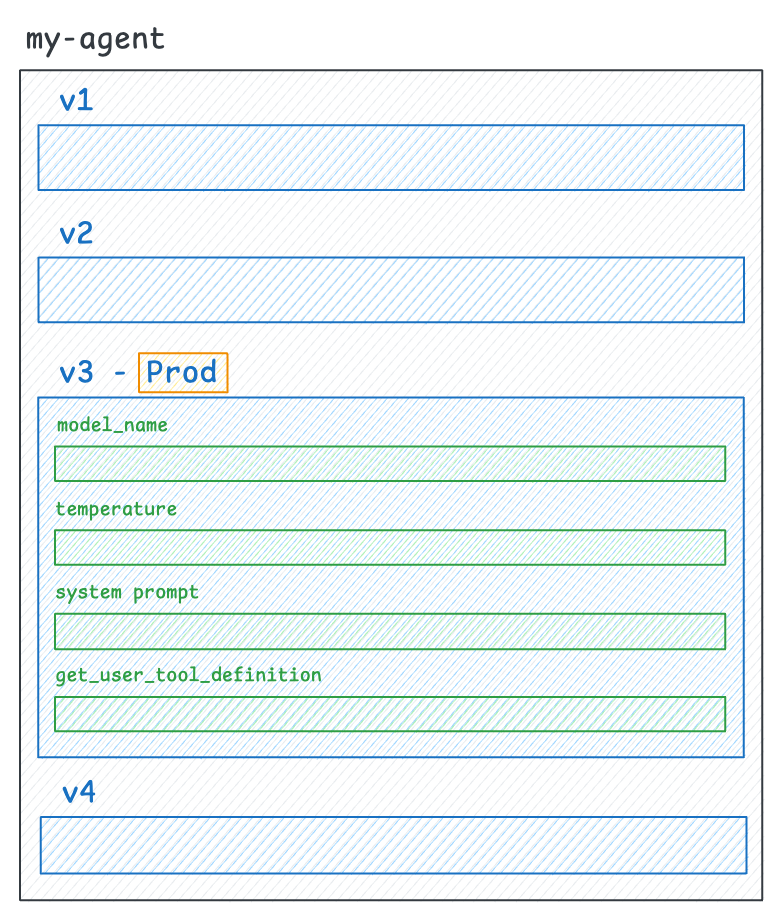
An Agent Configuration is a versioned bundle of everything that defines how your agent behaves:
- Prompts — System prompts, user prompt templates, and multi-turn chat templates
- Model parameters — Model name, temperature, top-p, and other LLM settings
- Tool definitions — Descriptions and schemas for tools your agent can call
- Custom parameters — Any other string or numeric values your agent needs (e.g., RAG retrieval thresholds)
Storing these together gives you a single source of truth for how your agent was configured at any point in time.
Versions
Every change creates a new immutable version (v1, v2, v3, etc.). Once created, a version can’t be modified — so you always have a full audit trail and can roll back if needed.
You can create new versions through the SDK or the Opik UI. See the Getting started guide for details.
Environments
Environments are labels you attach to a specific version to control which configuration your agent fetches at runtime. You manage these through the Opik UI — no code changes needed.
prod— The production version (this is what the SDK fetches by default)- Custom labels — Any label you create in the UI, like
stagingorcanary
To update your agent in production, just move the prod label to a new version in the UI. Your agent picks it up on the next fetch.
Fetching by version
Instead of using environment labels, you can also fetch a specific version directly using the version parameter:
latest: The most recently created versionv3(or any version name): A specific pinned version
You can specify env or version, but not both. If neither is specified, the SDK defaults to env="prod".
Fallback configuration
When you call get_or_create_config / getOrCreateConfig, you can provide a fallback — hardcoded defaults the SDK uses as a safety net.
Here’s how it works in practice: on your first deploy, if no configuration exists yet, the SDK creates one from your fallback values automatically. After that, it fetches from the backend and caches the result in memory (default TTL: 5 minutes). A background thread refreshes the cache, so your agent never blocks on a network call. If Opik becomes temporarily unreachable, the SDK serves the cached value — or, as a last resort, your hardcoded fallback.
You can check if the fallback was used by looking at is_fallback (Python) or isFallback (TypeScript). Useful for logging or alerting.
If you don’t provide a fallback and the backend is unreachable (or no configuration exists), the SDK raises a ConfigNotFound error. We recommend always providing a fallback for production agents.
See Guaranteed availability for more details.
Configuration types
Each field in your configuration has a type that determines how it’s stored and versioned: