

Roll out cost policies
Finding a saving is analysis; keeping it is policy. A cost policy turns a decision made in the dashboard — the default model, thinking budgets, output caps, denied MCP servers and skills — into a managed setting on every developer’s machine, and keeps it there.
This page is the complete picture of how policies behave: how organization and user policies fit together, who can change what, how a change reaches devices, and exactly what happens when a developer edits a managed setting locally or when you clear one from the dashboard.
Policies reach a device once Cost Intelligence is installed on it. If you haven’t rolled out yet, start with Installation.
Set the org baseline
Organization policies are the fleet-wide baseline: the values every developer is on unless you decide otherwise for them individually. You create one by applying a recommendation from the Cost Savings page — each is priced from your own traffic, and applying it writes it as policy — or by setting a value directly under Organization Policies.
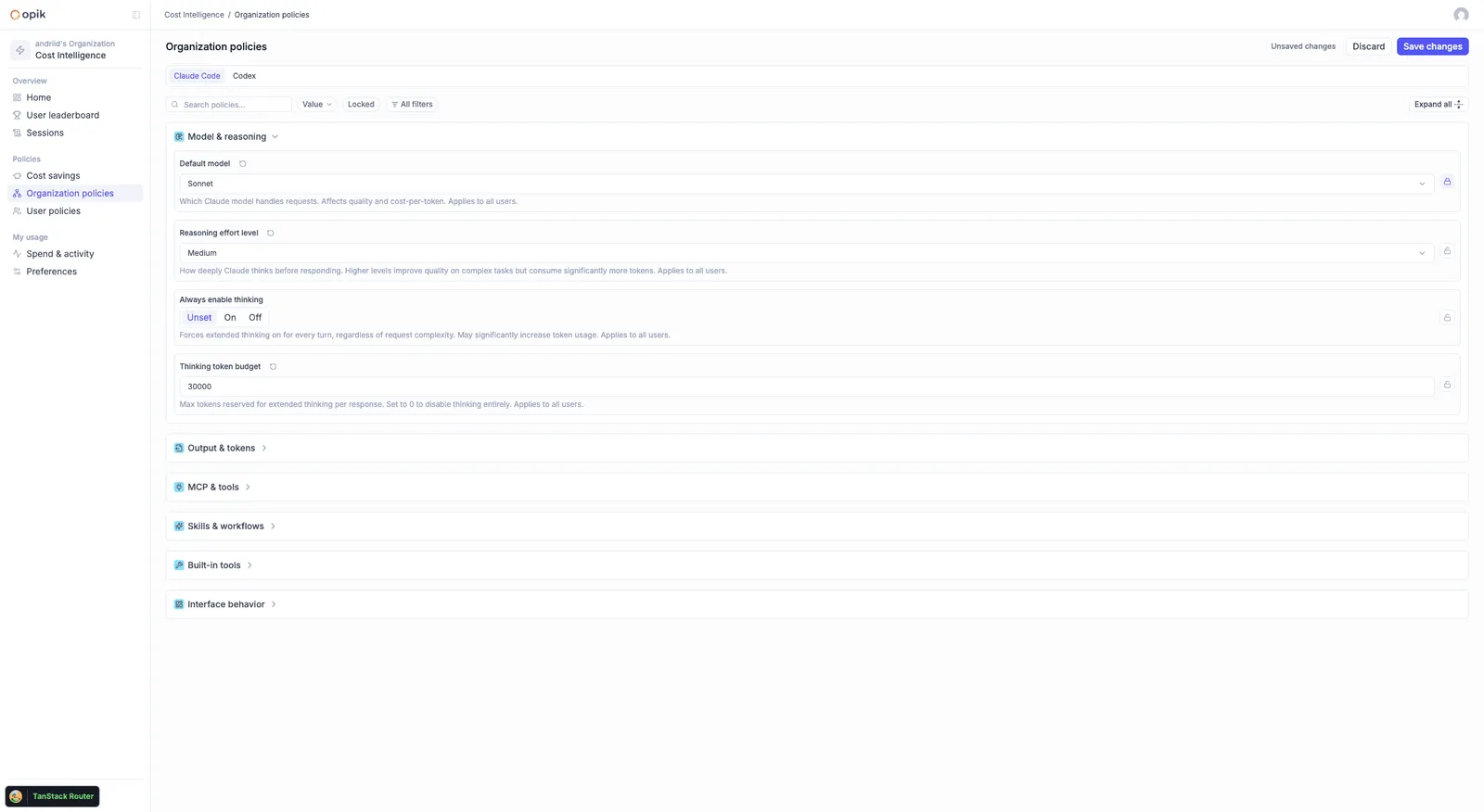
Delivery is automatic once you are set up. Bootstrap configuration (workspace, API key, base URL) is delivered once via managed settings or MDM; cost policies need no further push after that. You deploy once and manage spend from the dashboard afterwards.
Disabling a skill doesn’t take it away. The most common recommendation — turning off unused skills and MCP servers — removes their weight from the context that ships with every request. Nothing is uninstalled, and a disabled skill stays callable: when a developer asks for it by name, Claude Code re-enables it and uses it. A denied MCP server does stay off until the policy changes, which is why the recommendation only targets servers nobody has been using. The saving comes from the thousands of requests that never needed them.
Grant exceptions per user
A baseline only survives if exceptions are cheap to grant. User policies are per-user values that sit on top of the org baseline, so one team needing a bigger thinking budget never means loosening it for everyone. An admin can set them for any developer, and a developer can set their own — where you allow it — from their My preferences page.
The resolution rules are short:
- A per-user value overrides the org value, for that user only. Everyone without an override stays on the baseline.
- Every setting carries a lock. Locked means the developer cannot change that setting themselves; an admin still can. Unlocked means the developer may set their own value from My preferences.
- A customized value is labelled — customized by the user, or by an admin — so you can see which settings carry an override. A setting with no label is on the org baseline.
- Overrides are revertible. Removing a per-user value puts the developer straight back on the org baseline.
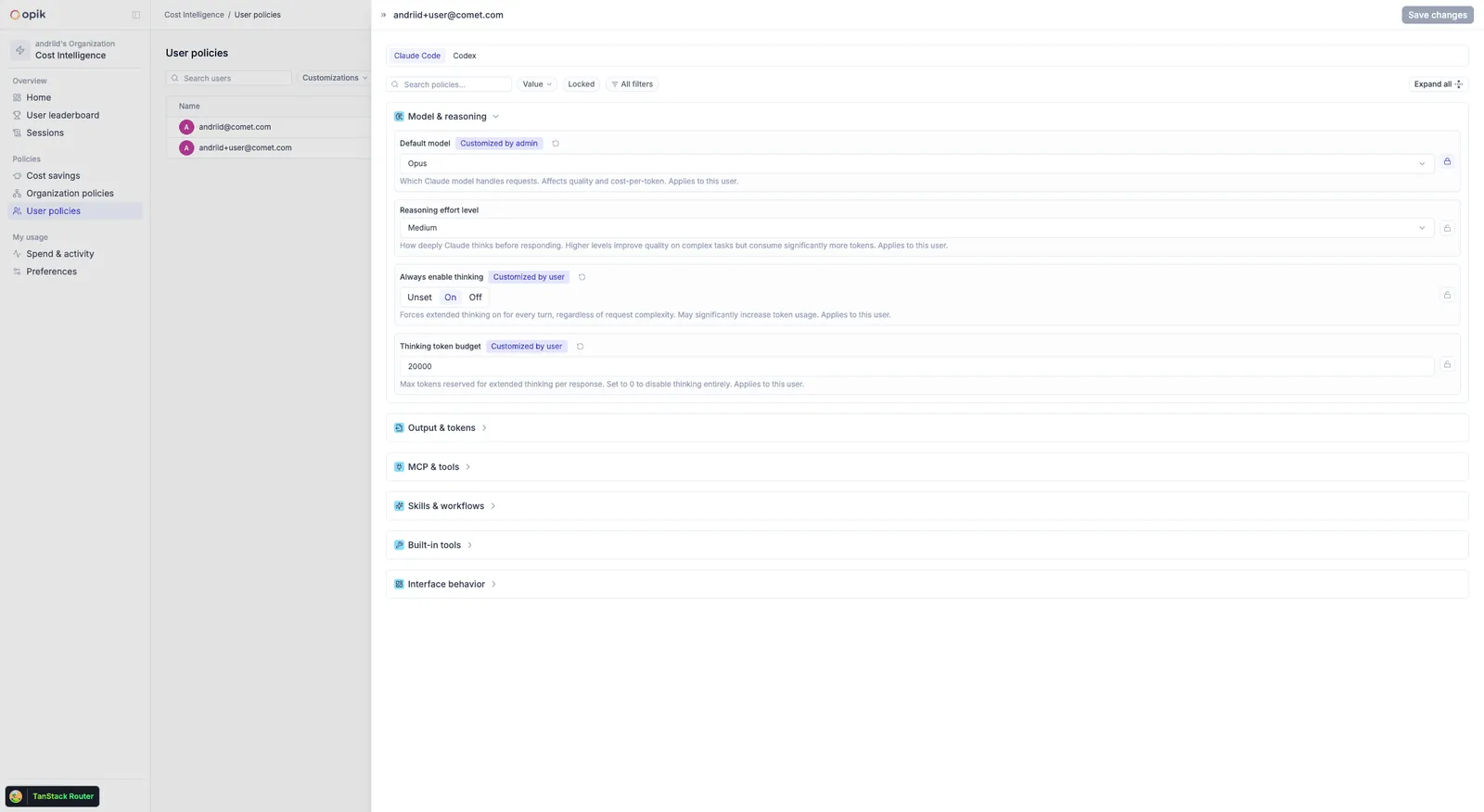
Worked through: suppose the org default model is locked, and the org thinking budget is set but left unlocked. Every developer runs on that model and cannot change it. Most run on the org thinking budget too, but a developer who needs more gets a per-user override — and can still adjust it themselves later, because that setting is unlocked. Reverting their override drops them back to the org budget.
Set the org baseline tighter than you think you need and grant exceptions per user. That is far easier to run than a loose baseline you keep trying to tighten later, and the exception list itself becomes useful data about who needs what.
How a developer is identified
Cost Intelligence identifies a developer by the email of the account signed in to the coding agent — for Claude Code, the Anthropic account’s email, observed from its sign-in. There is no separate login and nothing for the developer to enter. Per-user policies and the spend dashboards key on this same email, so the developer you grant an exception to is the same one whose spend you were looking at on the leaderboard. If someone shows up under an email you don’t recognize — a personal Anthropic account, or a gateway setup where no account profile exists — pin their identity with OPIK_CIPX_USER_EMAIL, delivered via managed settings or MDM.
How changes reach devices
There is no push and nothing to restart. Each device fetches the effective policy for its signed-in developer and applies it itself, over and over — so a machine that drifts from policy is brought back without any action from you. When you save a change, the confirmation says it takes effect in about 5 minutes, and that is what happens:
- An active device checks roughly every 5 minutes. Active means any agent request in the last 30 minutes. An idle machine stops checking and catches up moments after the developer starts working again — a laptop that slept through a change is back on policy within moments of its owner’s first request.
- Some settings apply from the next session. Claude Code reads a few settings — the model, most notably — only at session start, so a change (or a clear) becomes visible when the developer starts their next session.
- It works the same everywhere. Claude Code and Codex alike, on both the plugin install and the macOS app.
When a developer changes a setting locally
There are two ways a developer can change a managed setting, and they end differently.
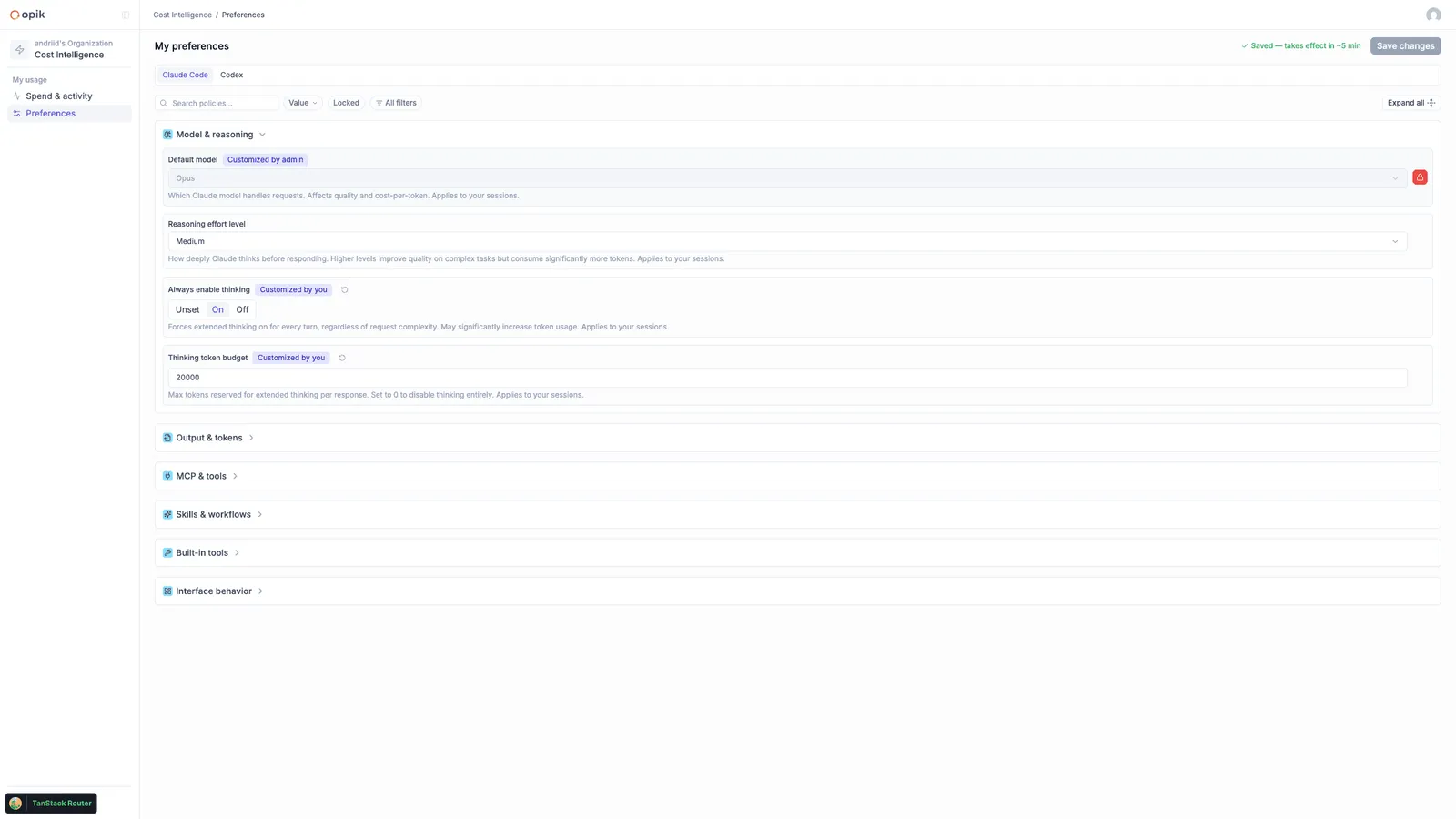
Through the product: if the setting is unlocked, the developer sets their own value from My preferences. That creates a per-user value — the same kind you set as an admin — visible in the dashboard as customized by the user, and revertible like any other override.
By hand: editing a managed value directly in ~/.claude/settings.json does not stick. While a policy is set, its values are re-applied on every check, so a hand-edit is corrected within minutes, not at some future rollout. The lock controls what the developer can do in the product, not the file — the file is kept at the resolved policy value either way.
Policies are defaults, not hard enforcement. They’re applied to the user
settings Claude Code reads, and Claude Code lets higher-precedence settings
win over those — a project’s own .claude/settings.json, or a settings file
passed at session start. A developer who sets a value there overrides the
policy for that project or session; Cost Intelligence manages the user
settings and does not touch those layers. For most teams a visible baseline
is enough; if you need values a developer cannot override at all, that’s a
device-management concern beyond these policies.
When you clear a setting
Clearing a setting in the dashboard removes it from devices conservatively: a device deletes the key only while it still holds the exact value the policy applied. Anything else is left in place, so clearing a policy never destroys a value the policy didn’t put there. The next-session rule applies here too — clear the org model, and each developer is back on the agent’s own default from their next session.
Behavior at a glance
What policy sync touches on the device
The write surface is deliberately narrow, and it is the same on every install:
For the wider picture of what Cost Intelligence reads and reports, see Data, privacy and security.
Boundaries worth knowing
Outdated Claude Code builds are left unmanaged; they pick policy up after updating.
Uninstalling Cost Intelligence leaves the last-applied values in place — it does not undo its own work on the way out. If you are decommissioning devices, clear your policies from the dashboard first, let devices return to agent defaults, then uninstall.