

macOS app with MDM
The macOS app is the rollout path for full coverage: it captures every Claude Code user on the machine, whether they work in the CLI or the desktop app. Developers keep working exactly as before — no base-URL change, no environment variables, nothing to install in the agent. The app sees the traffic anyway.
How it works
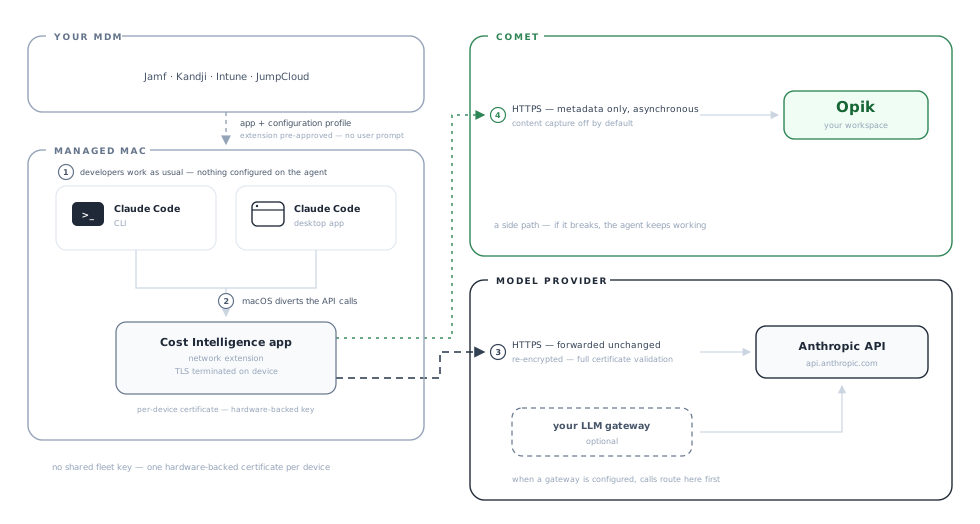
Everything happens on the developer’s machine. The app runs as a menu-bar app with a network extension, and macOS hands that extension the coding agent’s traffic. The extension acts as a local MITM (man-in-the-middle): it terminates TLS on the device to read each call, then forwards it re-encrypted — with full certificate validation — to Anthropic or your LLM gateway, unchanged:
The data landing in Opik is the same as the plugin produces. What differs is how the traffic gets seen:
The plugin is our recommended path. It is simpler — no system extension, no certificate, no TLS interception — and it runs on macOS, Linux and Windows. Its limit is coverage: it captures the Claude Code CLI, not the desktop app. Choose the macOS app when you want to roll Cost Intelligence out to all of your users, including the ones working in the Claude Code desktop app.
Deploy via MDM
Three steps, delivered with the MDM you already run (Jamf, Kandji, Intune, JumpCloud):
Push the app and its configuration profile
Deploy Opik CIPX.app to /Applications as a package payload, together with an MDM configuration profile. The profile does two jobs: it pre-approves the system extension so activation is silent (the developer never sees an approval prompt), and it forces the app’s settings so users can’t turn capture off. The app bundle embeds the extension and the capture engine, so there is nothing else to install.
View an example configuration profile
The team ID and the extension bundle identifier must match the shipped app. Email sales@comet.com for a filled-in, ready-to-push profile.
Every payload key, profile validation, and the per-MDM upload paths are in Advanced below.
Drop the workspace credentials
Ship a file per user at ~/.opik-cipx/config.toml:
It lands in a user home, so an MDM script running as root must resolve the console user and chown the file to them, with the file at mode 0600 and the directory 0700.
Launch once and verify
Trigger a first launch — a package postinstall script that opens the app in the console user’s context works best. From there the app handles everything itself: it activates the extension, starts capture, and registers a login item so capture survives reboots. With the profile in place, none of this prompts the user.
Then check a target device:
Finally, confirm traces are arriving in your Opik workspace. That last check is the one that matters: the app is deliberately fail-open, so a device missing its credentials file looks completely healthy and captures nothing.
Advanced
The configuration profile in detail
The profile carries two payloads that do different jobs.
Pre-approving the system extension. A com.apple.system-extension-policy payload allow-lists the capture extension so it activates silently: the developer never sees the System Settings → General → Login Items & Extensions → Network Extensions approval gate. This is honored only when the profile is pushed by an MDM the device is enrolled in — a locally installed profile is ignored for this payload type, so a test machine with a hand-installed profile will still show the manual approval prompt. That’s expected, and it isn’t a broken profile.
Forcing the app’s settings. A managed-preferences payload writes into the app’s preference domain com.comet.opik-cipx-app. Forced values take precedence over anything the user sets, and the corresponding controls are disabled in the app’s Settings window with a “Managed by your organization” note.
Validate the profile before pushing, because a malformed payload is silently ignored by some MDMs:
Where it goes in each MDM:
Why credentials ship as a file
The Opik destination is not a preference key, so no configuration profile can carry it. The capture engine is launched by a login-item app, and GUI apps don’t inherit shell environment, so nothing you export in a shell profile or push as an MDM environment variable reaches it. The per-user file at ~/.opik-cipx/config.toml is the only path that works.
The file contains the ingest API key, so use a workspace-scoped service-account key and rotate it by re-deploying the file.
Activation and first launch
On first launch the app activates the system extension, starts the capture engine, enables the proxy configuration, and registers a login item so capture returns after every reboot. The engine also applies your org’s cost policies to the machine automatically.
Activation is fail-safe: any error in the chain turns capture back off rather than leaving a half-configured proxy.
Ways to trigger the first launch, in order of preference:
- A package postinstall script that opens the app in the console user’s context.
- A LaunchAgent shipped alongside the app. This also covers users who weren’t logged in at install time.
- An MDM “run as current user” script.
The data path in detail
The four numbered steps in the diagram, in full:
- The developer works as usual. They prompt Claude Code from the CLI or the desktop app. Neither is configured, pointed at a proxy, or aware the app exists.
- macOS diverts the agent’s API calls to the app. The system extension terminates TLS on the device so the app can read each call and attribute its cost — that interception happens on the device only, and it never leaves the machine.
- The call is forwarded unchanged. The app opens its own TLS connection — to the Anthropic API by default, or to your LLM gateway when one is configured — with full certificate validation, and passes the request and response through untouched.
- Metadata ships to Opik on the side. Counts, costs, and structure — never content — go to your Opik workspace asynchronously. This side path never sits between the developer and the model: if anything in it fails, the agent keeps working.
Certificate trust
To categorize traffic rather than just count bytes, the extension terminates TLS locally, which means the client must trust the interception certificate.
The certificate authority is minted per device, with a private key that is hardware-backed and non-extractable. This is deliberate: there is no shared fleet-wide interception key, so compromising one device does not compromise the fleet. The consequence is that there is no single certificate to embed in a centrally authored MDM certificate payload; trust is established on the device that generated it.
For Claude Code this is handled for you: the app points Claude Code at the device’s own certificate. The certificate authority also carries constraints limiting it to the specific model-provider hostnames, so even a fully trusted authority cannot vouch for any other domain. That is worth raising early in a security review, because it’s the property that makes local termination defensible.
Uninstall
Removing the app without disabling first leaves an orphaned system-extension registration, so prefer the disable step.