> For clean Markdown of any page, append .md to the page URL.
> For a complete documentation index, see https://www.comet.com/docs/opik/v1/llms.txt.
> For full documentation content, see https://www.comet.com/docs/opik/v1/llms-full.txt.
> For AI client integration (Claude Code, Cursor, etc.), connect to the MCP server at https://www.comet.com/docs/opik/v1/_mcp/server.
# Getting Started
> Debug, evaluate, and monitor your LLM applications, RAG systems, and agentic workflows with comprehensive tracing, automated evaluations, and production-ready dashboards.
## Docs
- [Quickstart](https://www.comet.com/docs/opik/quickstart.md): Integrate Opik with your LLM application to log calls and chains efficiently. Get started with our step-by-step guide.
- [Quickstart notebook](https://www.comet.com/docs/opik/v1/quickstart_notebook.md): Learn to automate LLM workflow evaluation and track calls with Opik using Chain of Density Summarization for Arxiv papers.
- [Roadmap](https://www.comet.com/docs/opik/v1/roadmap.md): Explore Opik's evolving roadmap and contribute ideas to enhance our open-source project as we develop new features and improve functionality.
- [FAQ](https://www.comet.com/docs/opik/faq.md): Explore common questions about Opik, learn how to get started, and find assistance to enhance your experience with our powerful tool.
> **Note:** This page contains both a page directory (above) and the landing page content (below). The page directory is generated for agent use and does not appear on the landing page.
> For clean Markdown of any page, append .md to the page URL.
> For a complete documentation index, see https://www.comet.com/docs/opik/v1/llms.txt.
> For full documentation content, see https://www.comet.com/docs/opik/v1/llms-full.txt.
> For AI client integration (Claude Code, Cursor, etc.), connect to the MCP server at https://www.comet.com/docs/opik/v1/_mcp/server.
# Home
Opik is an [open-source](https://github.com/comet-ml/opik) logging, debugging, and optimization
platform for AI agents and LLM applications. If you're building AI features, you know it's easy to
spin up a working prototype but harder to log, test, iterate, and monitor to meet production
requirements.
Opik gives you all the tools you need to go from LLM observability to action across your AI
application footprint and dev cycle. Ship measurable improvements with gorgeous logs, annotation and
scoring functions, pre-configured LLM-as-a-judge [eval metrics](/v1/evaluation/metrics/overview), and
even [automated agent optimization algorithms](/v1/agent_optimization/overview) to maximize performance.
## End-to-End AI Engineering
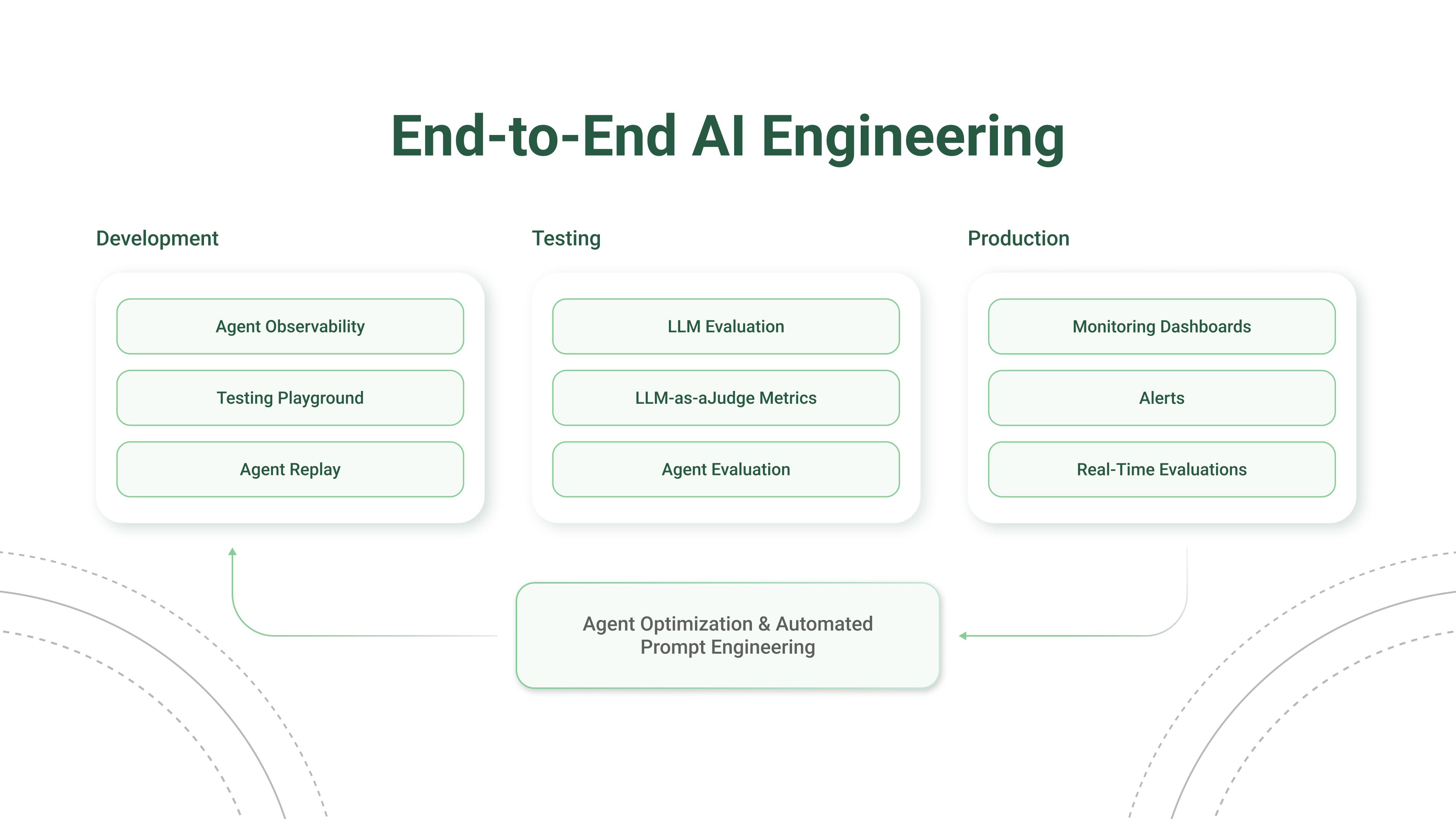 Opik is Open Source! You can find the full source code on [GitHub](https://github.com/comet-ml/opik) and the complete
self-hosting guide can be found [here](/v1/self-host/local_deployment).
## Core Functions
Opik integrates with your existing AI stack through your model provider or LLM framework.
Traces give you instant visibility into what's working, what's not, and why and includes
advanced analysis and debugging features built in.
Use LLM-as-a-judge and heuristic eval metrics to score your app or agent on hallucination,
context recall, and more.
Choose from six advanced optimization algorithms to auto-generate and score the best prompts for
the steps in your agentic system.
Store and version system prompts, compare results live in the [Prompt Playground](/v1/prompt_engineering/playground),
and experiment with different models with our LLM proxy.
Deploy Opik on your own infrastructure with local or Kubernetes deployment options.
## Video Tutorials
Prefer a visual guide ? Follow along as we cover everything from basic setup and trace logging to
LLM evaluation metrics, production monitoring, and more.
You can find a full set of video tutorials in the [Opik University](/v1/opik-university/overview).
## Open-Source access meets enterprise performance
All Opik versions ([cloud](https://www.comet.com/signup?from=llm),
[open source](https://github.com/comet-ml/opik), and
[enterprise](https://www.comet.com/site/pricing/)) include the full AI engineering featureset
and run on the Comet platform, with proven performance at scale supporting many of the world's
largest organizations.
Compare Opik to other LLM observability tools and you'll find that traces populate faster,
evaluations run smoother, and reliability comes standard — even for complex agentic systems serving
millions of users in production.
Opik is Open Source! You can find the full source code on [GitHub](https://github.com/comet-ml/opik) and the complete
self-hosting guide can be found [here](/v1/self-host/local_deployment).
## Core Functions
Opik integrates with your existing AI stack through your model provider or LLM framework.
Traces give you instant visibility into what's working, what's not, and why and includes
advanced analysis and debugging features built in.
Use LLM-as-a-judge and heuristic eval metrics to score your app or agent on hallucination,
context recall, and more.
Choose from six advanced optimization algorithms to auto-generate and score the best prompts for
the steps in your agentic system.
Store and version system prompts, compare results live in the [Prompt Playground](/v1/prompt_engineering/playground),
and experiment with different models with our LLM proxy.
Deploy Opik on your own infrastructure with local or Kubernetes deployment options.
## Video Tutorials
Prefer a visual guide ? Follow along as we cover everything from basic setup and trace logging to
LLM evaluation metrics, production monitoring, and more.
You can find a full set of video tutorials in the [Opik University](/v1/opik-university/overview).
## Open-Source access meets enterprise performance
All Opik versions ([cloud](https://www.comet.com/signup?from=llm),
[open source](https://github.com/comet-ml/opik), and
[enterprise](https://www.comet.com/site/pricing/)) include the full AI engineering featureset
and run on the Comet platform, with proven performance at scale supporting many of the world's
largest organizations.
Compare Opik to other LLM observability tools and you'll find that traces populate faster,
evaluations run smoother, and reliability comes standard — even for complex agentic systems serving
millions of users in production.