
For AI agents: a documentation index is available at the root level at /llms.txt and /llms-full.txt. Append /llms.txt to any URL for a page-level index, or .md for the markdown version of any page.
Copy to LLMGithubGo to App
DocumentationIntegrationsBuilding Self-Improving AgentsSelf-hosting OpikSDK & API reference
  • Getting Started
    • Home
    • Quickstart
    • Ollie Agent
    • FAQ
    • Changelog
  • Observability
    • Overview
    • Getting started
    • Concepts
    • Debugging agents with Ollie and Opik Connect
  • Development
    • Overview
    • Agent playground
    • Prompt playground
  • Evaluation
    • Overview
    • Getting started
    • Concepts
      • Building Test Suites
      • Datasets & Experiments
      • Manage datasets
      • Evaluate agent trajectories
      • Evaluate multi-turn agents
      • Annotation Queues
      • Manually logging experiments
  • Production
  • Administration
    • Overview
    • Roles and Permissions
  • Contributing
    • Contribution Overview
LogoLogo
Copy to LLMGithubGo to App
On this page
  • With Ollie
  • With the UI
  • With the SDK
  • Create a suite
  • Add test items
  • Define the task and run
  • Update assertions and execution policy
  • Inspect suite contents
  • Delete test items
  • Execution policies
EvaluationAdvanced

Building Test Suites

Was this page helpful?
Previous

Evaluate your agent

Step by step guide on how to evaluate your LLM application
Next
Built with

Test suites grow as you debug and improve your agent. There are three ways to build them: with Ollie, through the UI, or via the SDK.

With Ollie

The fastest way to turn a production failure into a test case. Open Ollie from any trace view and describe what went wrong:

“Add this trace to my customer-support-qa suite with the assertion: the response must cite a specific step from the provided context”

Ollie creates the test item directly — no copy-pasting required. You can also ask Ollie to run the suite after making changes:

“Run the customer-support-qa suite against the updated prompt”

See Debugging agents for the full workflow.

With the UI

In the Opik dashboard, navigate to the Test Suites section to create and manage suites visually. You can add test items, define assertions, configure execution policies, and review results — all without writing code.
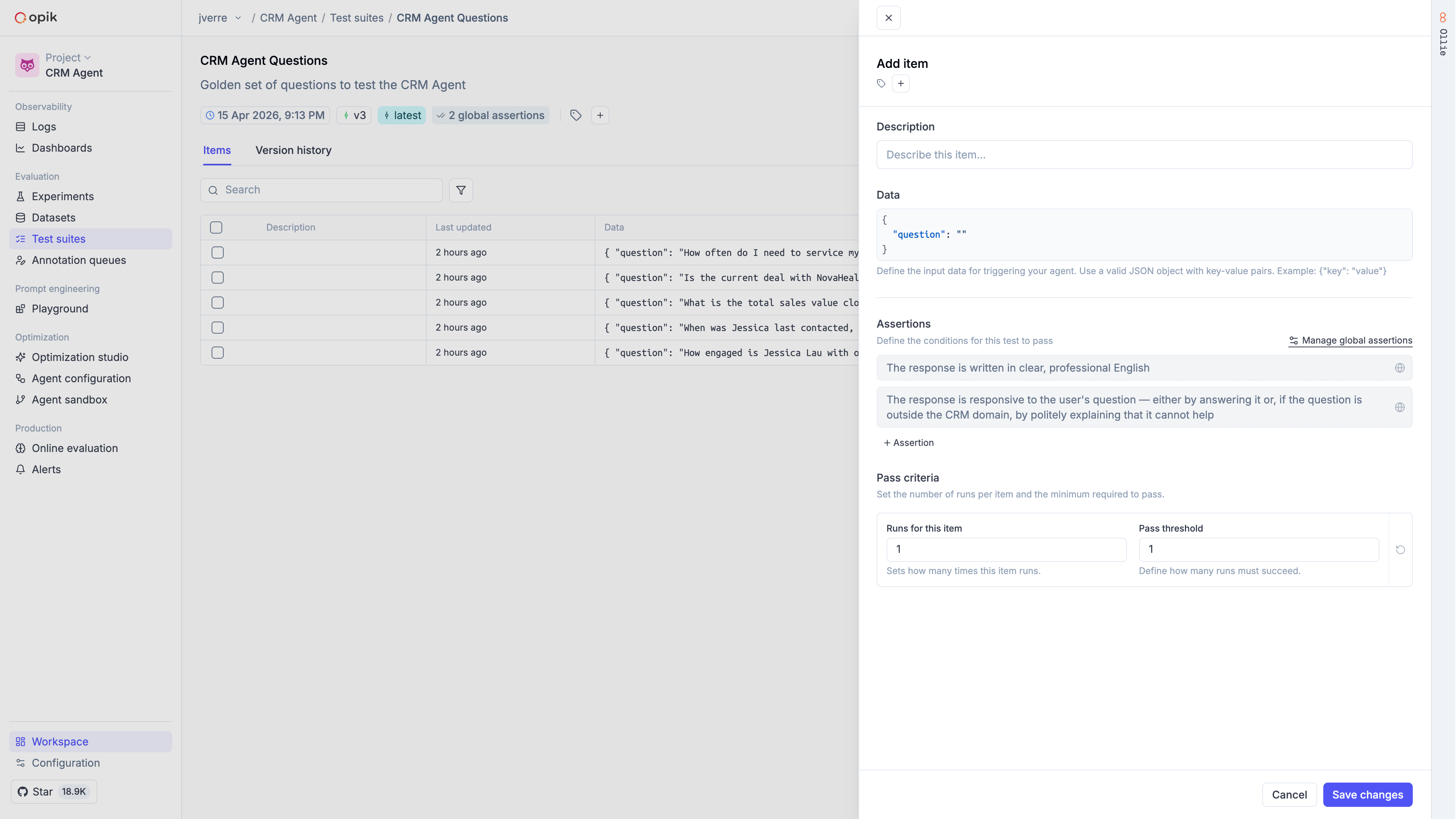
Test suite UI showing items list and the Add Item panel with assertions and pass criteria

With the SDK

Create a suite

Define the quality bars you care about as suite-level assertions:

1import opik
2
3opik_client = opik.Opik()
4
5suite = opik_client.get_or_create_test_suite(
6 name="customer-support-qa",
7 project_name="test-suites-demo",
8 global_assertions=[
9 "The response is grounded in the provided documentation context",
10 "The response directly addresses the user's question",
11 "The response is concise (3 sentences or fewer)",
12 ],
13 global_execution_policy={"runs_per_item": 2, "pass_threshold": 2},
14)

Add test items

Add individual items or batches. Items can include item-level assertions that are checked in addition to the suite-level assertions:

1suite.insert([
2 {
3 "data": {
4 "question": "How do I create a new project?",
5 "context": "To create a new project, go to the Dashboard and click 'New Project'.",
6 },
7 },
8 {
9 "data": {
10 "question": "Can I use this with Kubernetes?",
11 "context": "We support Docker containers and serverless functions.",
12 },
13 "assertions": [
14 "The response does NOT claim Kubernetes is supported",
15 "The response acknowledges that the information is not available",
16 ],
17 "execution_policy": {"runs_per_item": 3, "pass_threshold": 2},
18 },
19])

Define the task and run

The task function receives each item’s data and must return an object with input and output keys:

1from openai import OpenAI
2from opik.integrations.openai import track_openai
3
4openai_client = track_openai(OpenAI())
5
6def make_task(system_prompt):
7 def task(item):
8 response = openai_client.chat.completions.create(
9 model="gpt-4o-mini",
10 messages=[
11 {"role": "system", "content": system_prompt},
12 {"role": "user", "content": f"Question: {item['question']}\n\nContext:\n{item['context']}"},
13 ],
14 )
15 return {"input": item, "output": response.choices[0].message.content}
16 return task
17
18PROMPT_V1 = "You are a helpful assistant. Be as detailed as possible."
19PROMPT_V2 = "You are a concise assistant. Answer based ONLY on the provided context."
20
21result_v1 = opik.run_tests(test_suite=suite, task=make_task(PROMPT_V1))
22result_v2 = opik.run_tests(test_suite=suite, task=make_task(PROMPT_V2))
23
24print(f"v1 pass rate: {result_v1.pass_rate:.0%}")
25print(f"v2 pass rate: {result_v2.pass_rate:.0%}")

Each run creates a separate experiment in Opik, making it easy to compare results in the dashboard.
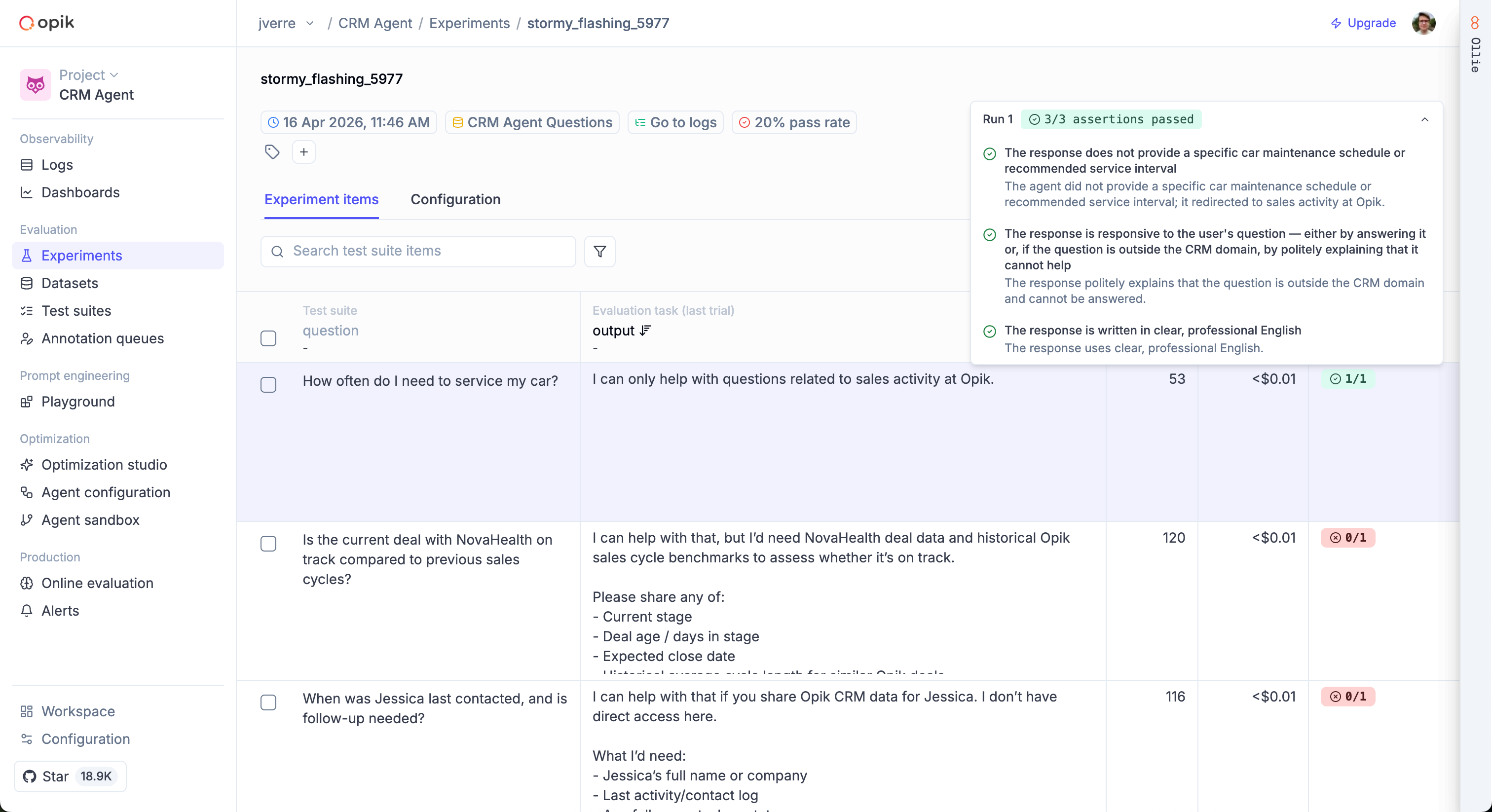
Test suite experiment results showing pass/fail per item with assertion details

The input should contain only the data your agent actually received when generating its response. The LLM judge uses input and output to evaluate assertions — if you accidentally include fields like expected_answer in input, the judge may use them to pass assertions that should fail.

Update assertions and execution policy

1suite.update_test_settings(
2 global_assertions=[
3 "The response is grounded in the provided context",
4 "The response is concise",
5 ],
6 global_execution_policy={"runs_per_item": 5, "pass_threshold": 3},
7)

Inspect suite contents

1items = suite.get_items()
2assertions = suite.get_global_assertions()
3policy = suite.get_global_execution_policy()
4
5print(f"Items: {len(items)}")
6print(f"Assertions: {assertions}")
7print(f"Policy: {policy}")

Delete test items

1items = suite.get_items()
2suite.delete([items[0]["id"]])

Execution policies

Execution policies control how many times each item is run and how many must pass. This is useful for handling non-deterministic LLM outputs.

1suite = opik_client.get_or_create_test_suite(
2 name="flaky-output-tests",
3 global_assertions=["Response follows the expected format"],
4 global_execution_policy={"runs_per_item": 3, "pass_threshold": 2},
5)

Pass/fail logic:

  • A run passes if all its assertions pass
  • An item passes if runs_passed >= pass_threshold
  • The pass rate is the ratio of passed items to total items. A pass rate of 1.0 means every item passed; 0.0 means none did

You can also override the policy for individual items:

1suite.insert([{
2 "data": {"question": "Is my account compromised?", "context": "..."},
3 "assertions": ["Response treats the concern with urgency"],
4 "execution_policy": {"runs_per_item": 5, "pass_threshold": 4},
5}])